Confidential
Chapter 2 Installing System
RF4402d Series Installation Manual v1.0 56
Copyright © 2018, All Rights Reserved.
3
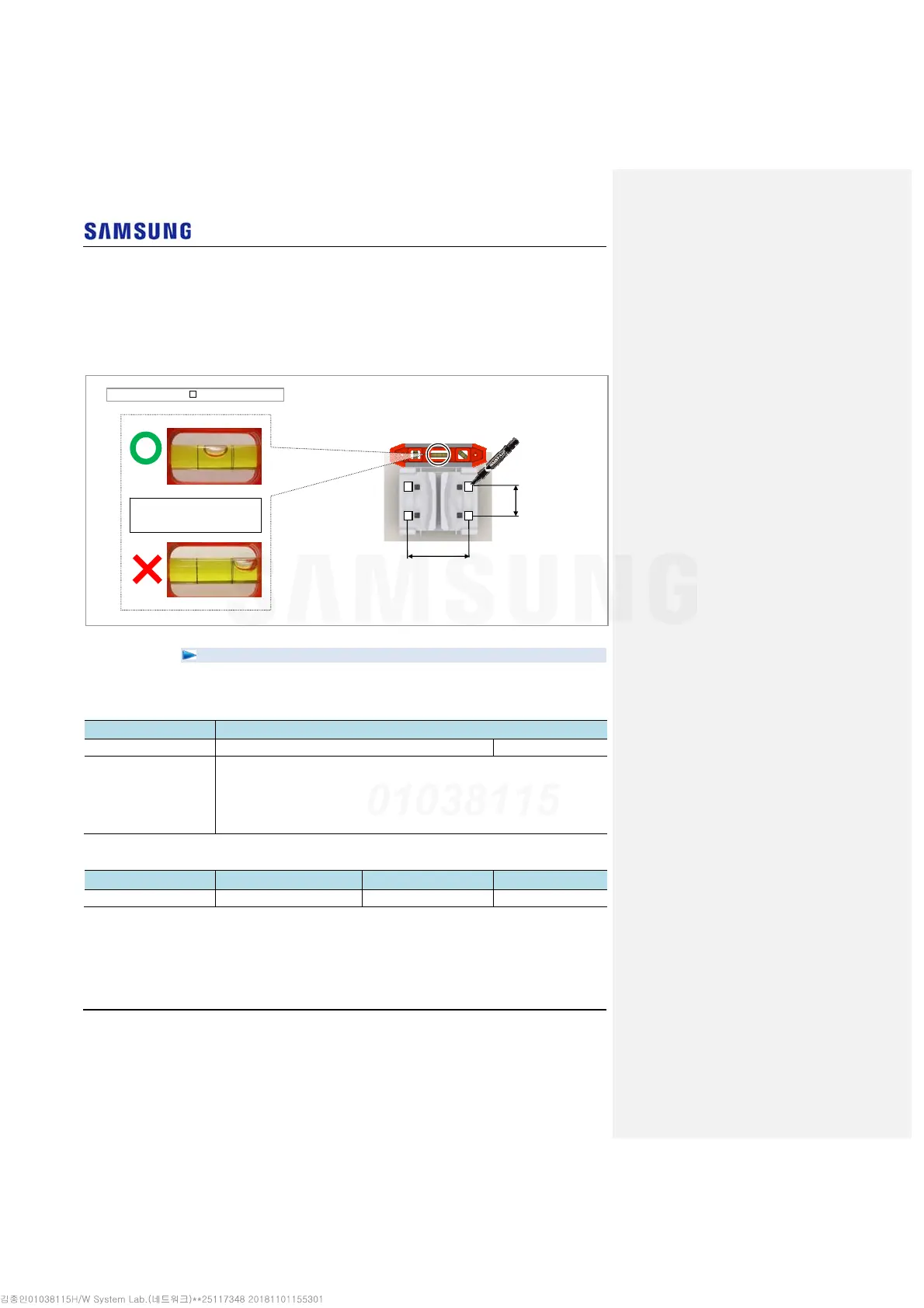
Place a mounting bracket on the fixing location, Check the level status using a
level and adjust the level of bracket assembly.
4
If the level status is normal, mark the anchor bolt holes on a wall.
Figure 53. Marking_Wall Type
To drill anchor holes and fix anchors
1
Make sure you have the following items:
Table 18. Parts and Tools for Drilling & Anchoring
Category Description
Parts M10 Strong Anchor 4 EA/RRH
Woking Tools
Hammer Drill
Concrete Drill Bit [0.55 in. (14 mm)]
Vacuum Cleaner
Hammer
Anchor Punch (For M10 Strong Anchor)
Table 19. Anchor Bolt Drill Bits and Hole Depth
Category Anchor Bolt Drill Bits Hole Depth
RRH (Wall Type) M10 0.55 in. (14 mm) 1.73 in. (44 mm)
If it is level, the bubble of the
spirit level is positioned at the
center of both lines.
[1 Sector Side & Standard Mounting Bracket Assembly]
5.11 (130)
Unit: in. (mm)/ : Marking Point
2.36
(60)



 To Next Page