HF Series Generators
Configuration
CF-1018R3
12
1.7 WORKSTATIONS CONFIGURATION
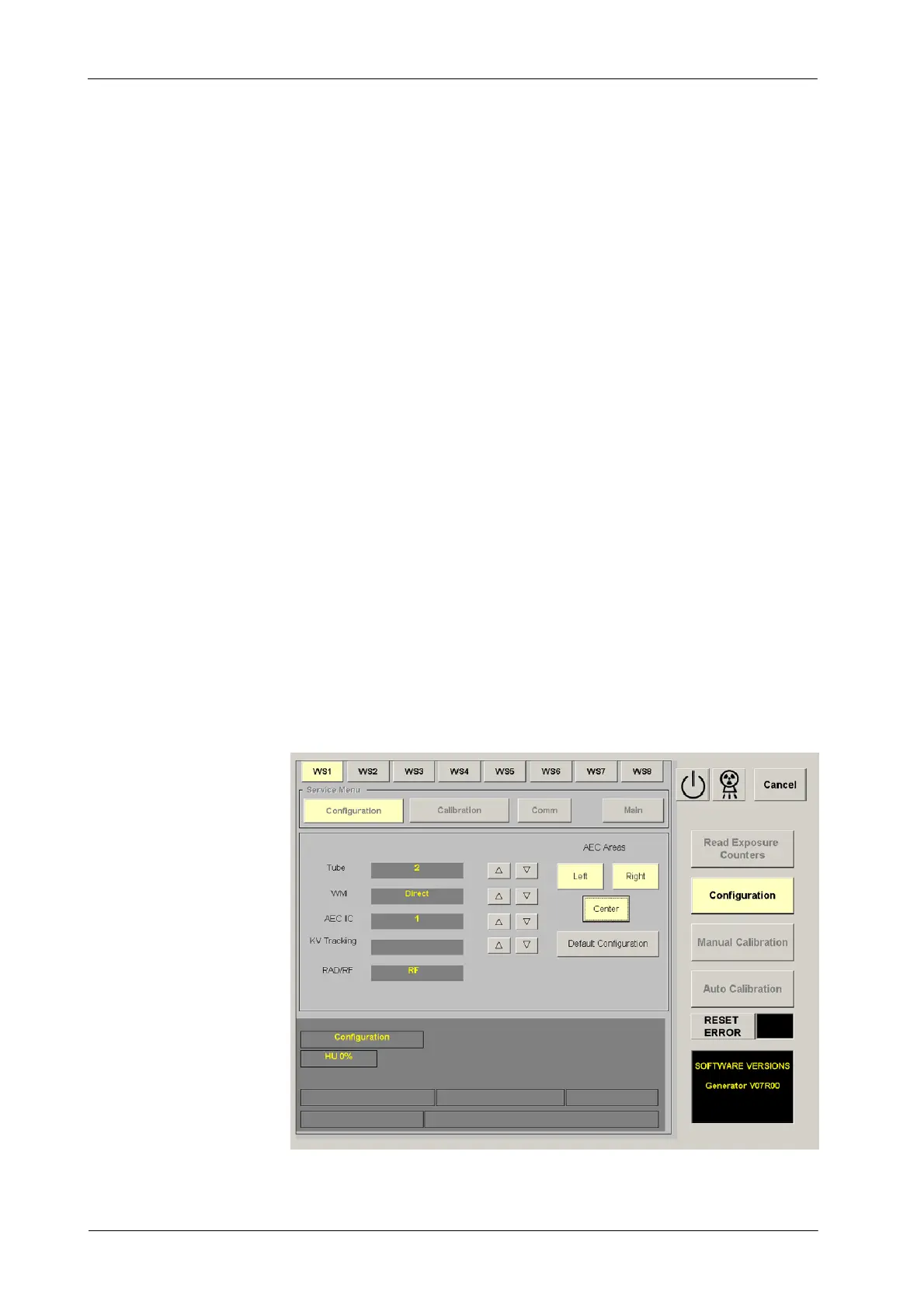
This screen is used to view the configuration of the Workstations (Tube, WM,
Ion Chamber, etc.) and the AEC Areas selected by default for each Workstation
in the system (optional).
The w orkstations can be configured according to the customer preferences or
default. If a workstation is configured with the value “Tube -- 0”, its button can
not be selected during operation.
CUSTOMIZED CONFIGURATION
This procedure has to be performed always that “ATP Console
CPU Board” is replaced by a new one.
1. Enter in the GSM program and select the “Configuration” button.
2. Once in Configuration mode, if the Generator has installed the “Fluoro
CPU Board” the program has to indicate “RF” on the RAD/RF window.
This means that Fluoro functions are enabled.
If the Fluoro functions are not enabled (“RF” does not appear) the
Fluoro Display and functions will be deactivated after selecting a
workstation for Tube-2. In this case, exit, check connection
between the Fluoro CPU and ATP Console CPU Board and enter
in Configuration again until the “RF” indication appears.
Illustration 1-5
Configuration
Note .
Note .



 To Next Page