11
11-20
Setting the Input/Output Conditions
09000
09001
・
・
・
・
・
・
・
・
・
・
・
・
・
・
・
・
・
・
・
・
・
・
・
・
・
・
・
・
・
・
・
D0000 DM0000
:
:
::
::
・
・
・
:
:
・
・
・
L
H
L
H
L
H
L
H
Termination code
Appended information
Output data from measurement No. 3
(block 0)
L
H
L
H
Data in a specified block
Sharp Mitsubishi OMRON Description
Result top write
address (* 2)
Result top write
address
+ 512 bytes
(* 2)
Sharp
09000 09300
Mitsubishi OMRON
D0000 DM0000
Result top write
address
19000 19300 D0256 DM0256
Top address of data
in specified blocks
11-6 Output block assignment
(Computer link output and general purpose serial output)
When measurement is controlled by a computer link or a communication interface (general purpose
serial IF: * 1), in addition to other block 0, blocks can be specified whose measurement data will be
output from the IV-S20 to a programmable controller or a personal computer.
*1 In the case of a communication interface (general purpose serial IF), output blocks can be
specified only when the measurement is started by a CCD trigger or a parallel IF signal and
the results are set by a general purpose serial IF signal. (See page 13-2.)
Enter item 5 COMPUTER LINK OUT & SERIAL OUTPUT on the [OBJECT TYPE I/O] menu to
specify selection. (see the next page.)
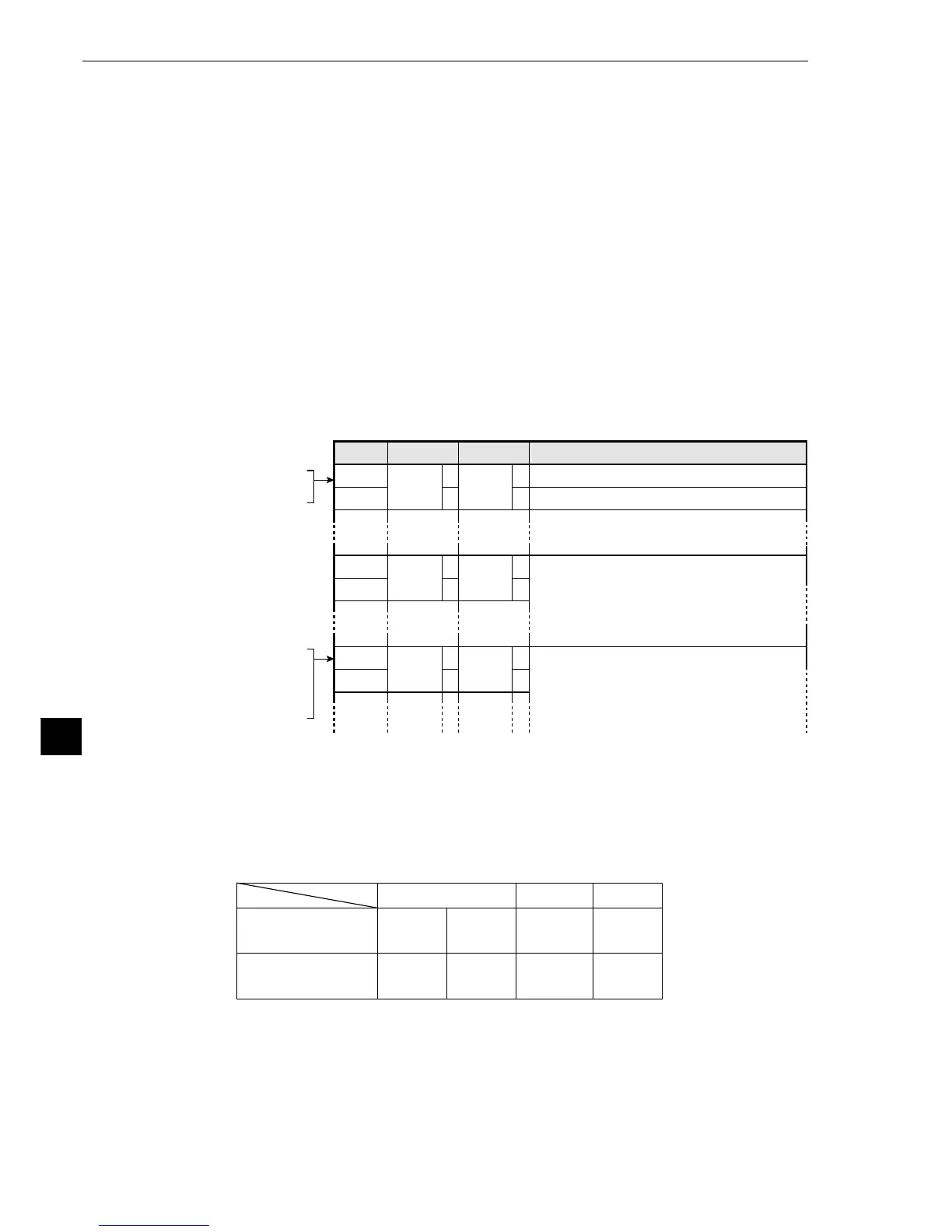
[1] Data in specified blocks
(1) In the case of a computer link
Data in the specified blocks will be output after the data (block 0) from measurement numbers 0 to
3 is output by the write register of the PC. (See page 14-3.)
[Write register map]
* 2 Set the result top write address in item 3 WRITE TOP ADDRESS on the [COMPUTER
LINK] menu. (See the preceding page.)
* 3 The top address to which the data in the specified blocks will be written is obtained by
adding 512 bytes to the result top write address.
- Setting examples for various manufacturers



 To Next Page