12-2
12
Other Settings and Operations
[2] Download all parameters
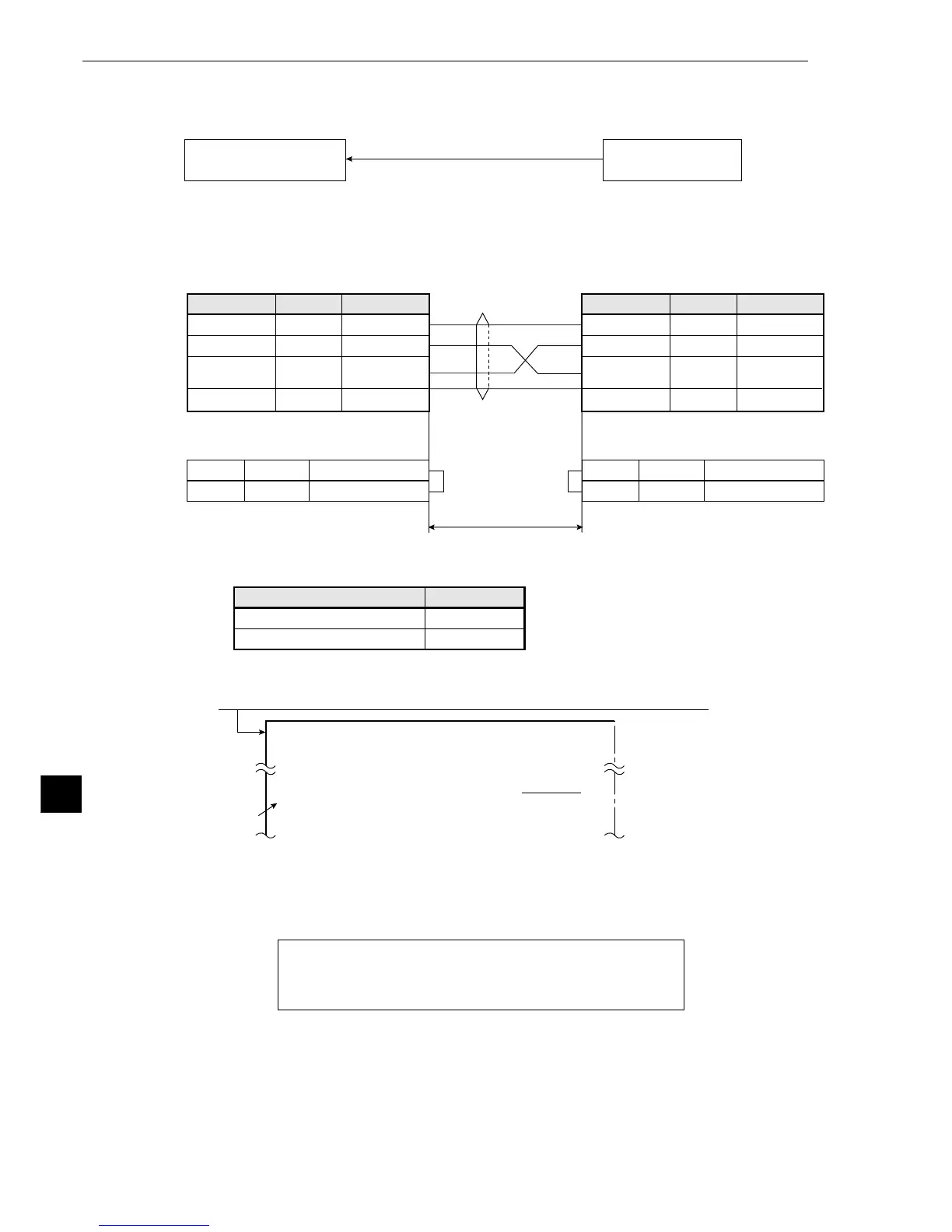
The IV-S20 can download a complete set of parameters (system I/O data and data about all object
types) from an identical IV-S20.
(1) Connections
Connections between IV-S20s are shown below.
* The maximum length of the communication cable depends on the communication speed.
(2) Operating procedure
1. Move the cursor to item 6 RECEIVING PARMS (receive all parameters) with the up and down keys, and
press the SET key.
- Communication with the connected IV-S20 will be started, and the progress of communica-
tion will be displayed on the bottom of the screen.
After all of the parameters have been downloaded from the connected IV-S20, the message
COMMUNICATING (sending data) will change to COMM COMPLETE (complete sending
data).
Note: Perform the operation above with the [MAIN OPS MENU] displayed on the target IV-
S20.
IV-S20: Opposite side
([MAIN OPS MENU])
IV-S20
([SYSTEM SETUP] menu)
All parameters (system I/O data and data
about all object types) are downloaded.
9.6, 19.2
38.4, 57.6, 115.2
* Conduct a communication test before
using the moduleto transfer data.
Communication speed (k bps)
Cable length
15 m max.
2 to 3 m
1
6
FL1
FL2
*(RS-232C)
Memory protection 1
Memory protection 2
1
6
FL1
FL2
Memory protection 1
Memory protection 2
Communication connectors on the IV-S20
(RS232C/RS422: 9-pin D-sub)
Communication connectors on the IV-S20
(RS232C/RS422: 9-pin D-sub)
Signal name
Connector shield
2
3
FG
RD
SD
Function
Frame ground
Received data
Transmitted
data
Signal ground
Pin NO.
5SG
Signal name
Connector shield
2
3
FG
RD
SD
Function
Frame ground
Received data
Transmitted
data
Signal ground
Pin NO.
5SG
1
[SYSTEM SETUP]
1
OPS MENU SETTING (TO NEXT SUB-MENU)
5DISPLAY MODE JAPANESE ENGLISH
6RECEIVING PARMS
EXEC
7INIT ALL PARMS EXEC
On the [MAIN OPS MENU], move the cursor to SET-SCRN, and press the SET key.
SYSTEM I/O
OBJECT TYPE DATA
■
■■■□□□□□□□□□□□□□
COMMUNICATING



 To Next Page