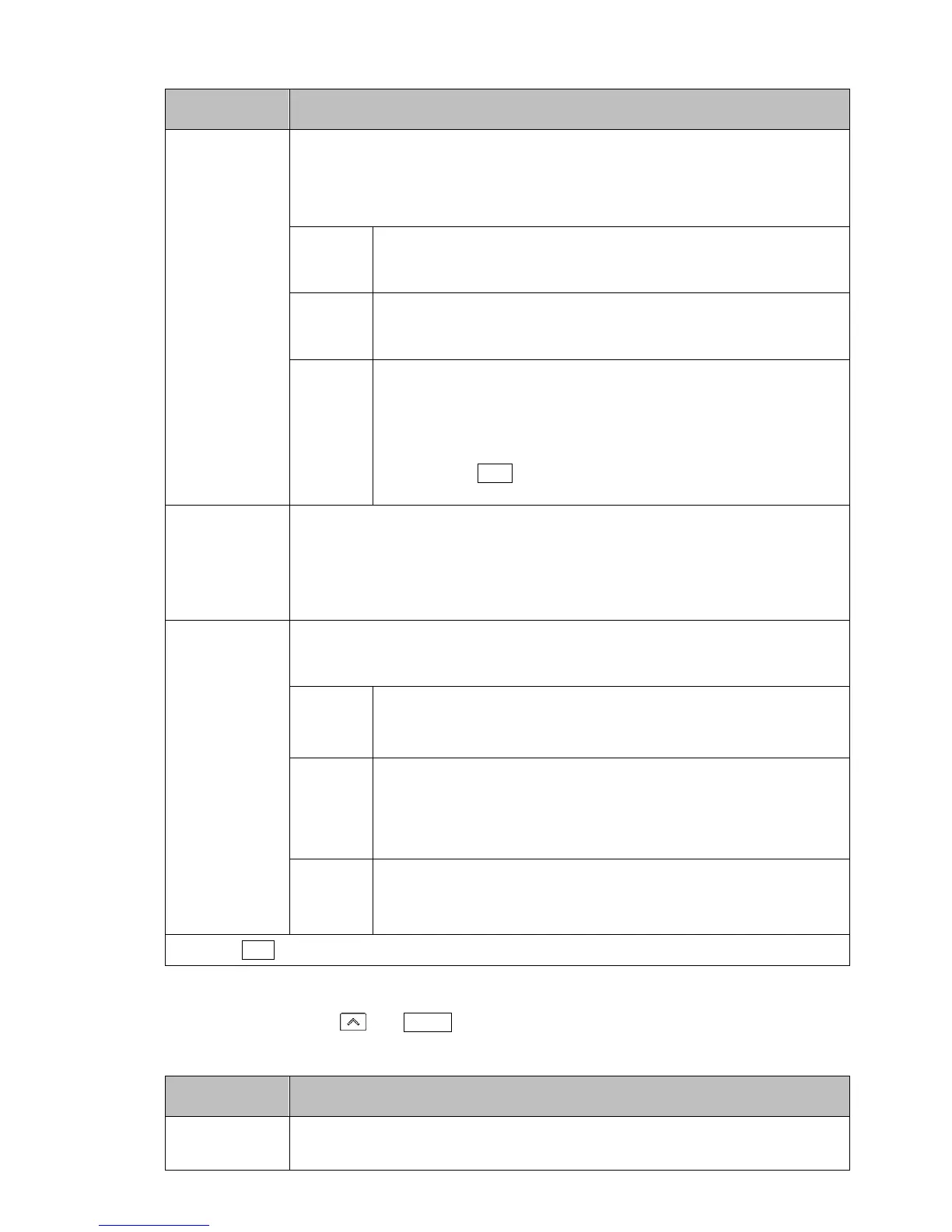
Factory Default
Setting Item, Function, Setting Range
pret
/ stop
Power restore action
• If the power fails during program control RUN, the controller can be operated
depending on the selection in [Power restore action].
• Selection item:
stop Stops after power is restored:
After power is restored, stops current program control, and returns
to the Program control STOP (in Standby).
cont Continues after power is restored:
After power is restored, continues (resumes) previous program
control.
hold Suspends after power is restored
After power is restored, suspends (on hold) current program
control, and performs Fixed value control using the SV from the
point of suspension.
Pressing the RUN key cancels suspension, and Program control
resumes.
s_sv
/ ///0
Step SV when program control starts
• Sets step SV when program control starts.
• Setting range:
Scaling low limit to Scaling high limit (The placement of the decimal point
follows the selection.)
s_sl
/ pv//
Program control start type
• Program control start type can be selected.
• Selection item:
pv// PV start
Only when program control starts, the step SV and step time are
advanced to the PV, then program control starts.
pvr/ PVR start
When program control starts and in pattern repeating, the step
SV and step time are advanced to the PV, then program control
starts.
sv// SV start
Program control starts from the value set in [Step SV when
program control starts].
Press the RST key. The unit returns to RUN mode.
(2) Control parameter setting mode.
In RUN mode, press the and MODE keys (in that order) together. The unit enters Control
parameter setting mode.



 To Next Page