Connection
4.7 Connecting the Interface Module to the CM IM DP M12, 7/8" Connection Module
ET 200pro distributed I/O system
Operating Instructions, 03/2013, A5E00335544-08
91
Connecting the Interface Module to the CM IM DP M12, 7/8"
Connection Module
Introduction
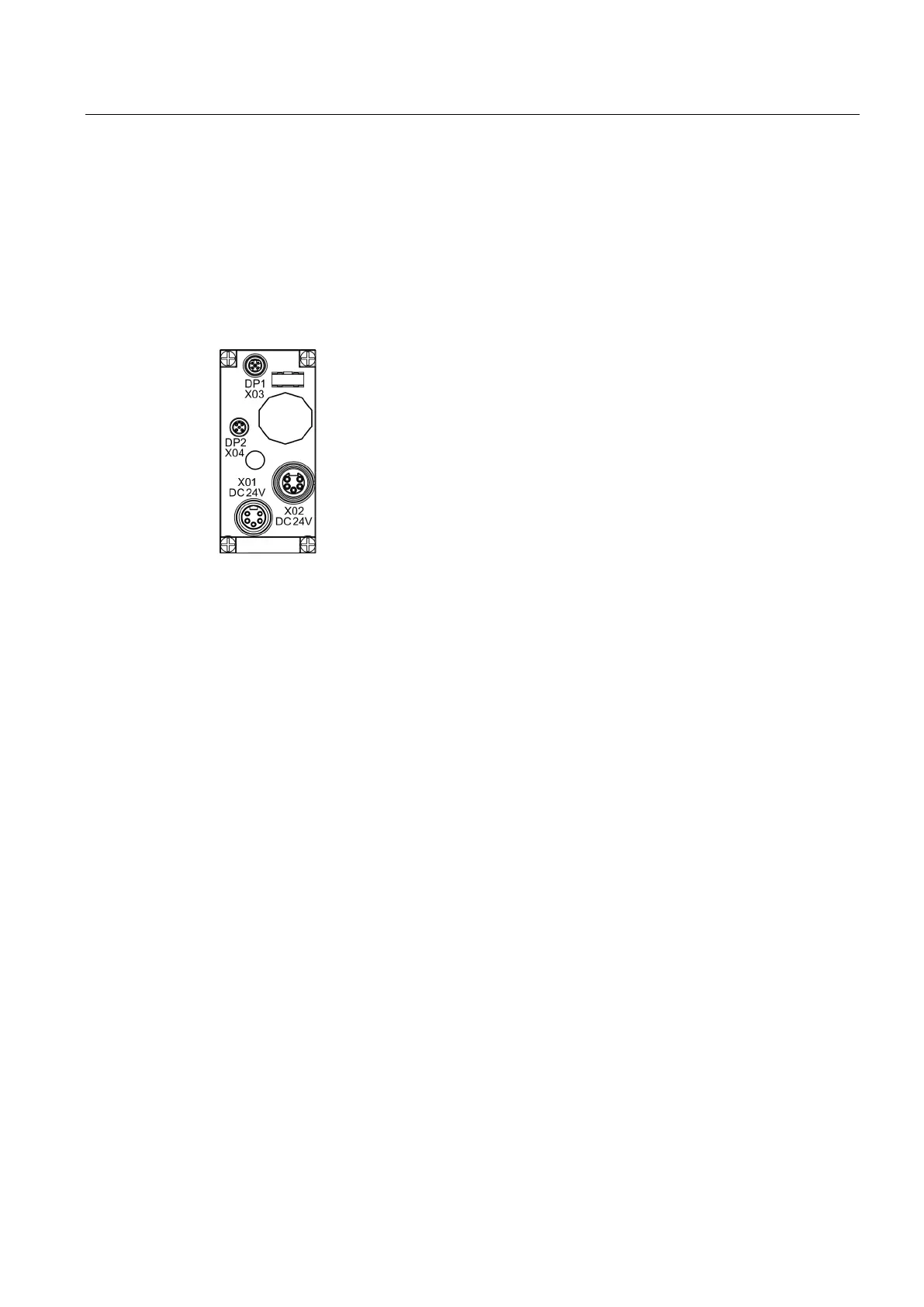
You connect the power supplies and PROFIBUS DP to the CM IM DP M12, 7/8" connection
module.
M12 circular socket connector (with male contact insert) for feeding PROFIBUS DP
DP2 X04 M12 circular socket connector (with female contact insert) for forwarding
X01 DC 24V 7/8" circular socket connector (with male contact insert) for feeding the 1L+
electronics/
encoder supply and 2L+ load voltage supply
X02 DC 24V 7/8" circular socket connector (with female contact insert), for looping the 1L+
electronics/
encoder supply and 2L+ load voltage supply
● The interface module (including the bus module) and the connection module are mounted
on the rack.
● You have set the PROFIBUS DP address on the connection module according to your
configuration.
● The terminating resistor must be activated if no loop cables are connected.
Screwdriver and stripping tool for wiring the M12 and 7/8" cable connectors, if you are
fabricating your own cables.


 To Next Page