DMS-1200 Release 6 Operations Manual
Section 4 – DMS-1200 Setup 41
4.12 Managing Email Server Settings
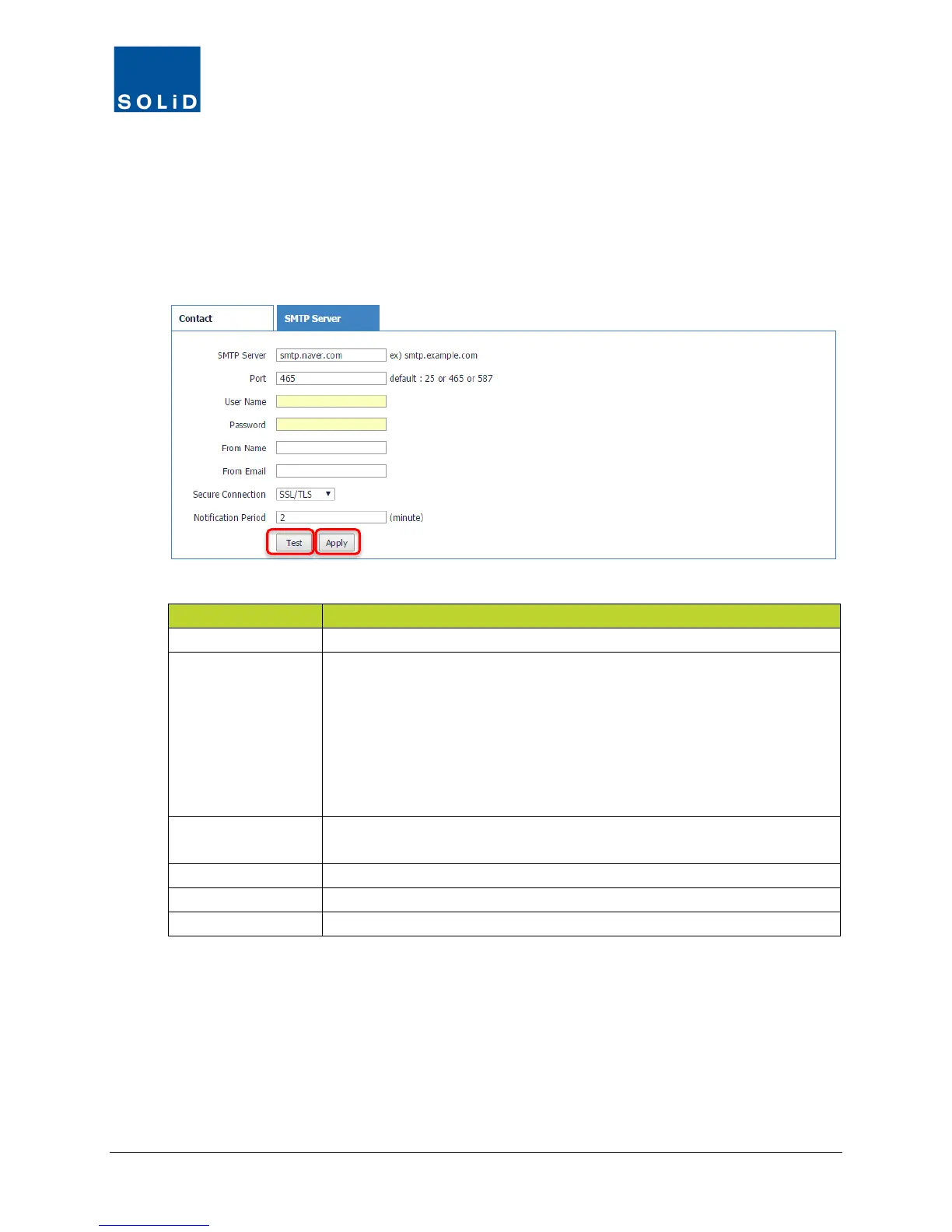
For the DMS-1200 to send emails, you must first define settings for the email server on your
network.
1. On the Network menu, click Email.
2. Click the SMTP Server tab.
3. Complete the information for the SMTP server according to these guidelines:
Enter IP address or DNS address of the server used for sending email.
Port
Enter the email server TCP port. Common SMTP ports include:
Port 25 = non-encrypted server using SMTP authentication.
Port 465 = secure SSL/TLS encryption server. SSL/TLS encryption is
started automatically before any SMTP level communication.
Port 587 = secure (TLS) using STARTTLS authentication. SSL/TLS
encryption may be started by STARTTLS command at SMTP level if
User Name /
Enter a user name and password to receive email notifications.
Enter sender name / email address to be displayed on / notification email.
Enter any security protocol used on the email server.
Specify period to collect and transmit alarms generated: 2-60 minutes.
Table 4.11 – Email Server Setup
4. Click Apply when you are done. Changes are saved immediately.
5. To test the email feature, click Test. Enter a name and email address to receive the test
notification, then click Send.



 To Next Page