DMS-1200 Release 6 Operations Manual
Section 7 – DAS Device Control 53
7.2.2 MDBU, VHF / UHF Setup
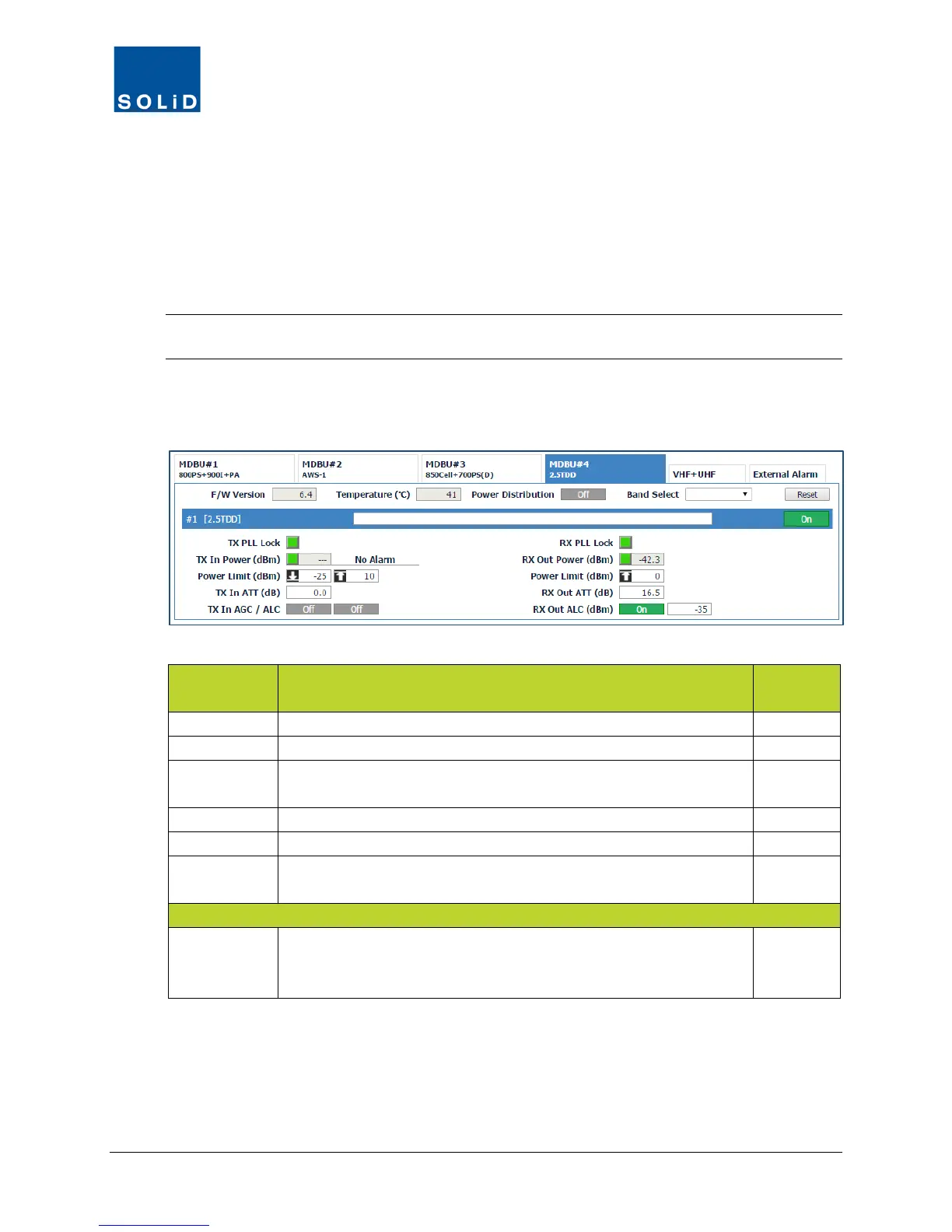
1. In the Tree Menu or Menu bar, click an MDBU or the VHF+UHF tab to load its Control
screen.
Some fields show current settings and are not user configurable, while others allow you to
configure parameters for the device.
You can see the Min / Max values for the parameter by clicking in the field.
TIP: SOLiD’s recommended device settings can be found in the document:
ALLIANCE DAS Tech Note - Commissioning with DMS-1200 available from SOLiD support.
2. Configure TX and RX settings for the MDBU according to the guidelines in the following
tables:
MDBU Field Description
User
Displays firmware version of MDBU.
Displays current temperature of MDBU.
Power
Distribution
Shows status of Power Distribution feature. (Power Distribution is turned
on/off from the
menu.)
N
Click Reset to cycle power and reboot MDBU.
Name Enter Band/Carrier for that MDBU port. Max 40 characters. Y
On/Off Click to turn MDBU port On/Off.
Active ports should be turned on; inactive off.
Y
Band Select From drop-down list, select the band to be use: Low Band, Middle Band,
or Upper Band. The same band is automatically assigned for the 2.5 RDD
amplifiers (RDUs) in the remotes.
Table continues on next page



 To Next Page