DMS-1200 Release 6 Operations Manual
Section 5 – User Account Setup 43
5.1 Adding / Deleting User Accounts
Only Administrators can add or delete user accounts.
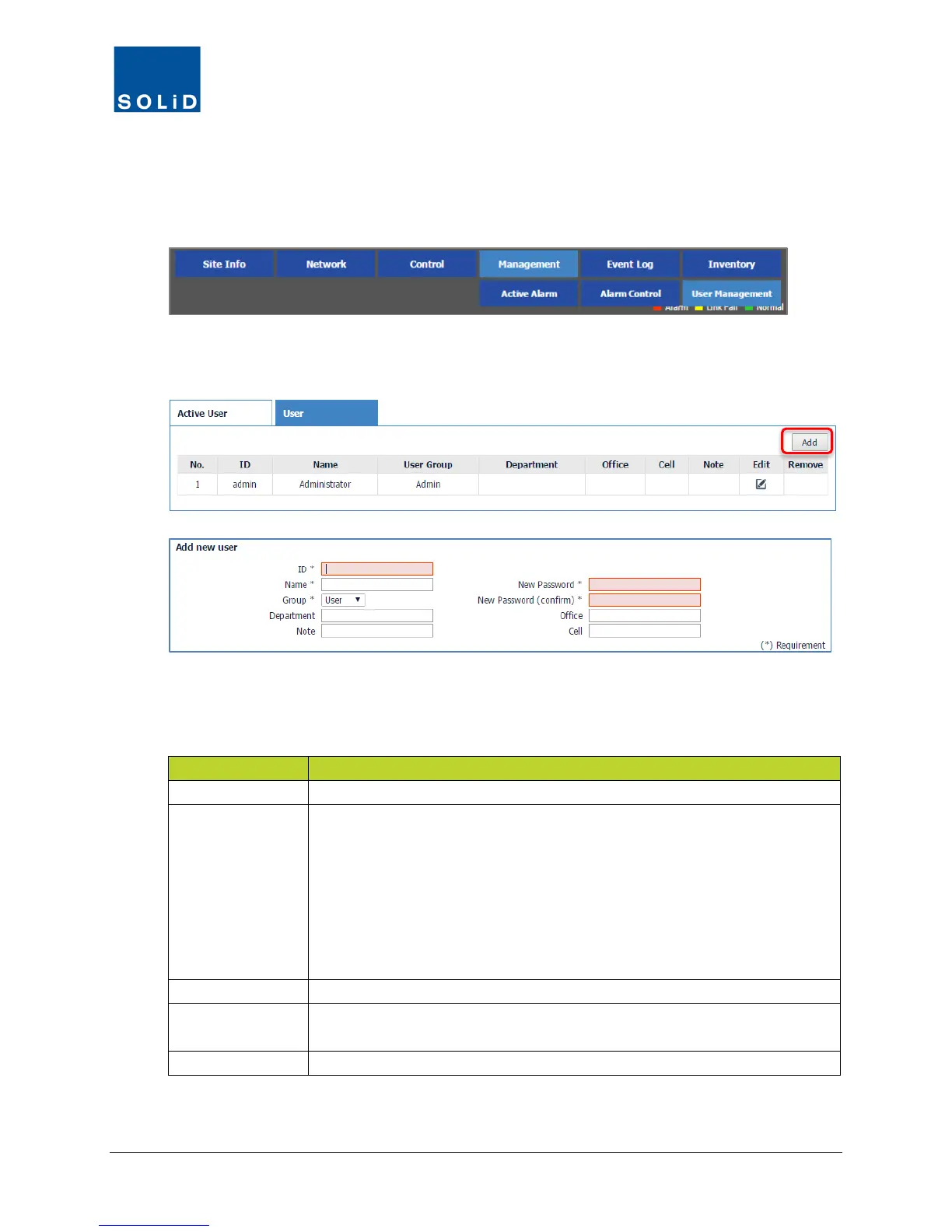
1. On the Management menu, click User Management.
2. Click the User tab to see a list of all registered users of the DMS-1200.
3. To add a user, click Add.
4. In the Add User dialog box, enter the user information. Fields with an asterisk (*) are
required.
Enter the user login ID and name.
Group
Assign the user to a group:
Admin: View/Change All Equipment and User Management Settings.
Tech: View/Change Equipment Level Settings. View-only User
Management.
User: View/Change Equipment Level Settings. Exceptions: No access to
Management menu options. No access to Network > System menu options.
View-only EasySet settings. Firmware download permitted.
Client: View only permissions.
Enter the department and any additional information about the user.
Password
Enter a password. Passwords must be at least four characters. Numbers
and special characters are permitted.
Enter contact telephone numbers.
Table 5.2 – DMS User Setup



 To Next Page