DMS-1200 Release 6 Operations Manual
Section 8 – System Commissioning with EasySet 87
8.1 Commissioning the DAS
The Auto Setup function provides a single screen for setting up all automatic functions in the DAS
(i.e., Auto Level Control, Auto Gain Control, Auto Gain Setting). The Commissioning function
optimizes all system parameters to the user-defined levels set in the Auto Setup process. When
executing EasySet with System Commissioning, these system parameters are adjusted together
with threshold values and ALC off/on values:
• Execute MDBU TX IN AGC
• Execute TX Optic Compensation
• AMP “ON”
• Execute TX OUT AGS “ON”
• PIMD Measurement (NHROU only)
You can also run Auto Setup without executing System Commissioning. See the next section
Running Auto Setup without System Commissioning
.
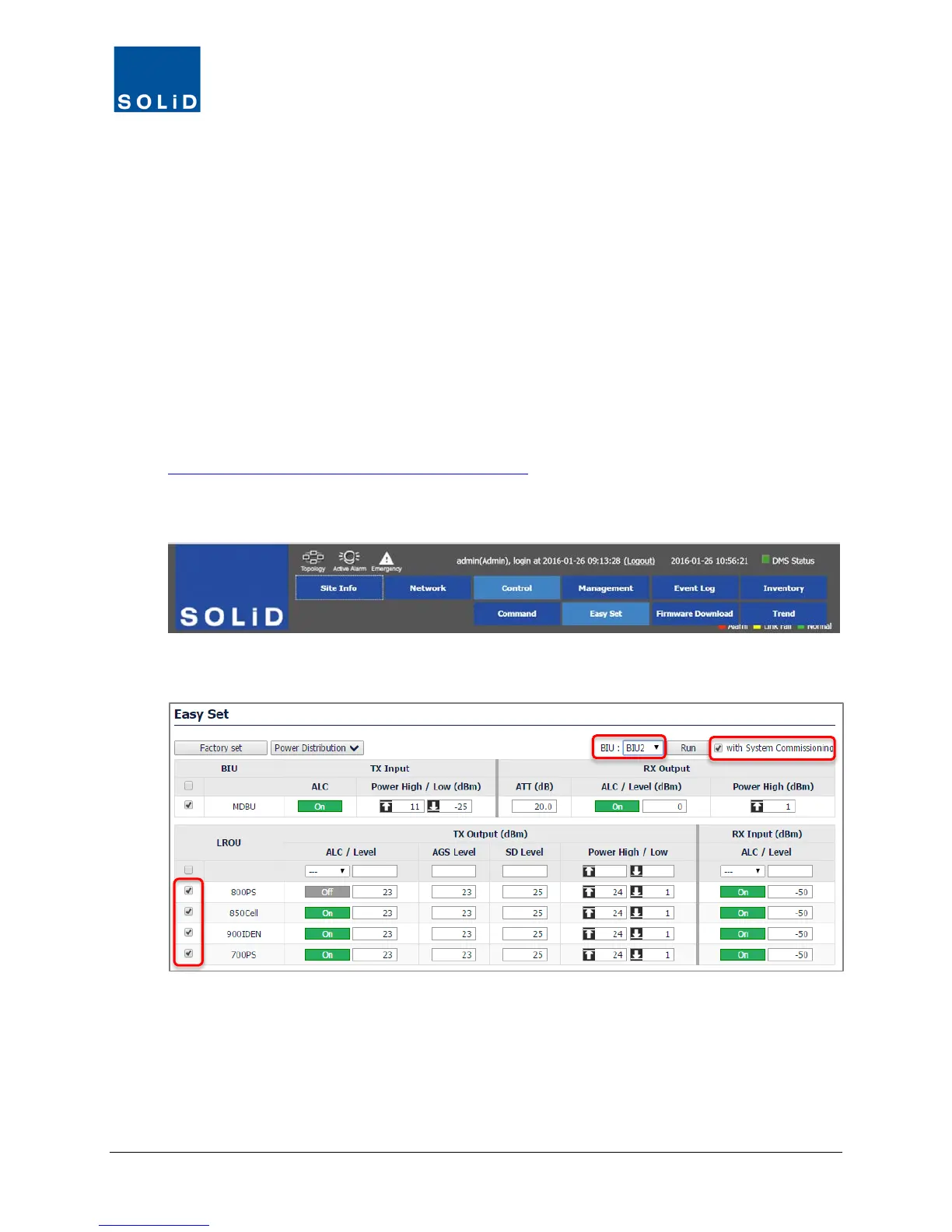
1. On the Navigation Bar, click Control > Easy Set
2. From the drop-down list, select a target BIU. This function is executed per BIU and configures
all components associated with that BIU.
3. In the check boxes, select the devices to configure.
4. Check the with System Commissioning box.



 To Next Page