DMS-1200 Release 6 Operations Manual
Section 8 – System Commissioning with EasySet 91
8.3 Calculating Power Distribution
The Power Distribution function automatically calculates the attenuation level required to equally
distribute TX power levels according to the number of channels and the type of input signal (i.e.,
700LTE, 1900, AWS, etc.). For dual BIU configurations, this function will allocate the same
amount of power to each band in both the primary and secondary BIU.
TIP: When power distribution function is activated, TX input ALC is turned off.
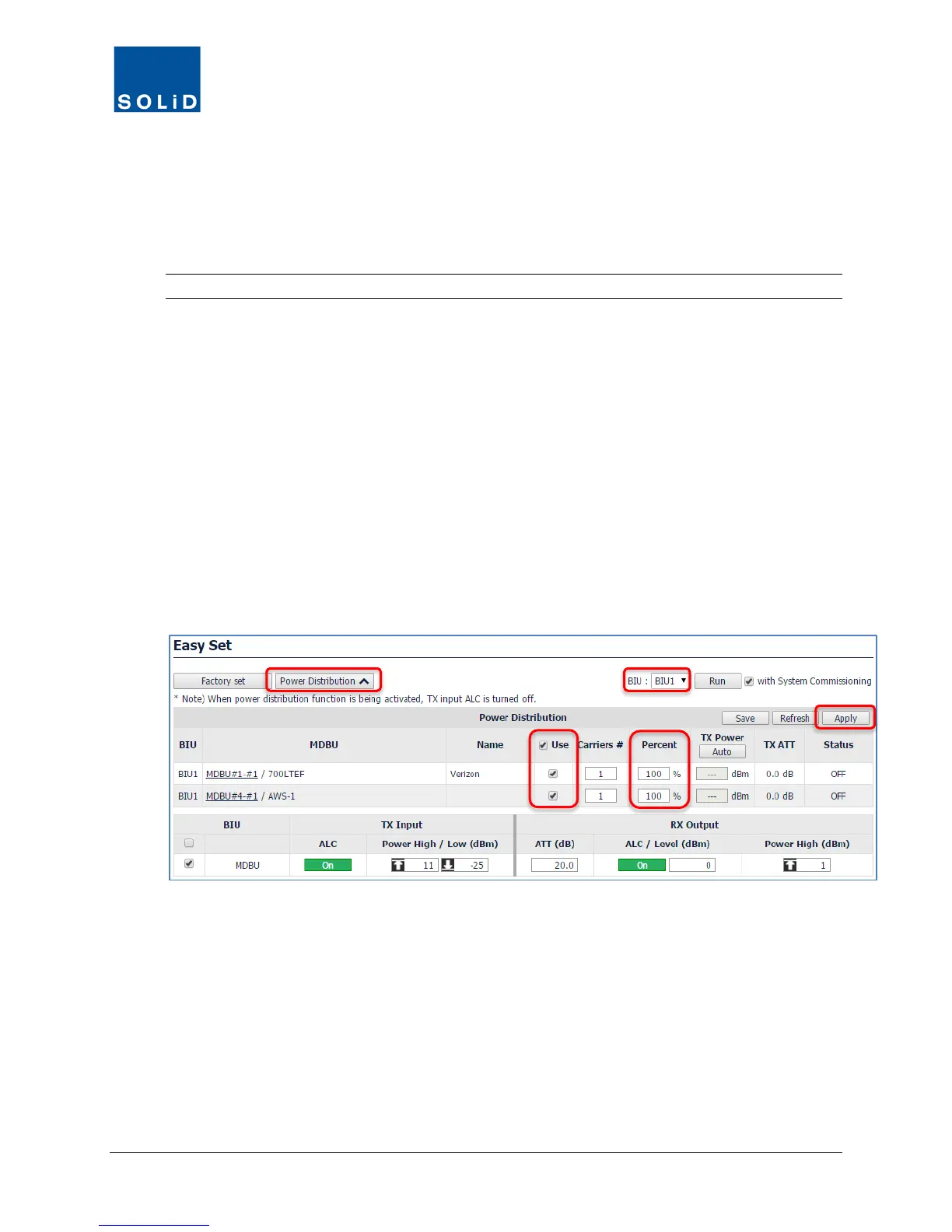
The following parameters are used for the Power Distribution function:
• Use (On / Off)
• TX Power
• Number of Carriers (channels)
• TX ATT
1. Click Power Distribution.
2. From the drop-down list, select a target BIU.
3. Check the Use box and enter the number of Carriers (channels) associated with each MDBU.
4. In the Percent column etc
5. Click Apply and OK to confirm.
6. Once complete, status is shown in the Result column. Click Refresh to clear the result status
or click Save to download a report in spreadsheet format.



 To Next Page