DMS-1200 Release 6 Operations Manual
Section 4 – DMS-1200 Setup 40
4.11 Setting up Email Notification
The DMS-1200 can send emails to administrators or technicians to notify them of alarm
conditions. You can customize the email notifications to report alarms according to the severity
level. For example, some administrators may only want to be notified of “critical” alarms, while
others may want to see all alarms reported by the system.
TIP: The list of email contacts is distinct from the list of DMS users. Entry on one list does not
automatically populate the other list.
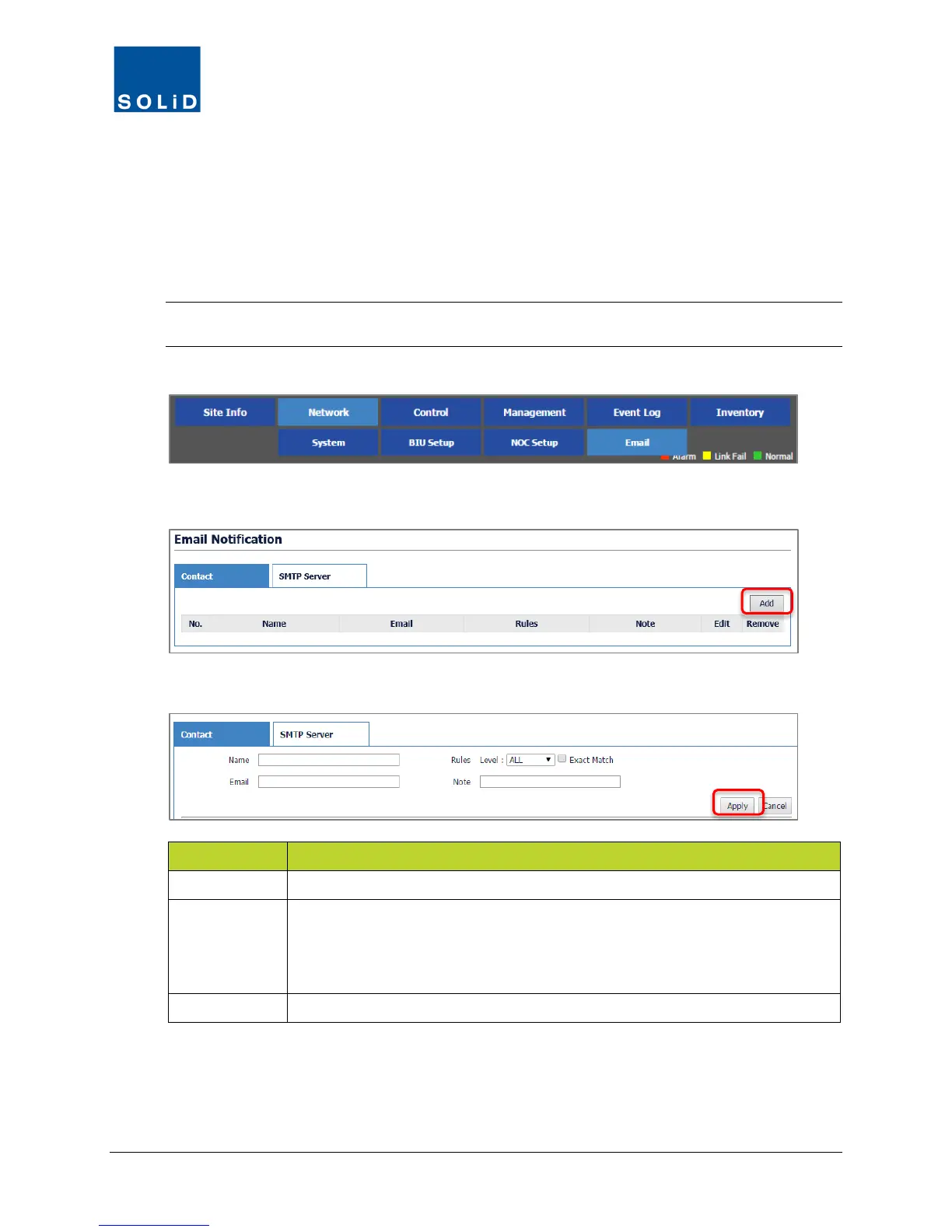
1. On the Network menu, click Email.
2. Click the Contact tab. To add a contact, click Add.
3. Edit the Email Notification settings according to the following guidelines:
Option Action / Status
Name / Email Enter the contact’s name and email address.
Rules Level
From the drop-down list, choose the Alert Level. All Alarm events at that level
and above (more severe) will generate an email notification. Check Exact
Match to generate notification for just that level. Alarm Levels are defined in
the Management > Alarm Control menu.
Note Enter any relevant information about the contact.
Table 4.10 – Email Contact Setup
4. Click Apply when you are done.
5. To delete a contact, click Remove next to the user’s name.



 To Next Page