DMS-1200 Release 6 Operations Manual
Section 7 – DAS Device Control 82
7.5.11 External Alarm Setup (THOR NHROU Only)
The NHROU supports an External dry contact alarm feature for both output and input alarms.
Output alarms can be sent to any dry contact application.
External ALM #1 supports output alarms. An event indicates active output on the alarm.
When an alarm condition exists, the output relay terminal will operate as shown below.
Table 7.29 – External Alarm Relay Setup Screen Fields
To Activate Alarms for Dry Contacts
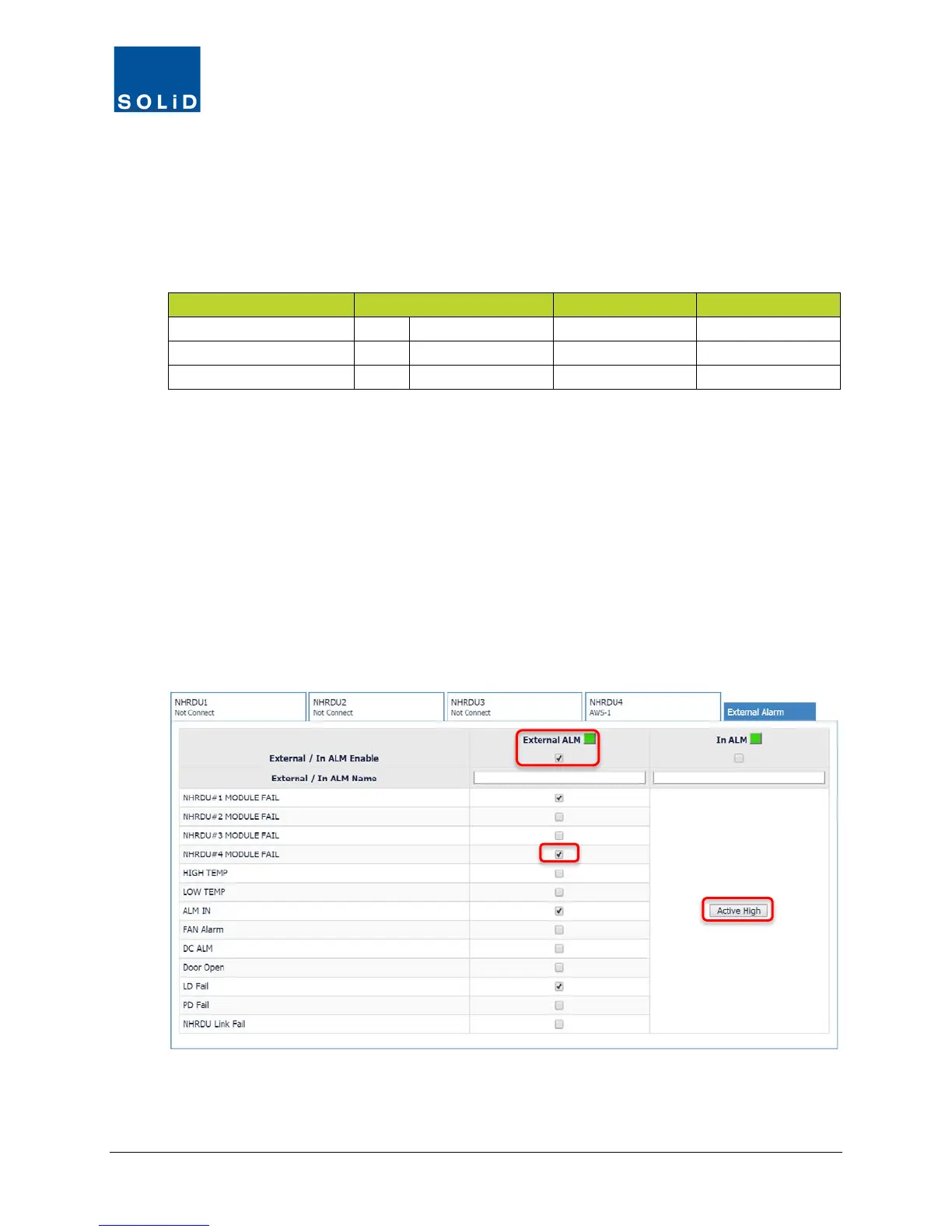
1. From the NHRDU setup screen, click on the External Alarm tab.
2. Check the External ALM and/or In ALM Enable box to activate.
3. For External ALM only, check the Enable box for each condition you would like reported.
4. For In ALM only, click on Active High or Active Low.
In the Active High state, when the contact detects anything other than a ground (zero voltage),
such as a voltage or open circuit, the alarm is activated. In the Active Low state, the alarm is
activated when a ground is detected.



 To Next Page