DMS-1200 Release 6 Operations Manual
Section 1 – DMS-1200 Release 6 Overview 7
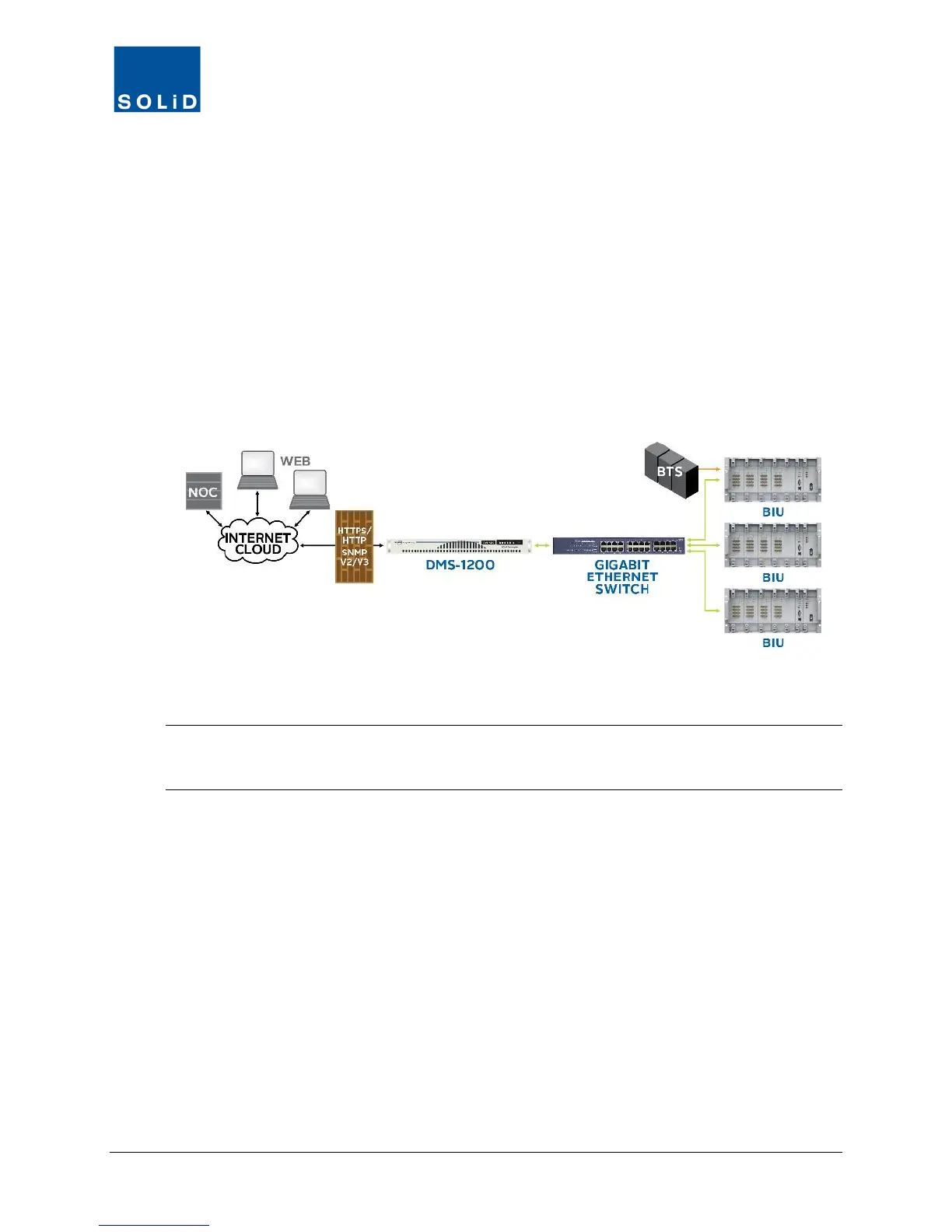
The DMS-1200 communicates with the DAS through the system’s BTS Interface Units (BIUs)
over a standard TCP/IP connection or secure HTTP / HTTPS protocol. Alarms and device status
are transmitted to the NOC via SNMPv2/v3.
As the next figure shows, you can access the DMS-1200 functions either:
• Onsite by connecting a laptop directly to the Console port on the DMS-1200; or
• Remotely from an external NOC through the public Internet by connecting the DMS-1200
to your data network.
The DMS-1200 server is based on the Ubuntu 12.04 LTS operating system. You can view the
user interface in any standard web browser from a desktop or laptop computer. A Gigabit
Ethernet switch is used when connecting multiple BIUs.
Figure 1.1 − DAS Management with DMS-1200
TIP: For connecting multiple BIUs to a DMS-1200, SOLiD recommends using a Gigabit Ethernet
switch from manufacturers like NETGEAR (model NETGEAR JGS524 24-port GB Ethernet
Switch) or equivalent.



 To Next Page