5-12
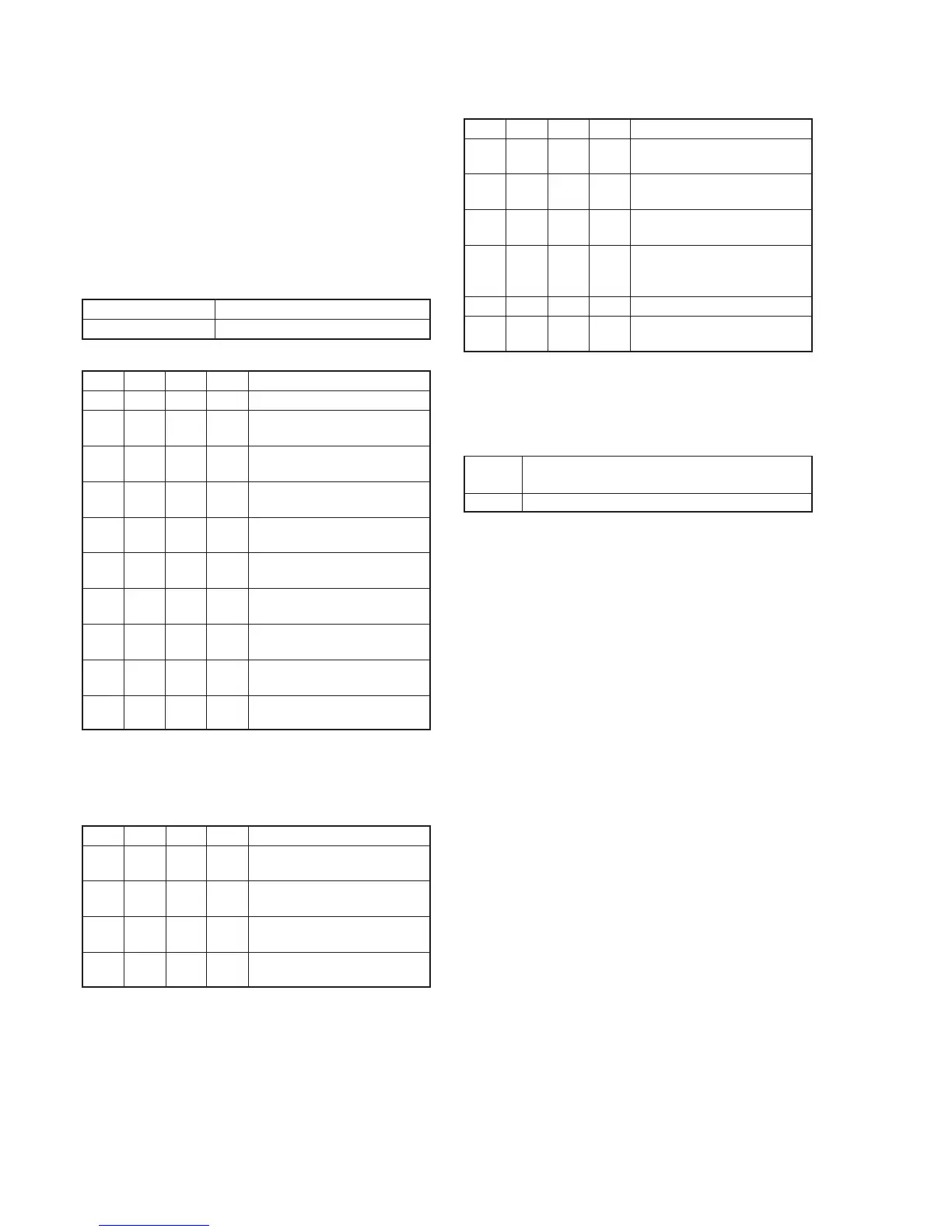
1-2-2. INITIALIZATION OF B PAGE DATA
(DCR-PC9/PC9E)
Note: When reading the B page data, insert a “Memory Stick” into the
“Memory Stick” slot.
Switch setting:
POWER................................................................. MEMORY
1. Initializing the B Page Data
Note: If the B page data has been initialized, the following
adjustments need to be performed again.
1) Modification of B page data
Adjusting page B
Adjusting Address 00 to FF
Initializing Method:
Order Page
Address
Data Procedure
1 0 01 01 Set the data.
2 2 8F 02 Set the data, and press PAUSE
button.
3 2 8F 03 Set the data, and press PAUSE
button.
4 2 8F 02 Set the data, and press PAUSE
button.
5 2 8F 00 Set the data, and press PAUSE
button.
6 5 0E 00 Set the data, and press PAUSE
button.
7 5 01 F3 Set the data, and press PAUSE
button.
8 5 00 01 Set the data, and press PAUSE
button.
9 5 0E Check that the data changes to
“01”.
10 Perform “Modification of B Page
Data”.
2. Modification of B Page Data
If the B page data has been initialized, change the data of the “Fixed
data-2” address shown in the following tables by manual input.
Preparations:
Order Page
Address
Data Procedure
1 2 8F 02 Set the data, and press PAUSE
button.
2 2 8F 03 Set the data, and press PAUSE
button.
3 2 8F 02 Set the data, and press PAUSE
button.
4 2 8F 00 Set the data, and press PAUSE
button.
Modifying Method:
1) Before changing the data, select page: 0, address: 01, and set
data: 01.
2) New data for changing are not shown in the tables because
they are different in destination. When changing the data, copy
the data built in the same model.
Note: If copy the data built in the different model, the camcorder may
not operate.
3) When changing the data, don’t press the PAUSE
button.
Processing after Completing Modification of B Page data:
Order Page
Address
Data Procedure
1 5 0E 00 Set the data, and press PAUSE
button.
2 5 01 FB Set the data, and press PAUSE
button.
3 5 00 01 Set the data, and press PAUSE
button.
4 5 0E Check that the data changes to
“01”. (The change data are written
in the flash memory.)
5 2 00 29 Set the data.
6 2 01 29 Set the data, and press PAUSE
button.
3. B Page Table
Note: Fixed data-1: Initialized data. (Refer to “1. Initializing the B Page
Data”.)
Fixed data-2: Modified data. (Refer to “2. Modification of B Page
Data”.)
Address Remark
00 to FF Fixed data-1
Table. 5-1-5.



 To Next Page