1-32
134
— Customizing Your Camcorder —
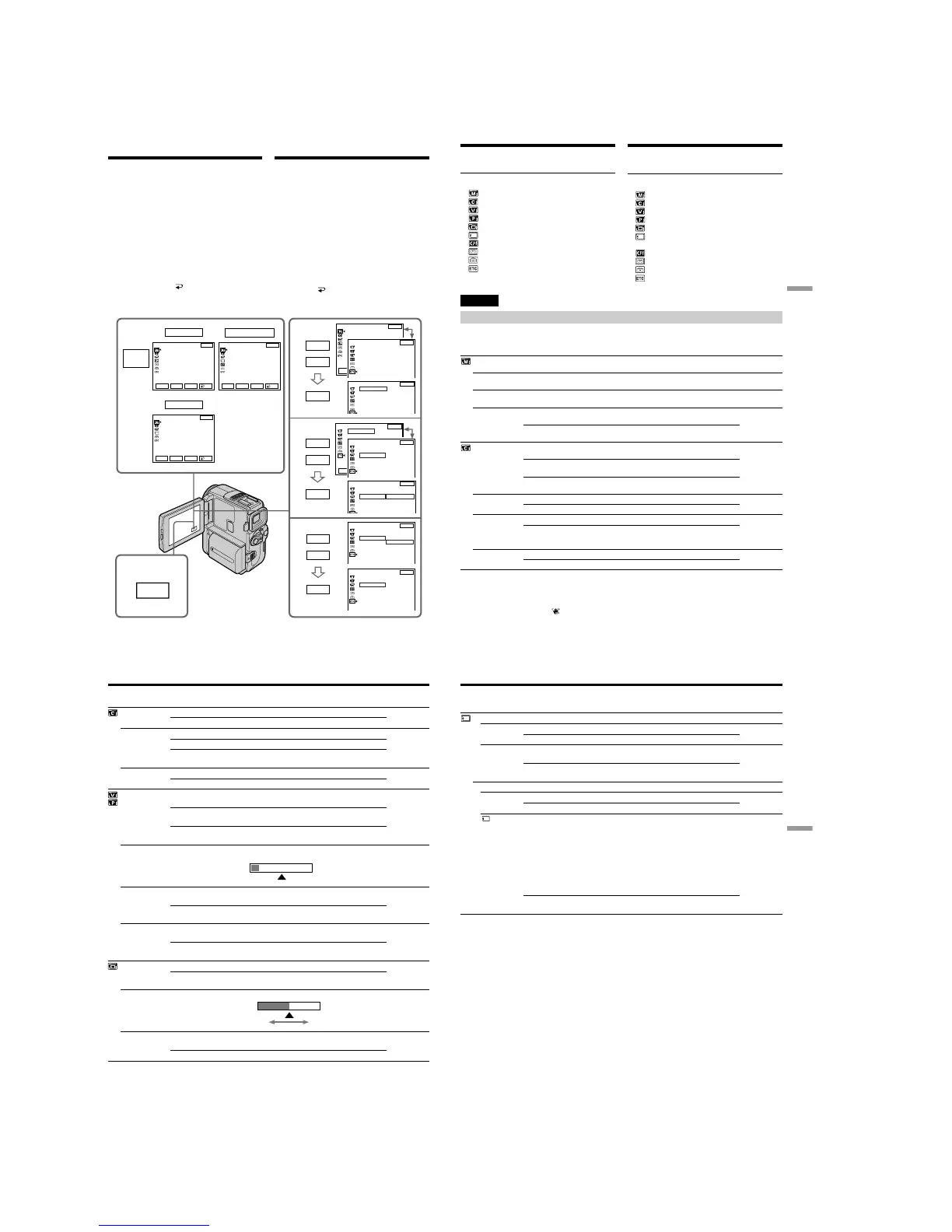
Changing the menu
settings
To change the mode settings in the menu
settings, select the menu items with r/R dial. The
default settings can be partially changed. First,
select the icon, then the menu item and then the
mode.
(1)In CAMERA, VCR(DCR-PC9E)/PLAYER
(DCR-PC6E) or MEMORY (DCR-PC9E only)
mode, press FN to display PAGE1.
(2)Press MENU to display the menu.
(3)Press r/R to select a desired icon, and press
EXEC.
(4)Press r/R to select a desired item, and press
EXEC.
(5)Press r/R to select a desired setting.
(6)Repeat steps from 3 to 5 if you want to change
other items. Press
RET. to return to step 3.
For details, see “Selecting the mode setting of
each item” (p. 135).
— Выполнение индивидуальных установок на видеокамере —
Изменение установок
меню
Для изменения установок режима в установках
меню выберите пункты меню с помощью r/R.
Установки по умолчанию могут быть частично
изменены
. Сначала выберите пиктограмму,
затем пункт меню, а затем режим.
(1)В режиме CAMERA, VCR(DCR-PC9E)/
PLAYER (DCR-PC6E) или MEMORY
(только DCR-PC9E) нажмите кнопку FN
для отображения PAGE1.
(2)
Нажмите кнопку MENU для отображения меню.
(3)Нажмите r/R для выбора желаемой
пиктограммы, а затем нажмите EXEC.
(4)Нажмите r/R для выбора желаемого
пункта, а затем нажмите EXEC.
(5)
Нажмите r/R для выбора желаемой установки.
(6)
Повторяйте пункты с 3 по 5, если Вы
хотите изменить другие установки.
Нажмите
RET. для возврата к пункту 3.
Подробные сведения приведены в разделе
“Выбор установок режима по каждому
пункту” (стр. 141).
1
FN
2
CAMERA
3
4
5
MANUAL SET
PROGRAM AE
P EFFECT
WHT BAL
AUTO SHTR
VCR/PLAYER
MANUAL SET
P EFFECT
MEMORY
MANUAL SET
PROGRAM AE
WHT BAL
MANUAL SET
PROGRAM AE
P EFFECT
OTHERS
WORLD TIME
BEEP
0 HR
OTHERS
WORLD TIME
BEEP
COMMANDER
DISPLAY
REC LAMP
ON
OFF
EXIT
RET.
EXEC
Rr
EXIT
RET.
EXEC
Rr
EXIT
RET.
EXEC
Rr
EXIT
RET.
EXEC
Rr
EXIT
RET.
EXEC
Rr
EXIT
r
R
EXEC
r
R
EXEC
r
R
EXEC
MENU
OTHERS
WORLD TIME
BEEP
COMMANDER
DISPLAY
REC LAMP
OTHERS
WORLD TIME
BEEP
COMMANDER
DISPLAY
REC LAMP
ON
OTHERS
WORLD TIME
BEEP
COMMANDER
DISPLAY
REC LAMP
OFF
EXIT
EXIT
EXIT
OTHERS
WORLD TIME
BEEP
COMMANDER
DISPLAY
REC LAMP
0 HR
EXIT
OTHERS
WORLD TIME
BEEP
COMMANDER
DISPLAY
REC LAMP
ON
OFF
EXIT
(DCR-PC9E only) /
(Только модель
DCR-PC9E)
135
Customizing Your Camcorder Выполнение индивидуальных установок на видеокамере
Changing the menu settings
English
Selecting the mode setting of each item z is the default setting.
Menu items differ depending on the position of the POWER switch.
The LCD screen shows only the items you can operate at the moment.
To return to FN
Press EXIT.
Menu items are displayed as the following
icons:
MANUAL SET
CAMERA SET
VCR SET (DCR-PC9E)
PLAYER SET (DCR-PC6E)
LCD/VF SET
MEMORY SET (DCR-PC9E only)
CM SET
TAPE SET
SETUP MENU
OTHERS
Icon/item
PROGRAM AE
P EFFECT
WHT BAL
AUTO SHTR
D ZOOM
16:9WIDE
STEADYSHOT
N.S. LIGHT
Mode
——
——
——
z ON
OFF
z OFF
20×
120×
z OFF
ON
z ON
OFF
z ON
OFF
Meaning
To suit your specific shooting requirement (p. 68)
To add special effects like those in films or on the TV
to images (p. 63)
To adjust the white balance (p. 71)
To automatically activate the electronic shutter when
shooting in bright conditions.
Not to automatically activate the electronic shutter
even when shooting in bright conditions.
To deactivate the digital zoom. Up to 10× zoom is
carried out.
To activate the digital zoom. More than 10× to 20×
zoom is performed digitally (p. 37).
To activate the digital zoom. More than 10× to 120×
zoom is performed digitally (p. 37).
—
To record a 16:9 wide picture (p. 59)
To compensate for camera-shake
To cancel the SteadyShot function. Natural pictures
are produced when shooting a stationary object with
a tripod.
To use the NightShot Light function (p. 41)
To cancel the NightShot Light function
POWER
switch
CAMERA
MEMORY
VCR/PLAYER
CAMERA
CAMERA
MEMORY
CAMERA
CAMERA
CAMERA
CAMERA
CAMERA
MEMORY
Notes on the SteadyShot function
•The SteadyShot function will not correct excessive camera-shake.
•Attachment of a conversion lens (optional) may influence the SteadyShot function.
If you cancel the SteadyShot function
The SteadyShot off indicator
appears. Your camcorder prevents excessive compensation for
camera-shake.
Изменение установок меню
Для возврата в положение FN
Нажмите кнопку EXIT.
Пункты меню отображаются в виде
приведенных ниже пиктограмм:
MANUAL SET
CAMERA SET
VCR SET (DCR-PC9E)
PLAYER SET (DCR-PC6E)
LCD/VF SET
MEMORY SET
(Только модель DCR-PC9E)
CM SET
TAPE SET
SETUP MENU
OTHERS
136
Icon/item
FRAME REC
INT. REC
EDIT SEARCH
HiFi SOUND
AUDIO MIX
A/V t DV OUT*
NTSC PB
LCD B. L.
LCD COLOUR
VF B.L.
Mode
z OFF
ON
ON
z OFF
SET
z OFF
ON
z STEREO
1
2
——
z OFF
ON
z ON PAL TV
NTSC 4.43
z BRT NORMAL
BRIGHT
——
z BRT NORMAL
BRIGHT
Meaning
To deactivate cut recording function.
To activate cut recording function (p. 81).
To activate interval recording function (p. 78).
To deactivate interval recording function.
To set waiting time and recording time for interval
recording function.
Not to display 7/– · + on the screen.
To display 7/– · + on the screen.
To play back a stereo tape or dual sound track tape
with main and sub sound
To play back a stereo tape with the left sound or a
dual sound tape with main sound
To play back a stereo tape with the right sound or a
dual sound track tape with sub sound
To adjust the balance between the stereo 1 and
stereo 2 (p. 124)
To output digital images in analog format using
your camcorder.
To output analog images in digital format using
your camcorder (p. 113).
To play back a tape recorded in the NTSC colour
system on a PAL system TV
To play back a tape recorder in the NTSC colour
system on a TV with the NTSC 4.43 mode
To set the brightness on the LCD screen normal
To brighten the LCD screen
To adjust the colour on the LCD screen with –/+
To set the brightness on the viewfinder screen to
normal.
To brighten the viewfinder screen.
POWER
switch
CAMERA
CAMERA
CAMERA
VCR/PLAYER
VCR/PLAYER
VCR
VCR/PLAYER
VCR/PLAYER
CAMERA
MEMORY
VCR/PLAYER
CAMERA
MEMORY
Changing the menu settings
VCR/PLAYER
CAMERA
MEMORY
ST1 ST2
Low intensity
high intensity
* DCR-PC9E only
Note on NTSC PB
When you play back a tape on a Multi System TV, select the best mode while viewing the picture on
the TV.
Notes on LCD B.L. and VF B.L.
When you select “BRIGHT”, battery life is reduced by about 10 percent during recording.
When you use the power source other than battery pack
LCD B.L. and VF B.L. are automatically selected to BRIGHT.
137
Customizing Your Camcorder Выполнение индивидуальных установок на видеокамере
Changing the menu settings
Icon/item
* STILL SET
PIC MODE
QUALITY
MOVIE SET
IMAGESIZE
REMAIN
Mode
z SINGLE
MULTI SCRN
z FINE
STANDARD
z 320 × 240
160 × 112
z AUTO
ON
Meaning
Not to record continuously.
To record 9 images continuously (p. 160).
To record still images in the fine image quality
mode.
To record still images in the standard image quality
mode.
To record moving pictures in 320 × 240 size.
To record moving pictures in 160 × 112 size.
To display the remaining capacity of the “Memory
Stick” in the following cases:
•for 5 seconds after setting the POWER switch to
MEMORY or VCR
•for 5 seconds after inserting a “Memory Stick” into
your camcorder in MEMORY or VCR mode
•when the capacity of the “Memory Stick” is less
than 1 minute in MEMORY mode
•for 5 seconds after completing a moving picture
recording
To always display the remaining capacity of the
“Memory Stick”.
POWER
switch
MEMORY
VCR
MEMORY
VCR
MEMORY
VCR
MEMORY
* DCR-PC9E only
If you select QUALITY (DCR-PC9E only)
The number of images you can record matched to that image quality is displayed.



 To Next Page