5-29
4. Contrast Adjustment (VC-265 board)
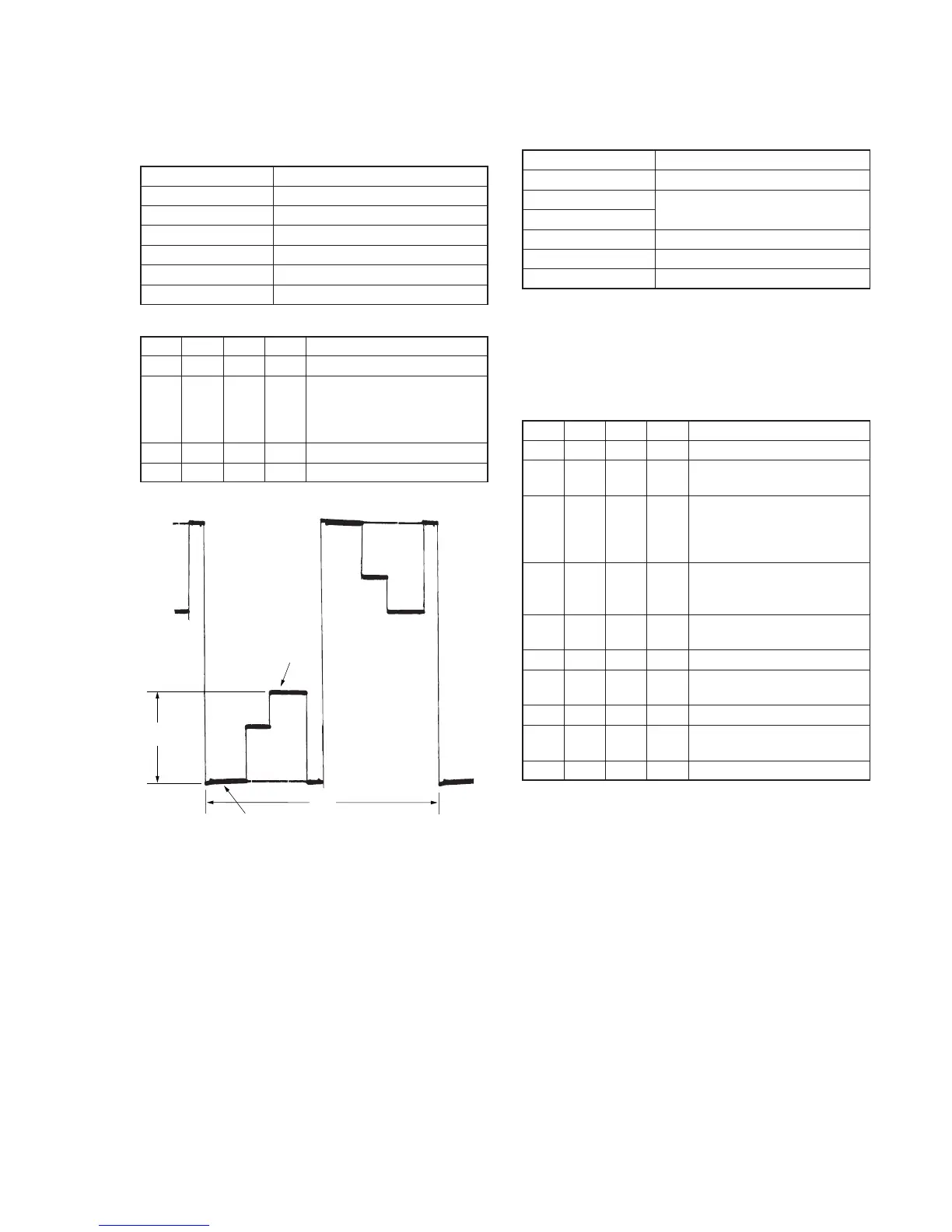
Set the level of the VIDEO signal for driving the LCD to the specified
value. If deviated, the screen image will be blackish or saturated
(whitish).
Mode Camera
Subject Arbitrary
Measurement Point Pin 4 of CN004 (EVF VG)
Measuring Instrument Oscilloscope
Adjustment Page D
Adjustment Address 99
Specified Value A=2.45 ± 0.05V
Adjusting method:
Order Page
Address
Data Procedure
1 0 01 01 Set the data.
2 D 99 Change the data and set the voltage
(A) between the 3 steps peak and
pedestal to the specified value.
(The data should be “00” to “7F”.)
3 D 99 Press PAUSE button.
4 0 01 00 Set the data.
5. White Balance Adjustment (VC-265 board)
Correct the white balance.
If deviated, the reproduction of the EVF screen may degenerate.
Mode Camera
Subject Arbitrary
Measurement Point Check on EVF screen
Measuring Instrument
Adjustment Page D
Adjustment Address 97, 98
Specified Value The EVF screen should not be colored.
Note1: Check the white balance only when replacing the following parts.
If necessary, adjust them.
1. LCD panel
2. Light induction plate
3. IC1802
Note2: Use the AC power adaptor.
Adjusting method:
Order Page
Address
Data Procedure
1 0 01 01 Set the data.
2 D 97 8D Set the data, and press PAUSE
button.
3 D 98 Set the following data, and press
PAUSE button.
73: DCR-PC9/PC9E
60: DCR-PC6E
4 D 98 Check that the EVF screen is not
colored. If not colored, proceed to
step 10.
5 D 97 Change the data so that the EVF
screen is not colored.
6 D 97 Press PAUSE button.
7 D 98 Change the data so that the EVF
screen is not colored.
8 D 98 Press PAUSE button.
9 D 98 If the EVF screen is colored, repeat
steps 5 to 9.
10 0 01 00 Set the data.
Fig. 5-1-16.
3 steps peak
Pedestal
A
2H



 To Next Page