Procedure
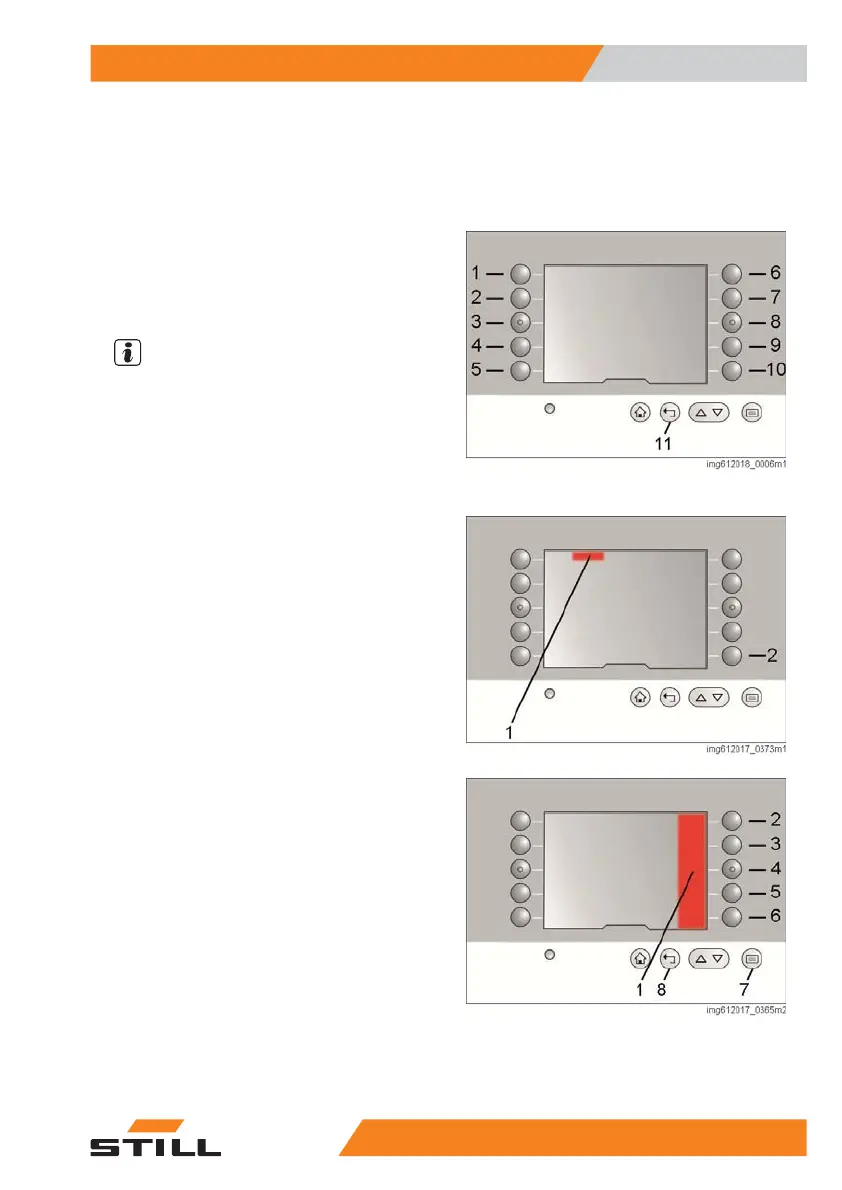
– Push button (7). The menu in area (1)
opens.
– Press key sequence (6) and (4).
– Use buttons (1)(10) to select the position for
the favourite function.
– Select the desired function in the list using
buttons (6) to (10).
NOTE
On some buttons there is a sub-menu with ad-
ditional options.
– Exit the list by pressing button (11).
Message list
Currently displayed error numbers can be hid-
den using push button (2). A warning symbol
(1) remains in the status bar with the number
of the current error. The hidden errors can be
displayed in the message list. The errors are
only displayed in the list until the cause is rec-
tified. All other errors can be read out using
the diagnostic software.
Procedure
– Push button (7). The menu in area (1)
opens.
– Press key sequence (6), (6) and (2).
The message list shows all of the current error
numbers.
– Exit the list by pressing button (8).
Overview
3
Operating the display
395231 804 2502 EN - 04/2020


 To Next Page