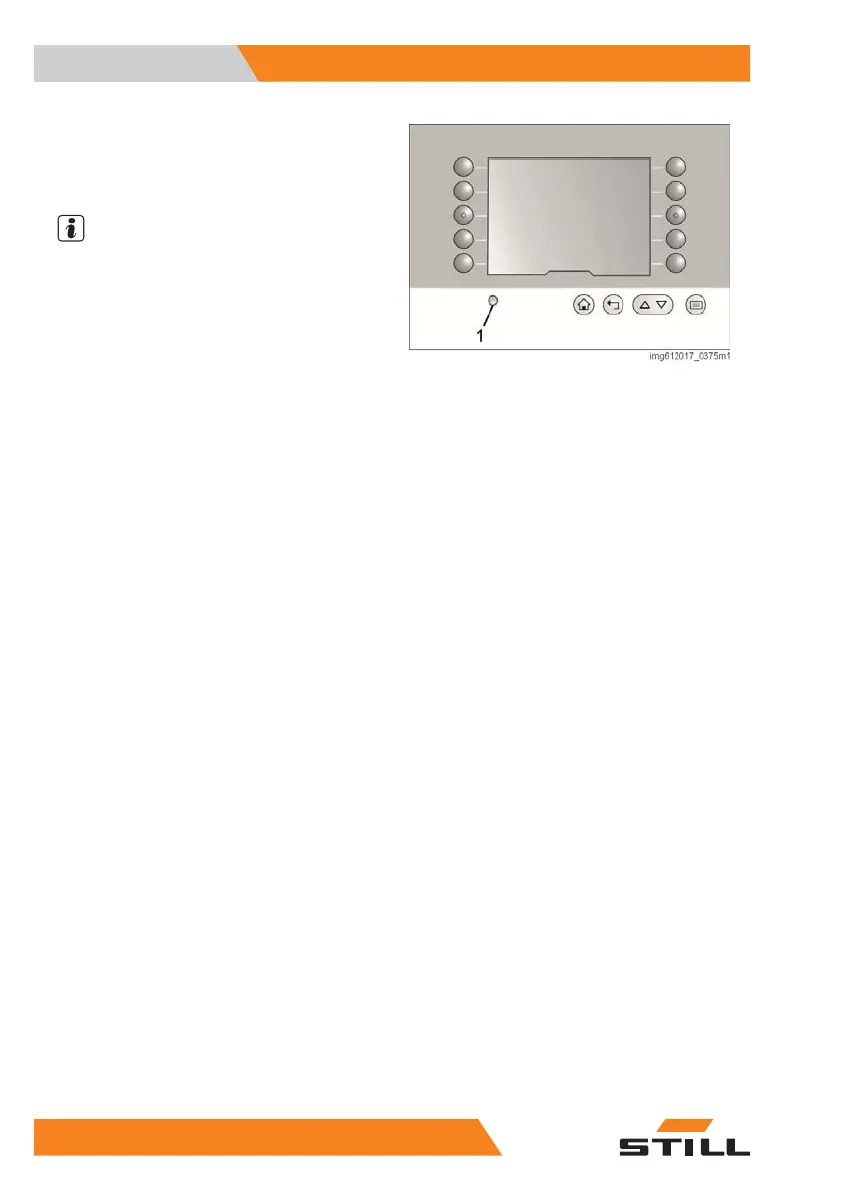
Brightness setting
The brightness is automatically adjusted by a
light sensor (1) below the display.
NOTE
For the automatic brightness feature to func-
tion correctly, the sensor must not be covered
or contaminated.
Operating instructions
The controller assists the operator in operating
the industrial truck effectively.
Operating instructions take the form of:
●
Illuminated buttons
●
Message in plain text
●
Pictogram
●
Error number
If a particular button needs to be actuated in
order to continue working, this button is illumi-
nated.
The messages in plain text provide direct in-
formation in the configured language.
Pictograms provide self-explanatory, lan-
guage-neutral information on the necessary
operating steps.
In the event of a fault or defect, one or more
numbers appear led by a pictogram of a warn-
ing triangle. Call the authorised service centre
and provide the authorised service centre with
these numbers.
Overview
3
Operating instructions
40 5231 804 2502 EN - 04/2020


 To Next Page