Electronic access control
As an option, these industrial trucks can also
be equipped with electronic access control in
place of the key switch.
These systems are available as options:
●
PIN code input
●
RFID chip
●
RFID card
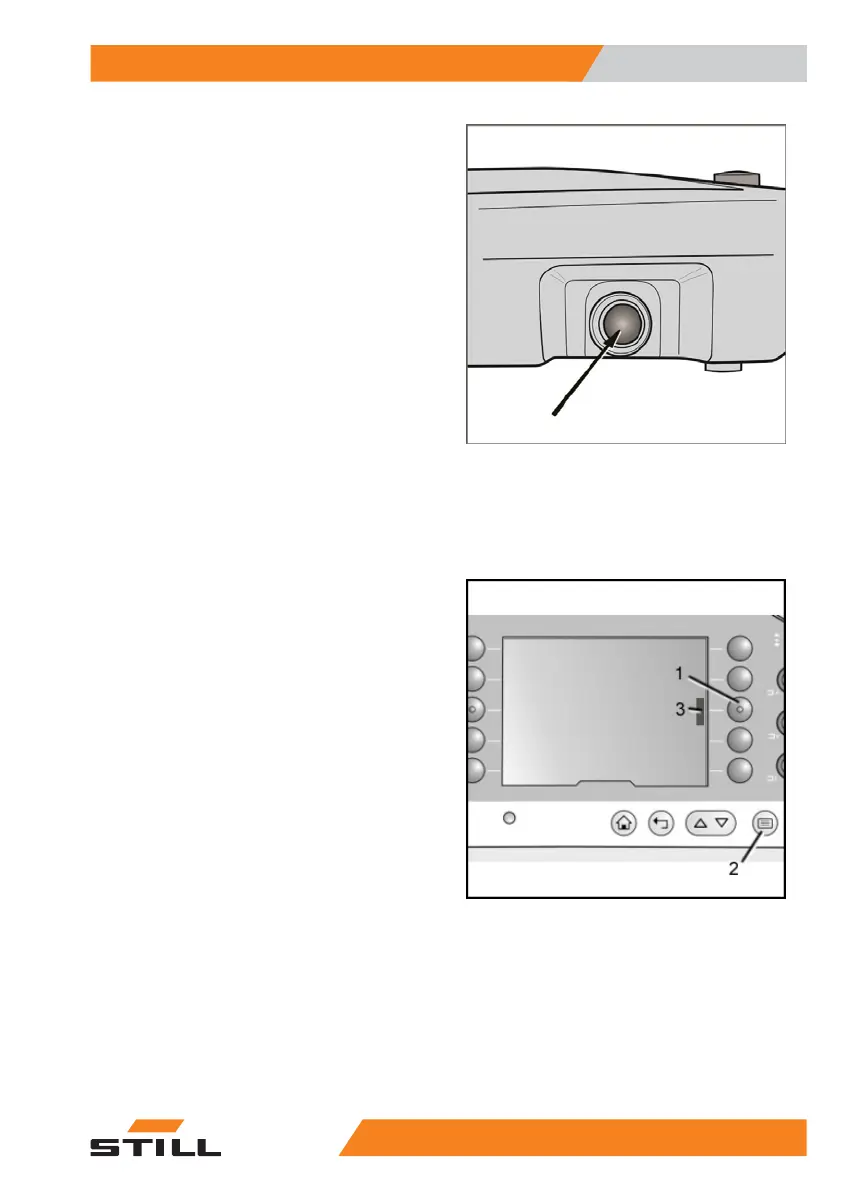
Switching on the controller
Push the push button for approximately 2 sec-
onds. The controller is switched on. The dis-
play is activated and the working spotlights*
are switched on.
Once the industrial truck is switched on, all
functions are initially disabled. The functions
of the industrial truck are enabled only once
the electronic access control has been cor-
rectly activated.
PIN code
The functions are enabled by entering a valid
five-digit number code using the keypad (see
also "factory setting").
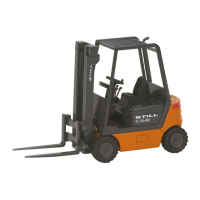
– Press the F1 (1) button.
Depending on the language, the following dis-
play prompts the user to enter the specified
PIN code.
– Enter the five-digit code within 8 seconds.
– Press button (2). This confirms the entry.
When the PIN code is entered correctly, a
short acoustic signal will sound.
The display returns to the start screen.
The coloured bar in the display next to the F1
button (3) indicates that the functions of the in-
dustrial truck are now enabled.
Incorrect PIN code, input time elapsed
When an incorrect PIN code is entered or if
the input time of 8 seconds elapses:
– Press the F1 button (1) again.
Special equipment
7
Electronic access control
1255231 804 2502 EN - 04/2020


 To Next Page