The information contained in this document is confidential, and only for the information of the intended recipient and may not be published or redistributed without the prior written consent of Summa NV.
Summa nv Tel +32 59 27 00 11 Fax +32 59 27 00 63 Email support@summa.com Website www.summa.com Page 64 of 76
9 Menu Structure
The machine has to be started in service mode to have all menu options available. When the
machine runs in service mode, then it behaves differently to when running in user mode:
media sensor is not used which could cause small media to drop out of the machine.
9.1 Service mode
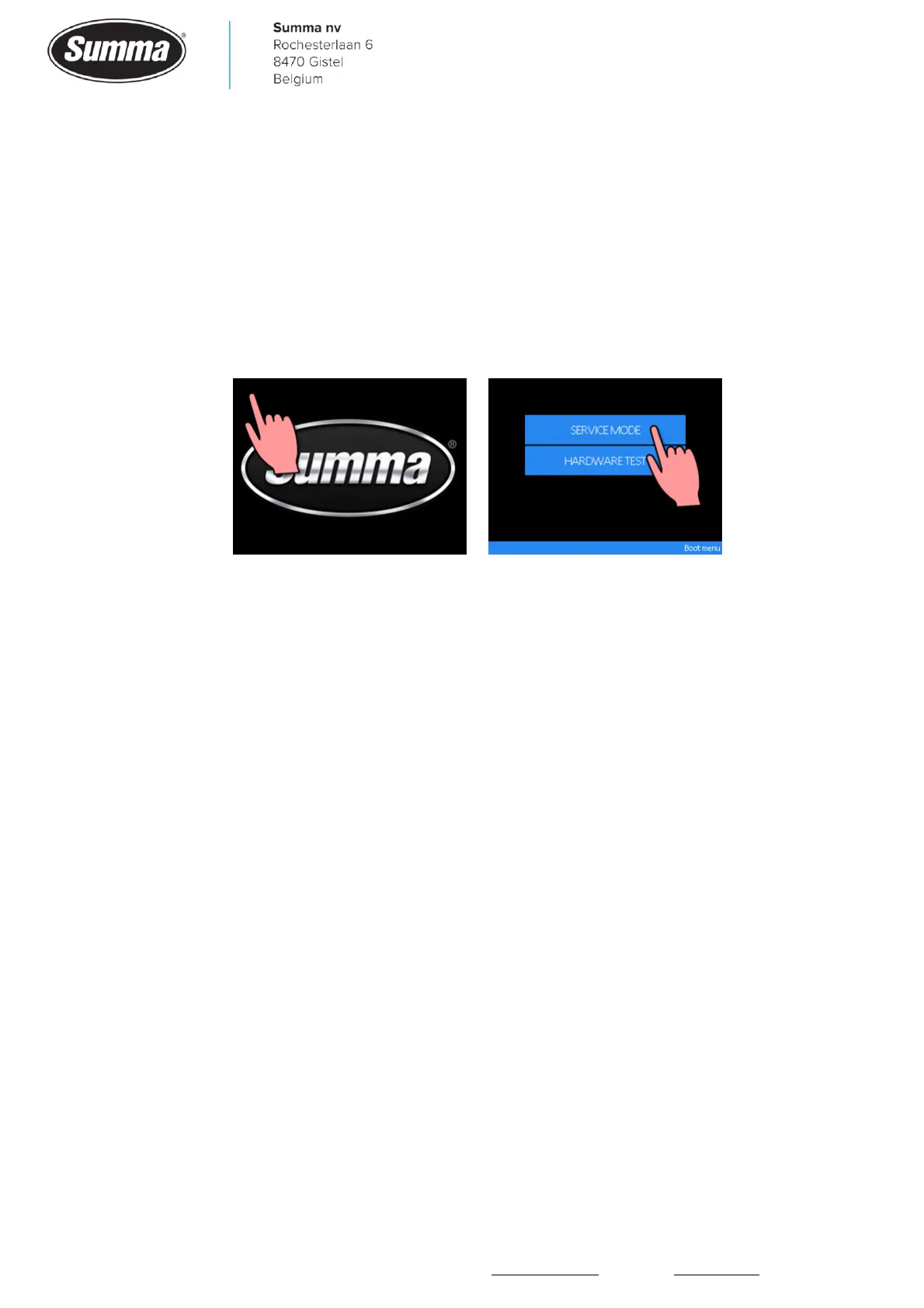
To start the machine in service mode, press and hold the upper left corner when the Summa
logo is displayed during boot up. Release the display, then click the [SERVICE MODE].
To exit service mode, restart the machine.
9.2 Settings
By pressing the [Settings] button, all parameters are accessible to configure the machine.
See the user’s guide for a description of all parameters.
Some general rules:
• Set “FlexCut” to OFF to mix normal contour cut with FlexCut, unless the complete job has to
be cut in FlexCut mode.
• Set “Autoload” to ON when using roll media.









 To Next Page