The information contained in this document is confidential, and only for the information of the intended recipient and may not be published or redistributed without the prior written consent of Summa NV.
Summa nv Tel +32 59 27 00 11 Fax +32 59 27 00 63 Email support@summa.com Website www.summa.com Page 69 of 76
then clean the sensor. Remove vinyl parts from the bottom of the sensor. The optics is
accessible by removing the sticker covering the cleaning hole. Use compressed air, or a
cotton stick with isopropyl-alcohol. Replace the sticker. Probably replace the cutter head
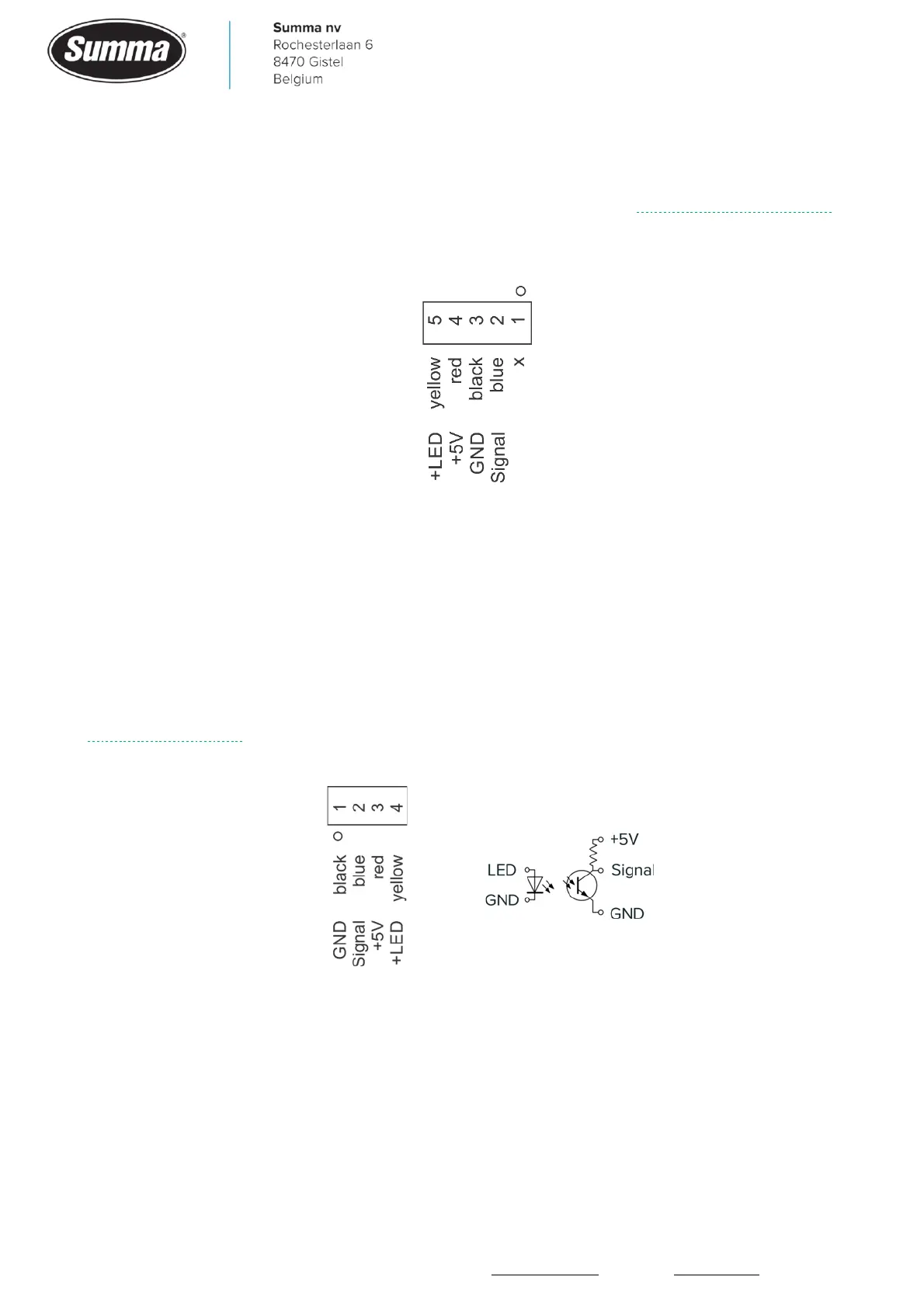
(Drag Head: KIT-2021; T Head: KIT-2022). The OPOS sensor is wired to connector J3 on the
cutter head PCB.
Voltages can be measured with reference to the black wire (pin 3): blue wire (pin 2) depends
on the color of the media under the OPOS sensor. With black media, the voltage is near 0V.
With white media, the voltage is between +2.5V and +3.5V. Red wire (pin 4) is +5V. Yellow
(pin 5) is +2.4V.
10.2.8 Cam sensor
Slide the cutter head over a pinch roller block to change the status from COVERED to NOT
COVERED and vice versa. In case the status does not change, then clean the cam sensor, or
replace the sensor (KIT-2011). Probably the flat cable is broken. The cam sensor is wired to
connector J8 on the cutter head PCB.
Voltages can be measured with reference to the black wire (pin 1): blue wire (pin 2) is 0V
when uncovered, +5V when covered. Red (pin 3) is 5V. Yellow (pin 4) is the saturation
voltage for the LED: 1.25V.
10.2.9 Ultrasonic sensor
This status line is only visible when the optional roll-up unit is mounted and enabled. Hold an
A4 sheet 10 cm away from the sensor to change the status to COVERED. Move the sheet 20









 To Next Page