The information contained in this document is confidential, and only for the information of the intended recipient and may not be published or redistributed without the prior written consent of Summa NV.
Summa nv Tel +32 59 27 00 11 Fax +32 59 27 00 63 Email support@summa.com Website www.summa.com Page 32 of 76
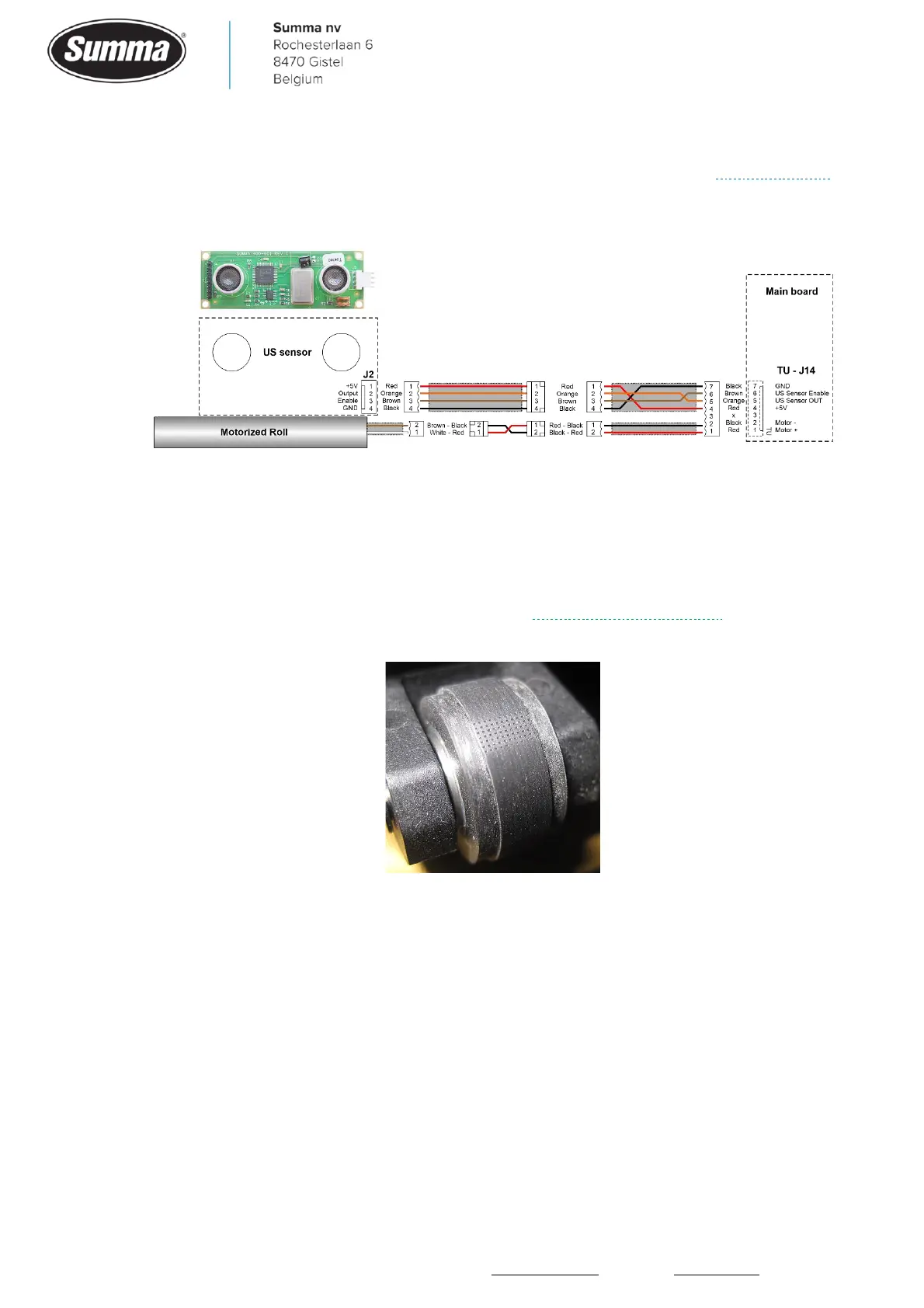
• The wiring may be incorrect. Check the wiring between the main board and the ultrasonic
sensor in case the status of the ultrasonic sensor does not change in the monitor screen.
Check the wiring between the main board and the motorized roll in case the roll does not
rotate, or rotates in the wrong direction.
4.21 Ticking sound
When the machine produces a ticking sound when the media is transported, then check the
following:
• Pinch rollers were for long time lowered on the media when the machine was inactive. This
may have created a flat surface on the pinch roller. Replace the pinch rollers. Lift the pinch
rollers when the machine stands idle for more than 2 hours.
• Glue may stick on the pinch rollers. Clean the pinch rollers with a cloth and isopropyl-alcohol.
• The drive drum may have collected glue from the media. Clean the drive drum.
• The bearings used to support the drive drum may have become dirty. Clean with compressed
air.
• One of the bearings used to support the drive drum may have clogged grease. Spray WD40 in
the bearings.









 To Next Page