25. ROUTE SURVEYING
168
• The reference point coordinates can
be stored as the coordinates for a
known point in the current job by
pressing [REC].
"30.1 Registering/Deleting
Known Point Data"
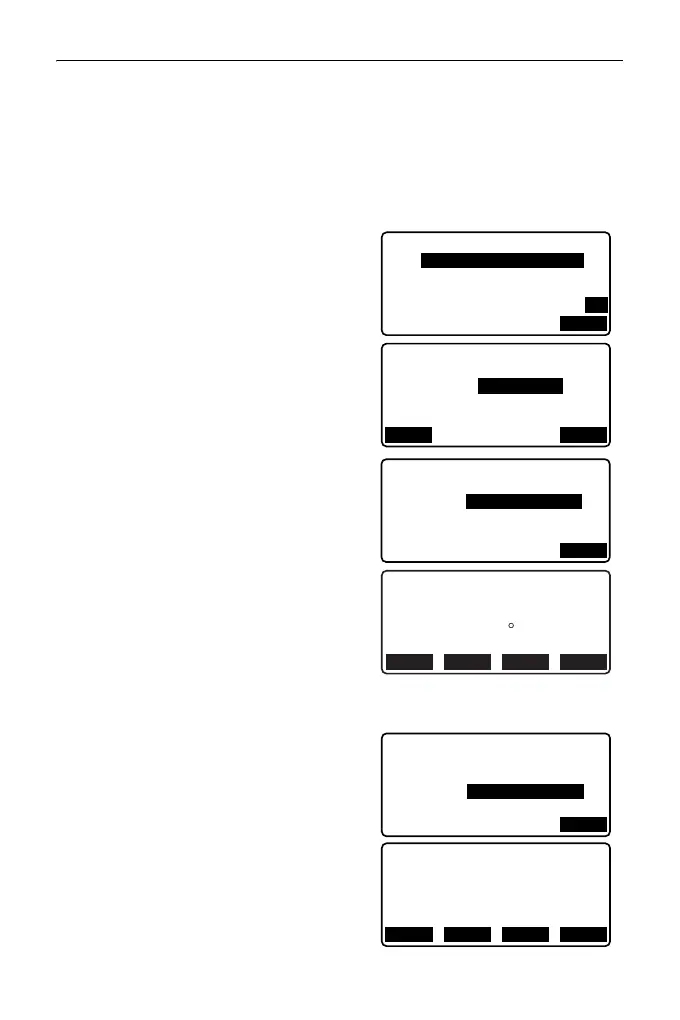
4. Input the coordinates of the IP point,
then press [OK].
• The azimuth angle to the IP point can
be set by pressing [AZMTH] on the
second page. Press [COORD] to
return to coordinate input.
5. Input the reference point follow-up
distance in "St. ofs". Input the target
point follow-up distance in "Sta..ing".
6. Press [OK] in the screen shown in
step 5 to calculate the center peg
coordinates. The coordinates and
azimuth angle are then displayed on
the screen.
7. Press {ESC} twice to finish Straight
Line calculation and return to <Road>.
• Press [WIDTH] to move to the width
peg setting screen. The coordinates
of the width peg can be found by
inputting the route width and
pressing [OK].
Np:
Ep:
200.000
Line/IP
200.000
P2
AZMTH
Line/IP
Azmth
45.0005
COORD
OK
Line/CL peg
St. ofs
Sta..ing
0.000m
25.000m
OK
N
E
45 00' 00"
117.678
Line/CL peg
117.678
Azmth
WIDTH
CENTER
REC S-O
Line/WidthPeg
CL ofs
Sta..ing
5.000m
25.000m
OK
N
E
114.142
Line/WidthPeg
121.213
WIDTH
CENTER
REC S-O



 To Next Page