EasyManua.ls Logo

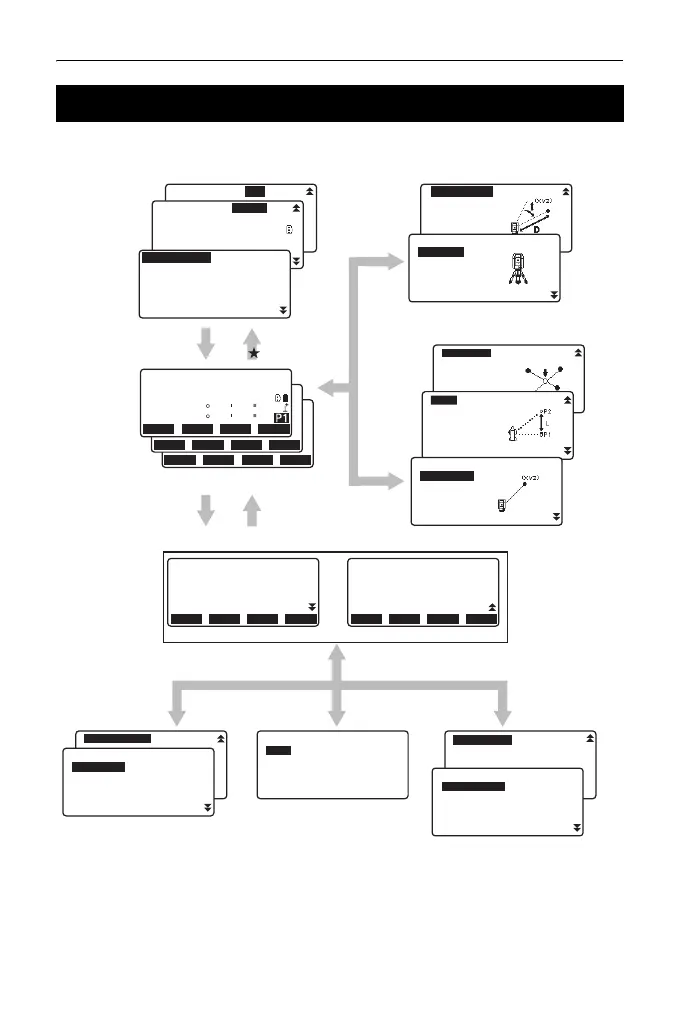
Topcon ES-101 - 4.2 Mode Diagram

Topcon ES-101
324 pages
Print Icon
To Next Page IconTo Next Page
To Previous Page IconTo Previous Page
Loading...
4. ES FUNCTIONS
16
4.2 Mode Diagram
'&/
ࡔ࠾ࡘ࡯
࠴࡞࠻
છᗧⷺ
ኻ࿁
᡼኿
᧮ᛂ
ࠝࡈ࠮࠶࠻
P. 1
P. 2
P. 1
P. 2
P. 3
Data Mode
Configuration Mode
P. 1
P. 2
P. 1
P. 2
USB Mode
P. 1
P. 2
{ESC}
{ESC}
[DATA][USB] [CNFG]
{ }
Status Screen
P. 1
"MENU"
"TOPO"
P. 2
P. 3
{ESC}
[OBS]
[MENU]
[TOPO]
{ESC}
〝✢⸘▚
Star key Mode
OBS Mode
OFFSET
TOPO
S-OMLM
Intersect.
Traverse
Road
Xsection
L-pointer :Off
Off On
Reflector :Prism
Laser plum :Off
Laser lev. :3
Illum.hold :Laser
Prism Sheet N-Prism
Quick format
Data
JOB
Known data
Code
REM
Area calc.
S-O Line
P-Project
Pt to line
S-O Arc
Dist+Coord
Note
View
Deletion
TILT
H-SET
EDMMENU
OBS
PC 0
0ppm
SD
ZA
HA-R
89
0
59
00
50
00
SHVMEAS 0SET
COORD
ES-103
S/N 123456
Date 2012/01/01
Time 12:00:00
Job.JOB1
rec 9999
CNFGOBS USB DATA
ES-103
S/N 123456
Ver. XXX-XX-XX
XXX-XX-XX
Job.JOB1
rec 9999
CNFGOBS USB DATA
USB
Save data
Load known PT
Save code
Load code
File status
Entry menu
Tilt crn :Yes(H, V)
Contrast :10
Reticle lev :3
Press <Enter> key
TOPO JOB1
Occupy
BS data
Angle data
Dist data
Coord data
MENU
Coordinate
S-O
Topography
MLM
Offset
Change Password
Date and time
Key function
Config
Obs.condition
Instr.config
Comms setup
Unit
Instr.const

Table of Contents

Related product manuals