28. RECORDING DATA - TOPO MENU -
216
Angle measurement data can be stored in the current JOB.
PROCEDURE
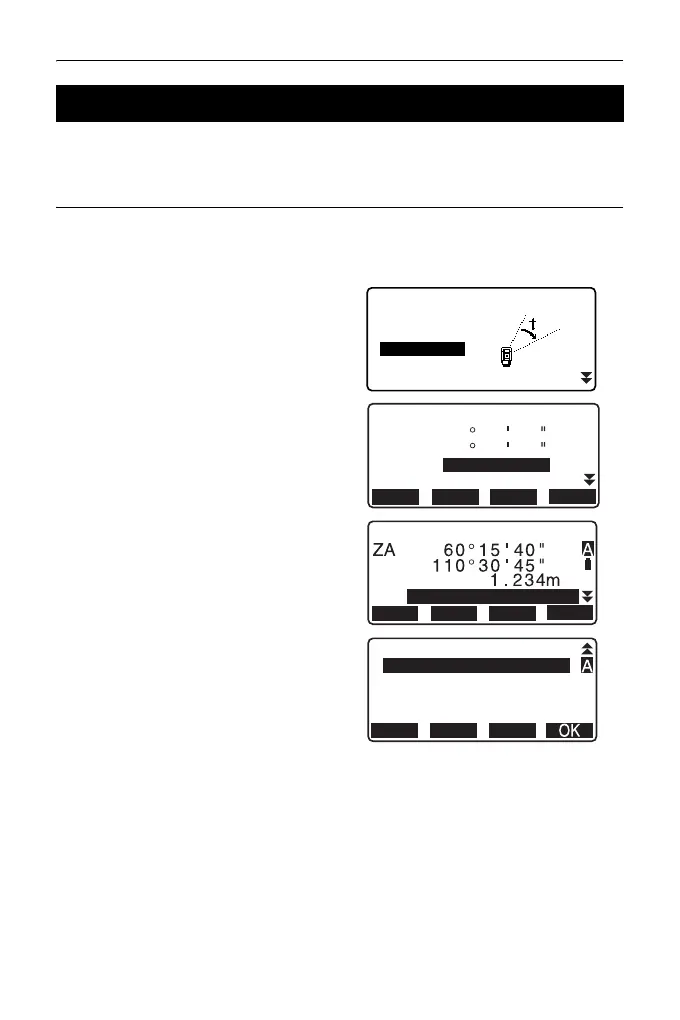
1. Press [TOPO] in the third page of
OBS mode to display <TOPO>.
2. Select “Angle data” and sight the
point to be recorded.
Angle measurement values are
displayed in real time.
3. Set the following items.
(1) Target height
(2) Point name
(3) Code
4. Check the input data, then press
[REC].
5. Press {ESC} to quit measurement
and restore <TOPO>.
28.3 Recording Angle Measurement Data
TOPO JOB1
Occupy
Angle data
Dist data
Coord data
BS data
0
ZA
HR
PT
HA-R
60
40
5
1
45
110
3
H-SET
TILTREC
0SET
0.000m
PT
HR
1010
HA-R
H-SET
TILTREC
0SET



 To Next Page