28. RECORDING DATA - TOPO MENU -
222
It is possible to display the data within the current JOB that is selected.
• It is possible to search for data within the JOB to be displayed by point name.
But the note data cannot be searched.
• Known point data that are entered from an external instrument are not
reviewed.
PROCEDURE Reviewing JOB data
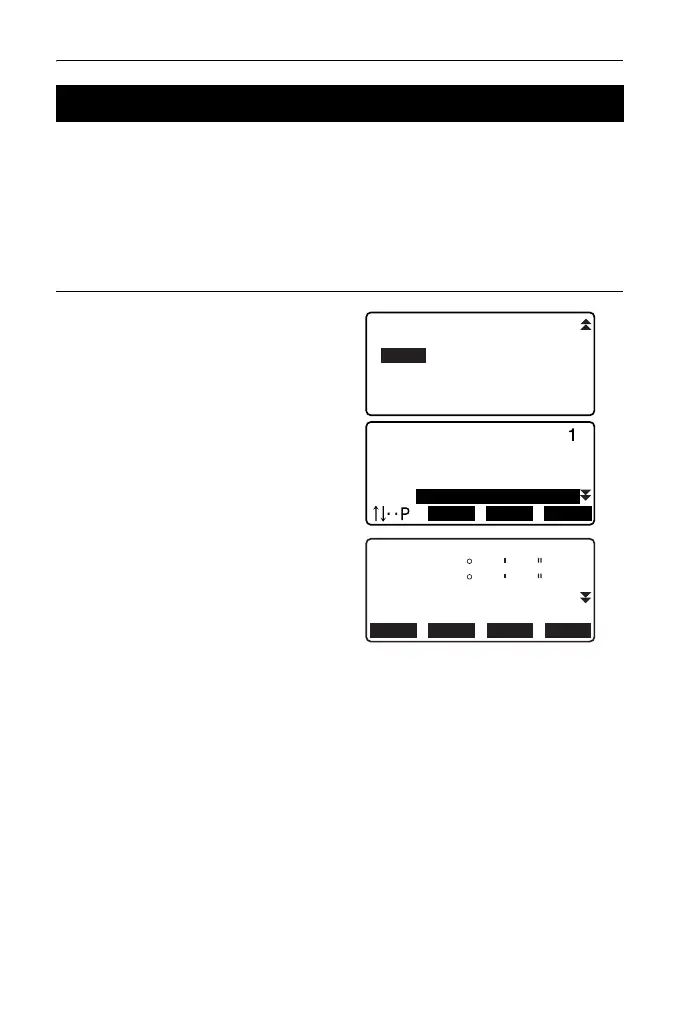
1. Press [TOPO] in the third page of
OBS mode to display <TOPO>.
Select “View” to display the list of
recorded points.
2. Select the point name to be
displayed in detail and press
[ENT].
Details of the data are displayed.
This screen contains distance
measurement data.
• To display previous data item,
press [PREV].
• To display next data, press
[NEXT].
•Press [EDIT] to edit code/target
height/point name of the
selected point name. Items that
can be edited depend on the
type of data selected.
Press [OK] to confirm changes
and return to the previous
screen.
28.8 Reviewing JOB Data
2
2
2
3
FIRST LAST SRCH
Occ
RED
Bkb
Ang.
Dist
Dist + Coord
Note
View
Deletion
NEXT PREV
EDIT RED
SD
ZA
HA-R
123.456m
20 31 21
117
PT
1010
32 21
HR
123.456m



 To Next Page