50
11. ANGLE MEASUREMENT
This section explains the procedures for basic angle measurement.
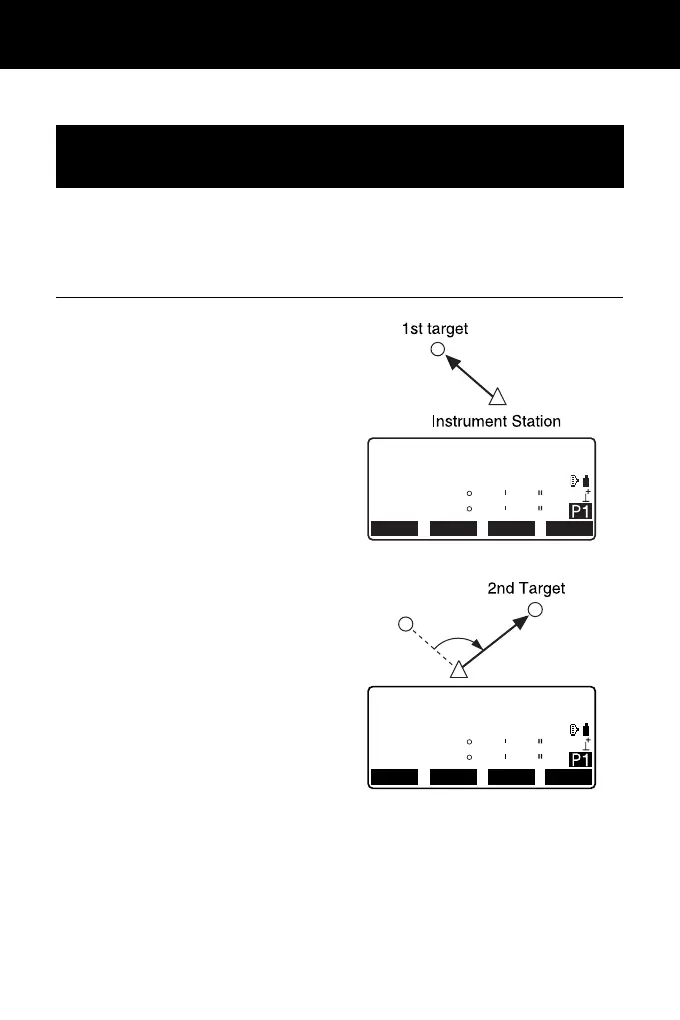
Use the “0SET” function to measure the included angle between two points. The
horizontal angle can be set to 0 at any direction.
PROCEDURE
1. Sight the first target as at right.
2. In the first page of the OBS mode
screen, press [0SET].
[0SET] will flash, so press [0SET]
again.
The horizontal angle at the first
target becomes 0°.
3. Sight the second target.
The displayed horizontal angle
(HA-R) is the included angle
between two points.
11.1 Measuring the Horizontal Angle between Two
Points (Horizontal Angle 0°)
OBS
PC 0
0ppm
SD
ZA
HA-R
89
0
59
00
50
00
MEAS
SHV
0SET
COORD
OBS
PC
0
0
ppm
SD
ZA
HA-R
89
117
59
32
50
20
SHV 0SET
COORD
MEAS



 To Next Page