35. CHECKS AND ADJUSTMENTS
280
3. Wait until a beep sounds and sight
the reference point in Face 2.
Rotate the instrument 180°. Sight
the same point in Face 2 and press
[OK].
4. Set the constant.
Press [YES] to set the constant.
•Press [NO] to discard the data
and return to <Collimation>.
PROCEDURE Check 1: Perpendicularity of the reticle to the
horizontal axis
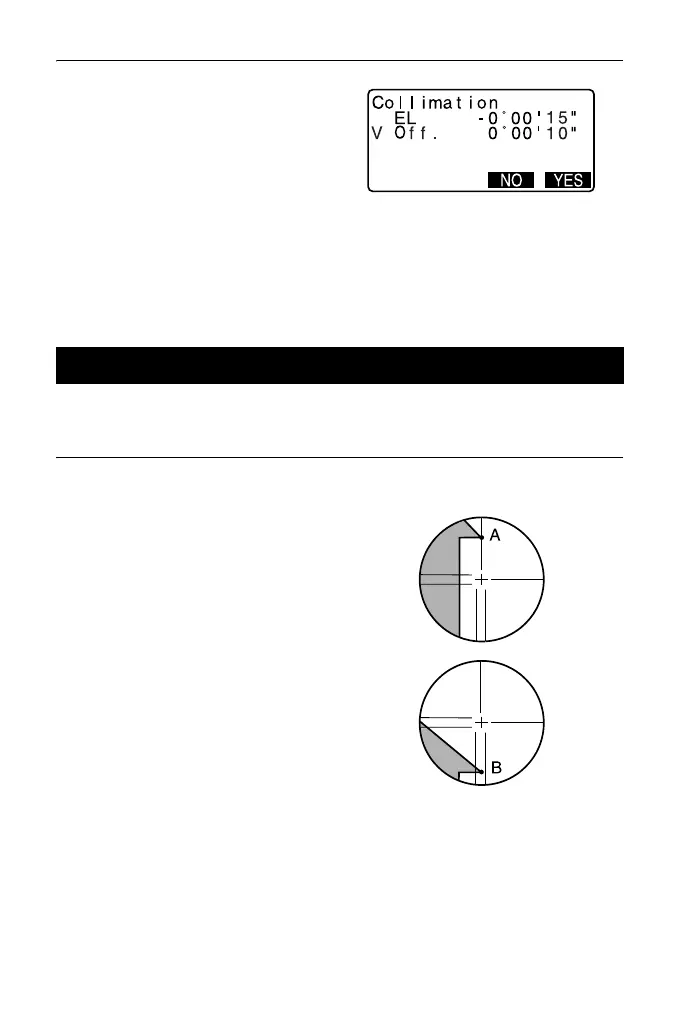
1. Carefully level the instrument.
2. Align a clearly visible target (the
edge of a roof for example) on
point A of the reticle line.
3. Use the telescope fine motion
screw to align the target to point B
on a vertical line.
If the target moves parallel to the
vertical line, adjustment is
unnecessary. If its movement
deviates from the vertical line,
have our service representative
adjust it.
35.4 Reticle



 To Next Page