36
9. POWER ON/OFF
Setting “V manual”: "33.1 Configuration -Config Mode-", Setting/changing
password: "33.4 Changing Password"
PROCEDURE Power ON
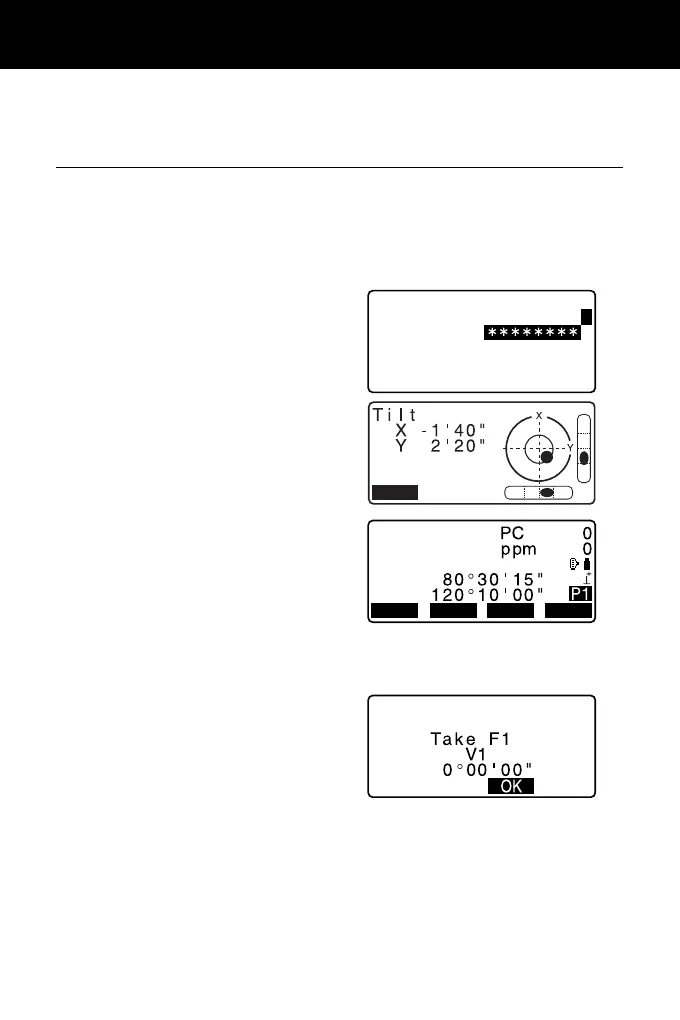
1. Press {ON}.
When the power is switched on, a
self-check is run to make sure the
instrument is operating normally.
• When password is set, the
display appears as at right. Input
password and press {ENT}.
Then, the electric circular level is
displayed in the screen. After
leveling the instrument, press [OK]
to enter into the OBS mode.
"7.2 Levelling"
• When “V manual” is set to “Yes”, the
display appears as at right after
leveling the instrument and press
[OK].
Manually indexing the vertical
circle by face left, face right
measurements:
"38. EXPLANATION"
• If “Out of range” or the Tilt screen is displayed, level the instrument again.
• “Tilt crn” in “Obs. condition” should be set to “No” if the display is unsteady due
to vibration or strong wind.
"33.1 Configuration -Config Mode-"
OBS
SD
ZA
HA-R
SHVMEAS 0SET
COORD



 To Next Page