89
15. SETTING-OUT MEASUREMENT
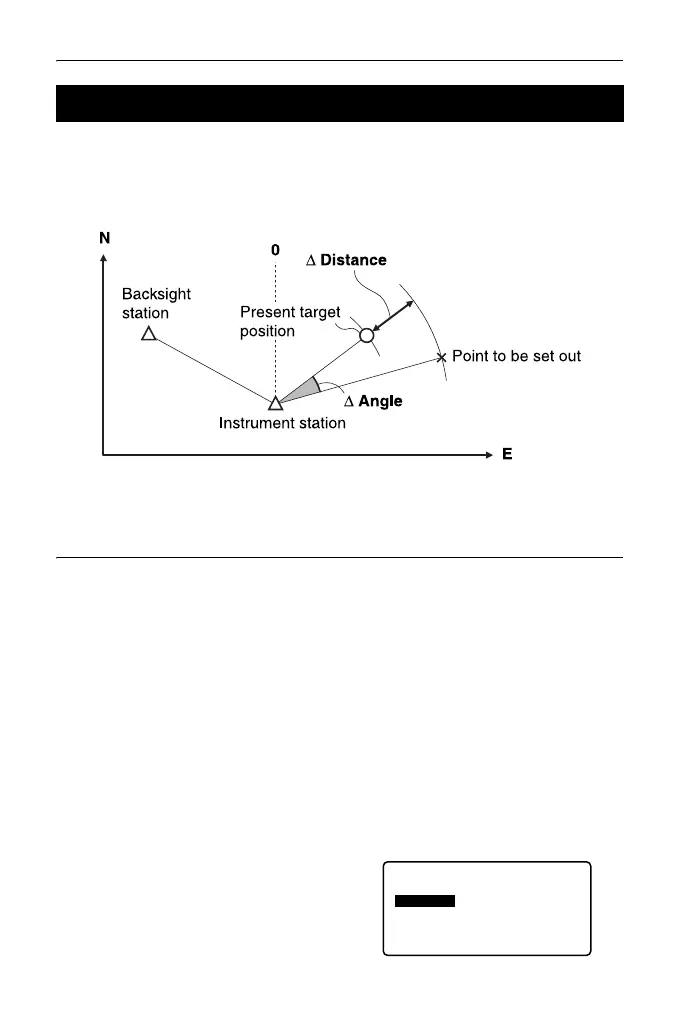
After setting the coordinates for the point to be set out, the ES calculates the
setting-out horizontal angle and horizontal distance. By selecting the horizontal
angle and then the horizontal distance setting-out functions, the required
coordinate location can be set out.
• To find the Z coordinate, attach the target to a pole etc. with the same target
height.
PROCEDURE
1. Press [S-O] on the third page of
the OBS mode screen to display
<S-O>.
2. Select "Occ.orien." to set the
instrument station data and
azimuth angle of the backsight
point.
"13.1 Entering Instrument
Station Data and Azimuth
Angle PROCEDURE Reading
in Registered Coordinate
Data"
3. Select “S-O data”. <S-O Coord> is
displayed.
15.1 Coordinates Setting-out Measurement
S-O
Occ.Orien
Observation
EDM
S-O data



 To Next Page