12. DISTANCE MEASUREMENT
56
4. Press {ESC} to finish signal
checking and return to Obs Mode.
• When is displayed persistently, contact your local dealer.
• If no key operations are performed for two minutes, the display automatically
returns to the OBS mode screen.
An angle can be measured at the same time as the distance.
PROCEDURE
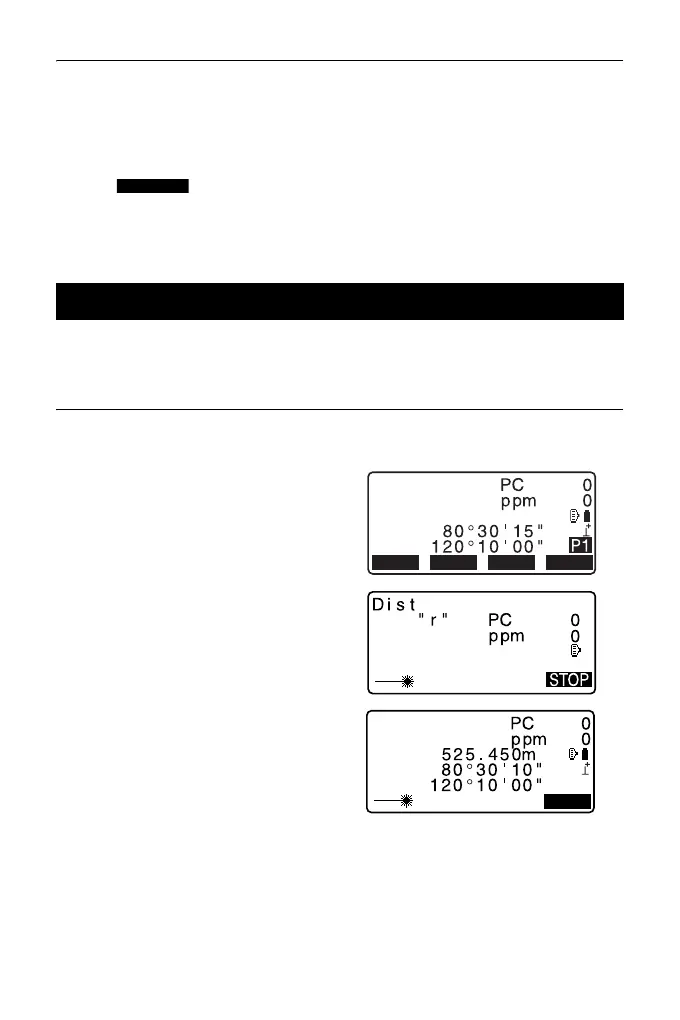
1. Sight the target.
2. In the first page of Obs Mode,
press [MEAS] to start distance
measurement.
When measurement starts, EDM
information (distance mode, prism
constant correction value,
atmospheric correction factor) is
represented by a flashing light.
A short beep sounds, and the
measured distance data (SD),
vertical angle (ZA), and horizontal
angle (HA-R) are displayed.
12.2 Distance and Angle Measurement
SHVMEAS 0SET
COORD
OBS
SD
ZA
HA-R



 To Next Page