208
27. POINT TO LINE MEASUREMENT
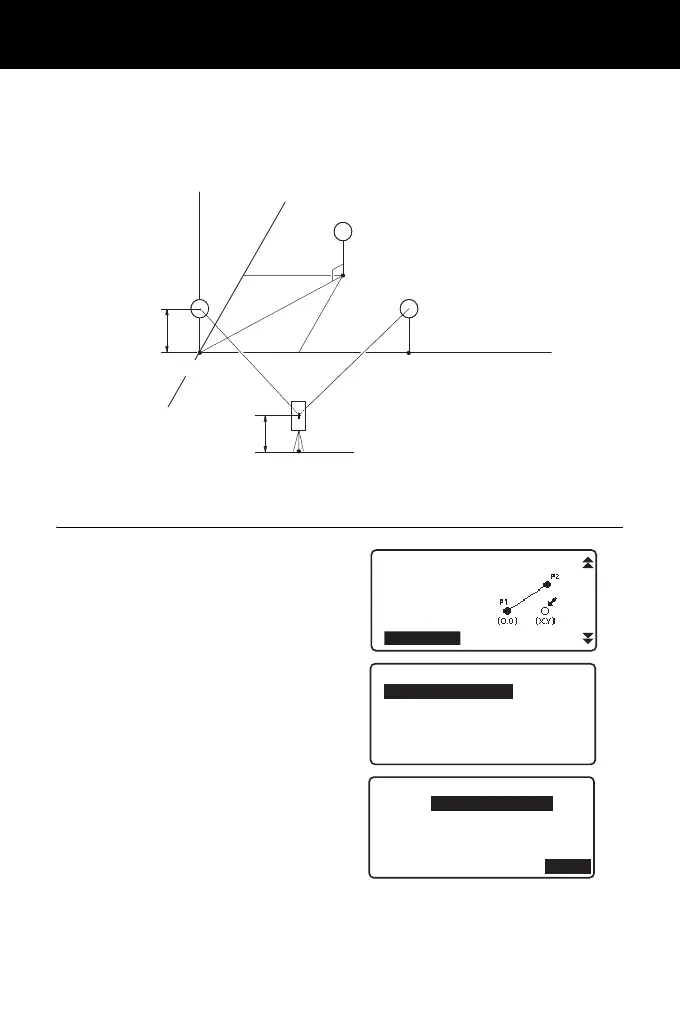
Point to line allows an operator to define the coordinates of the target point when
a line connecting the base point A (0, 0, 0) and the point B is set as the X axis.
The instrument's station coordinates and angle for an unknown point C is set by
observing the point A and the point B.
PROCEDURE Setting Baseline
1. Press [Menu] on the second page
of the OBS mode and select "Pt to
line".
2. Select "Define baseline".
3. Enter an instrument height and
press [OK].
P(n, e, z)
n
A(0, 0, 0)
N
e
z
Target height
E
B
Instruments
height
Instruments Point (Unkown point)
Line
Prism P1
Prism P2
Z
C
REM
Area calc.
S-O Line
P-Project
PT to Line
S-O Arc
Point to line
Define baseline
Point to line
Height
HI
1.500 m
OK



 To Next Page