209
27. Point to Line MEASUREMENT
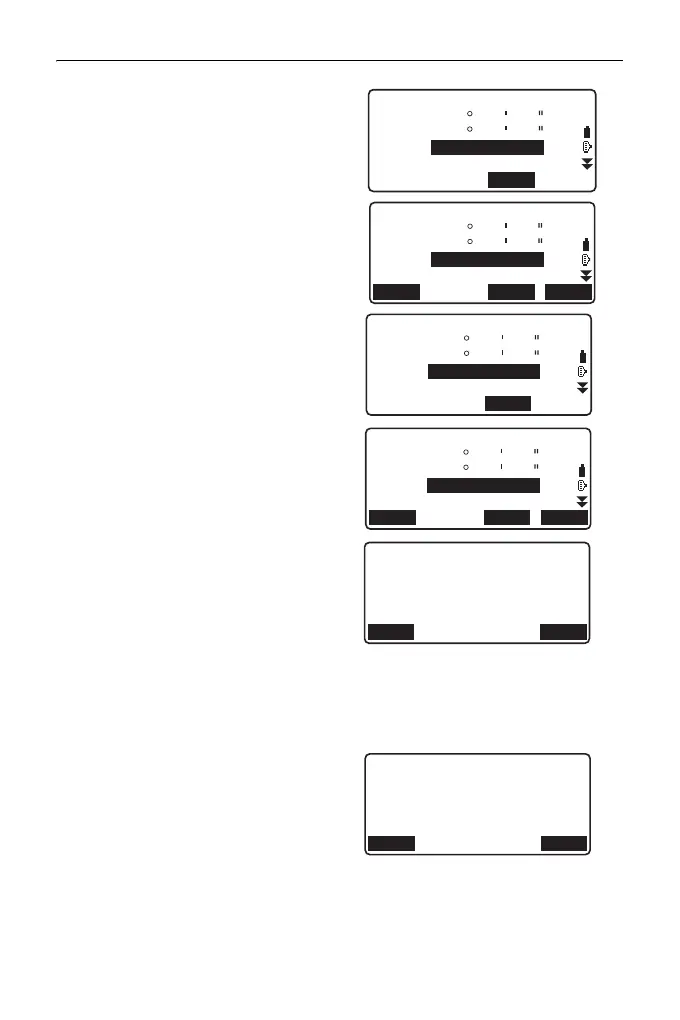
4. Collimate the first target point and
press [MEAS].
After confirming the measured
result, press [OK].
5. Measure the second target point
in the same manner as the first
one.
Confirm the measured result and
press [OK].
6. Confirm the measured result of
the baseline defined from the line
between the first target point and
the second one.
Pressing [OK] sets the
instrument's point coordinates and
angle.
Continue with the measurement of
Point to Line.
• Pressing [S.CO] displays the
instrument point coordinates
defined from the measurement
results of the first target point
and the second one.
Pressing [OK] conducts
measurement of Point to Line.
1003
Measure 1st PT
ZA
HA-R
HR
PT
0
0
00
00
00
00
MEAS
1.000m
1003
HR
PT
34
123
56
45
12
26
MEAS OKREC
1.000m
5.123m
SD
ZA
HA-R
1004
Measure 2nd PT
ZA
HA-R
HR
PT
45
178
12
56
34
31
MEAS
2.000m
1004
HR
PT
45
178
12
56
34
31
MEAS OKREC
2.000m
5.123m
SD
ZA
HA-R
HD
OKS.CO
0.123m
VD
-0.003m
SD
0.156m
Baseline pt1-pt2
OKREC
20.000
30.000
40.000
N0:
E0:
Z0:
2.000m
HI



 To Next Page