253
33. CHANGING THE SETTINGS
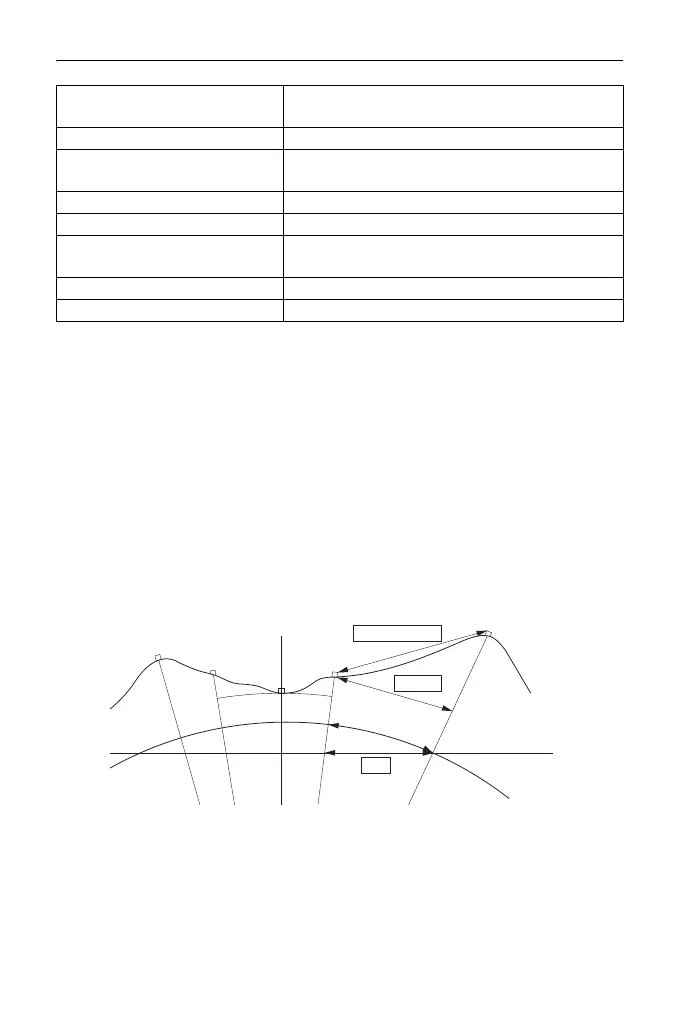
Horizontal distance (H Dist)
The ES calculates the horizontal distance using the slope distance.
There are the following 2 ways to display the horizontal distance data.
Ground:
The distance that reflects neither the Sea level correction factor nor the
Scale factor.
Grid:
The distance in the plane rectangular coordinates system that reflects the
Sea level correction and Scale factors (or the distance in the plane
rectangular coordinates system that reflects the Scale factor only, when
"No" is set for "Sea level crn".)
• The horizontal distance data recorded in this instrument is the ground distance
only, and the displayed value changes according to the settings for the
horizontal distance. When reviewing the observation data in the TOPO menu,
set "Horizontal distance" and "Scale factor" so that the intended value is
displayed.
V.obs (Vertical angle display
method)
Zenith*, Horiz, Horiz 90° (Horizontal ±90°)
Coord. N-E-Z*, E-N-Z
Ang.reso.(Angle resolution) ES-101/102/103/105:1”*, 5”
ES-107:1”, 5”*
Sheet mod On*, Off
Ofs V ang Hold*, Free
Stn.ID Incr. (station ID incre-
ment)
0 to 99999 (100*)
V manual Yes, No*
Input order PT CODE*/CODE PT
Mean sea level
Plane rectangular
coordinates system
Projection
distance
Ground
Grid
Slope distance



 To Next Page