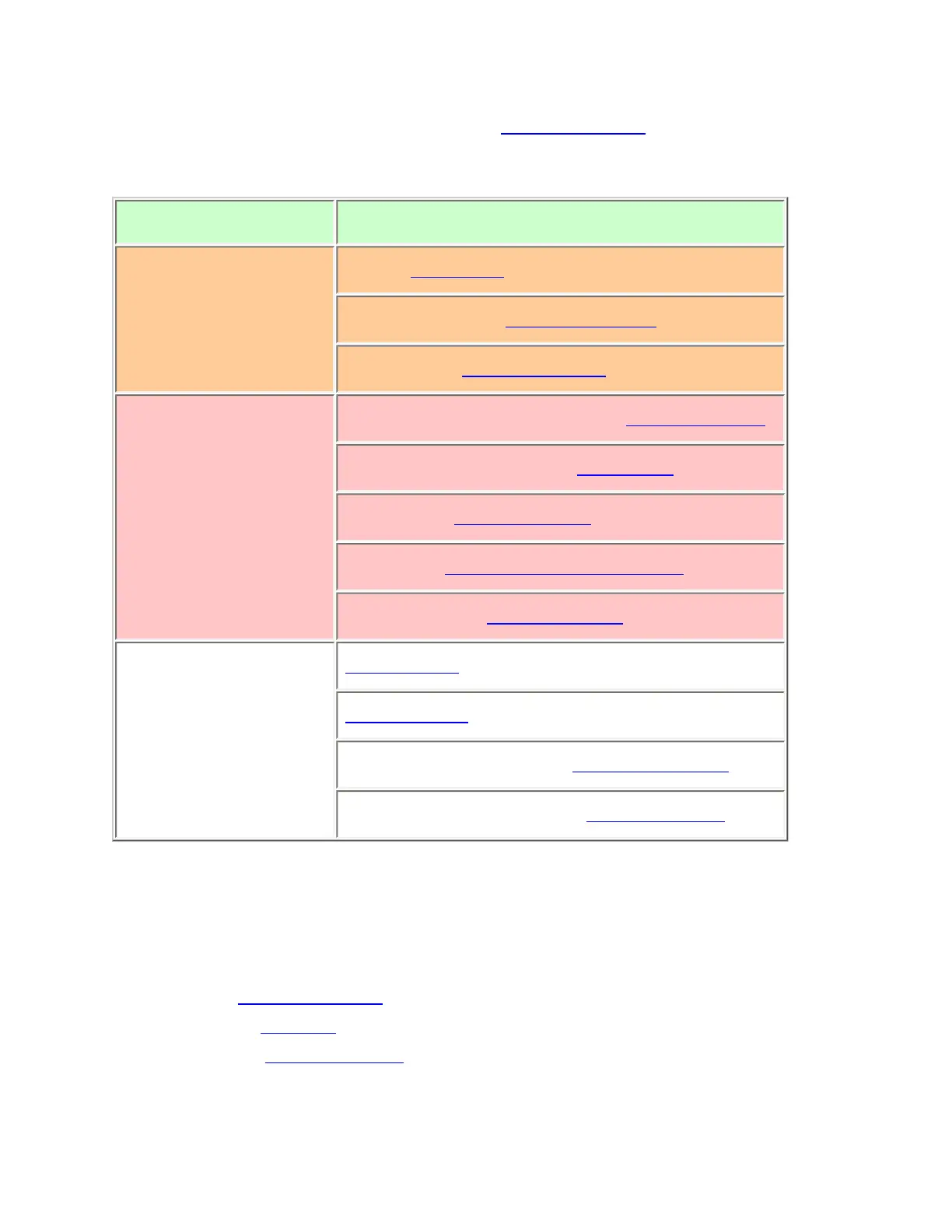
System properties
(All of these options can be found under the Program System menu. If necessary, the sub-
menu and the exact option name are listed beside each property.)
Required None
Recommended
Name (Edit Name)
Network address (P25 NAC Option)
Number tag (Set Number Tag)
Optional
Automatic gain control (AGC) (Set Audio AGC)
Record (BCD996XT only Set Record)
Delay time (Set Delay Time)
ID format (Set ID Format (DEC/HEX)
ID scan/search (ID Scan/Search)
Available Operations
Copy system
Delete system
Review Locked-Out IDs (Rvw ID:Srch L/O)
Clear All Locked-Out IDs (Clr All L/O IDs)
Create exactly 1 site
Each single-frequency P25 system must contain exactly 1 site.
1. On the Program System menu, select the system you just created.
2. Go to the Edit Site menu and select New Site .
3. Select the Set Frequencies menu and enter the frequencies for this site.
4. If you need to change any of the site properties, you can do that now. Unless a
property is Required , you can operate the system without changing the default
file:///C|/Documents%20and%20Settings/POpitz/My%20Do..._090515/Manual/SingleFrequencyP25TrunkedSystems.html (2 of 5)5/26/2009 11:11:55 AM



 To Next Page