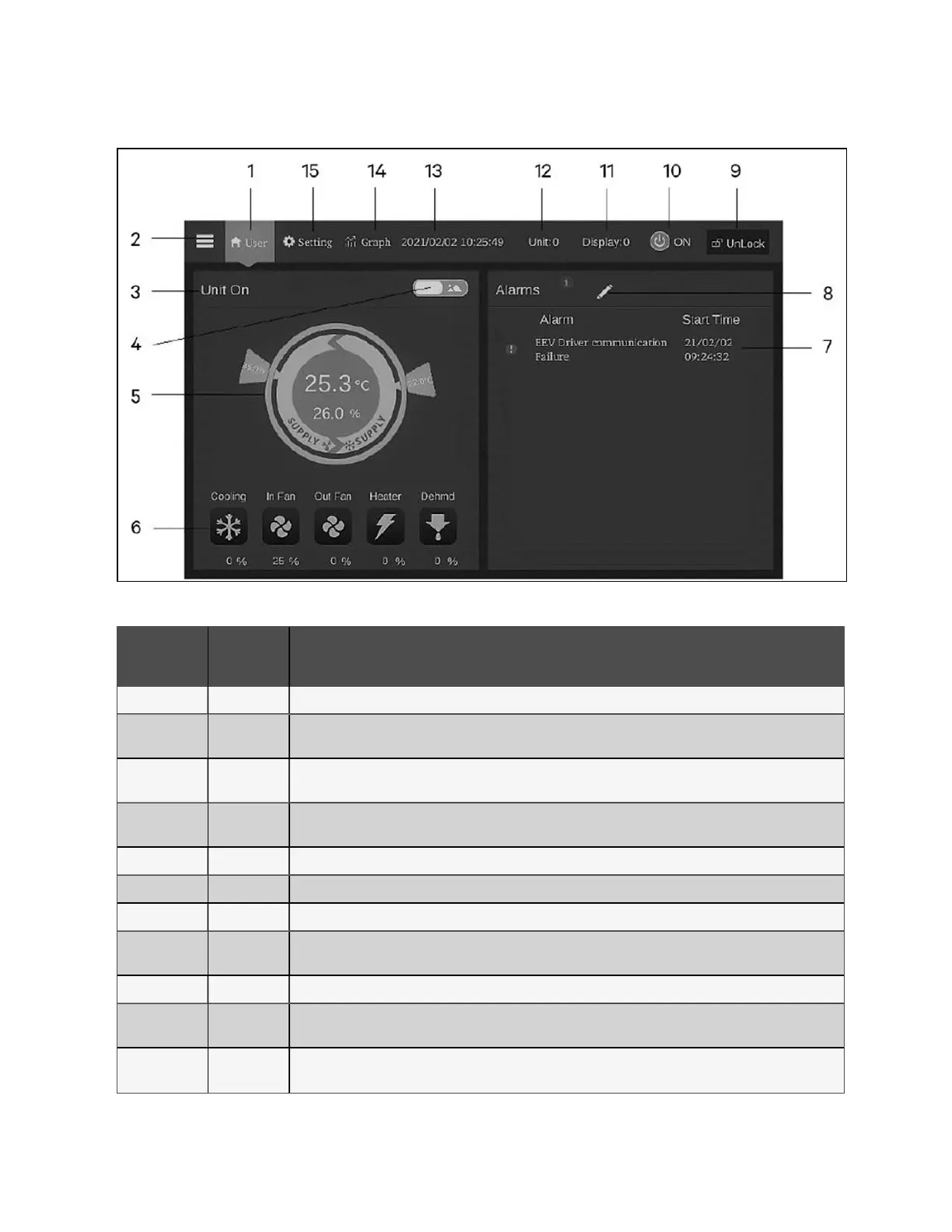
Figure 7.18 CRD10 Display Screen
Number
Touch
Key
Functional Description
1 Home button Return to the home page.
2 Menu button
Check or configure the operation status, alarm information, temperature and humidity settings, parameter settings,
temperature and humidity graph, and check version information and service information.
3
Operating
status
Display the current state of the unit: unit run, remote off, display off, monitor off, standby.
4
Toggle button
1
Switch between graphical display mode and list display mode.
5 Control mode Show unit settings and temperature and humidity data.
6 Status display Show the data of cooling, fan, electric heater, humidifier, dehumidifier, fan speed, heating status, and humidifier status.
7 Alarm list Show current alarms and the time when they are generated.
8
Toggle button
2
Switch between the sensor data page and the alarm page.
9 Unlock button Unlock the HMI display.
10
ON/OFF
button
Press the button for three second to start or stop the unit.
11
Display
address
Show HMI address and set the HMI address.
Table 7.7 CRD10 Display Screen
64 Proprietary and Confidential ©2024 Vertiv Group Corp. 7 Network Settings
Vertiv™ SmartRow™ 2 Infrastructure Solution User Guide



 To Next Page