7.5.2 Vertiv™ Liebert® CR019
To activate the user menu:
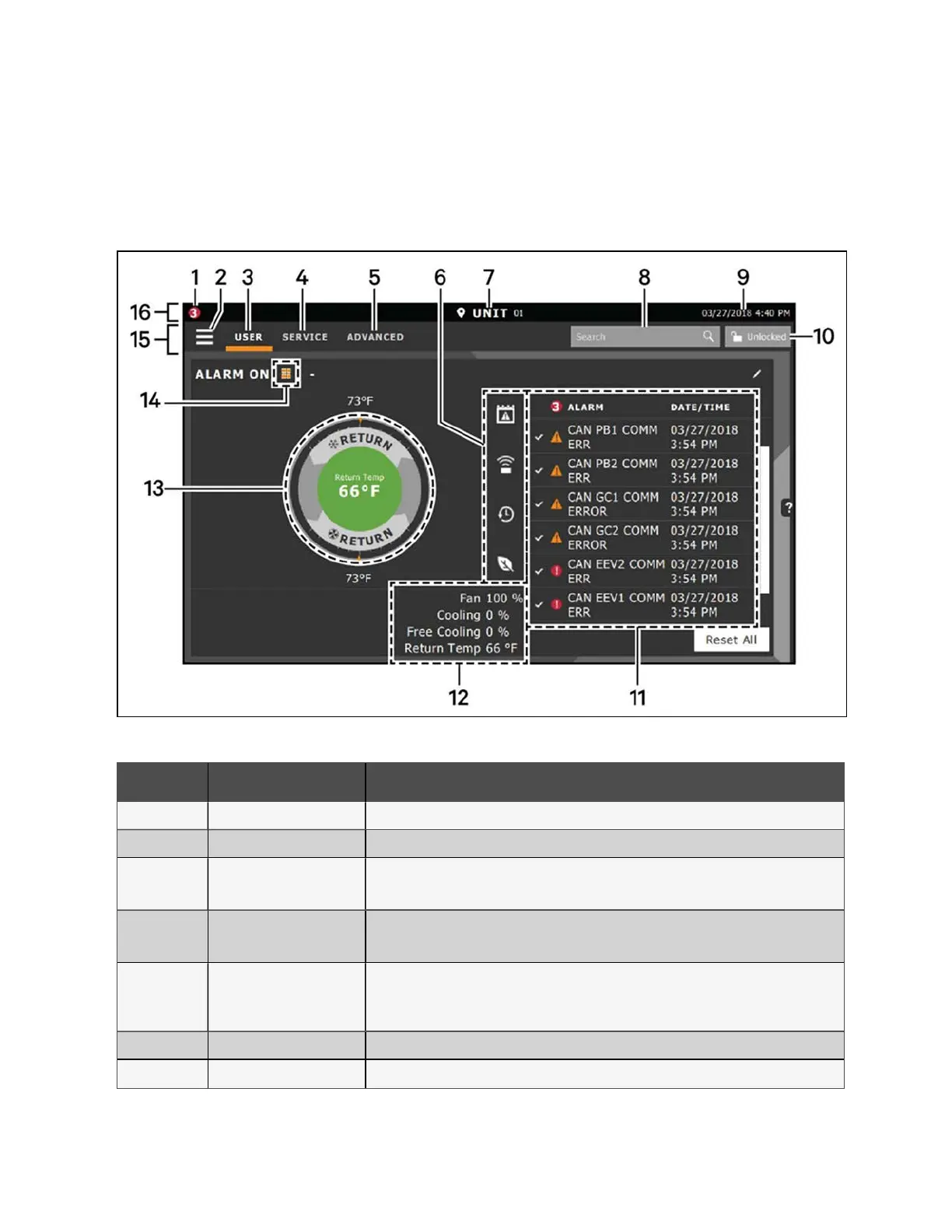
Press Locked and enter the default user password:1490. The home page appears, as shown in the following figure.
Figure 7.20 CR019 Display screen
Number Touch Key Functional Description
1 Alarms Present Shows the number of active alarms.
2 Menu Icon Shows a menu for user or service options, depending on which icon is selected.
3 User Icon
Shows user options on the main display and menu.
NOTE: You must unlock the display with the User PIN to access the menu and options.
4 Service Icon
Shows service options on the main display and menu.
NOTE: You must unlock the display with the Service PIN to access the menu and options.
5 Advanced Icon
Shows advanced options on the main display and menu.
NOTE: You must unlock the display with the Service PIN to access the menu and read-only
options.
6 Cooling Unit Parameters Shows the status of selected system parameter settings.
7 Unit Identification Allows you to customize the unit name up to six characters/numbers.
Table 7.9 CR019 Display Screen
7 Network Settings Proprietary and Confidential ©2024 Vertiv Group Corp. 67
Vertiv™ SmartRow™ 2 Infrastructure Solution User Guide



 To Next Page