Product Features
5
7. DVR : In case of controlling several DVRs with one remote controller, the user can apply the individual ID
to distinguish each DVR.
8. MENU : This key calls up the DVR MENU on screen. It shows sub menu directories for further selection. To
exit, press it one more time.
9. Function Key Group : From left to right, PTZ, FRZ, ZOOM, OSD key buttons are grouped. Pressing the relevant
key button brings you to the selected Menu directly. It applies to each Menu respectively.
10.PLAY Group : It plays the same role like Playback, START, STOP, PAUSE, R.PLAY key buttons on front
panel of DVR.
11.AUX : Reserved
12.MUTE : It makes DVR audio output off. It turns on once you press this button again.
13.Number Keypad : This is numeric key button. Pressing the relevant number brings you to the selected channel.
Also you can use this numeric keypad for IP number input for network setup.
14.SEQ. : This key functions the same as SEQ button on front panel of DVR.
15.MULTI : This key functions the same as MULTI button on front panel of DVR.
16.16 channel split group : This key is similar to MULTI Key, but these keys are playing the giro role and make
it possible to move to the relevant split screen. From the left in sequential order, direct movement to 4 channel
screen, 9 channel screen, 8 channel screen, 16 channel screen is provided.
1.4. Manipulating Mouse
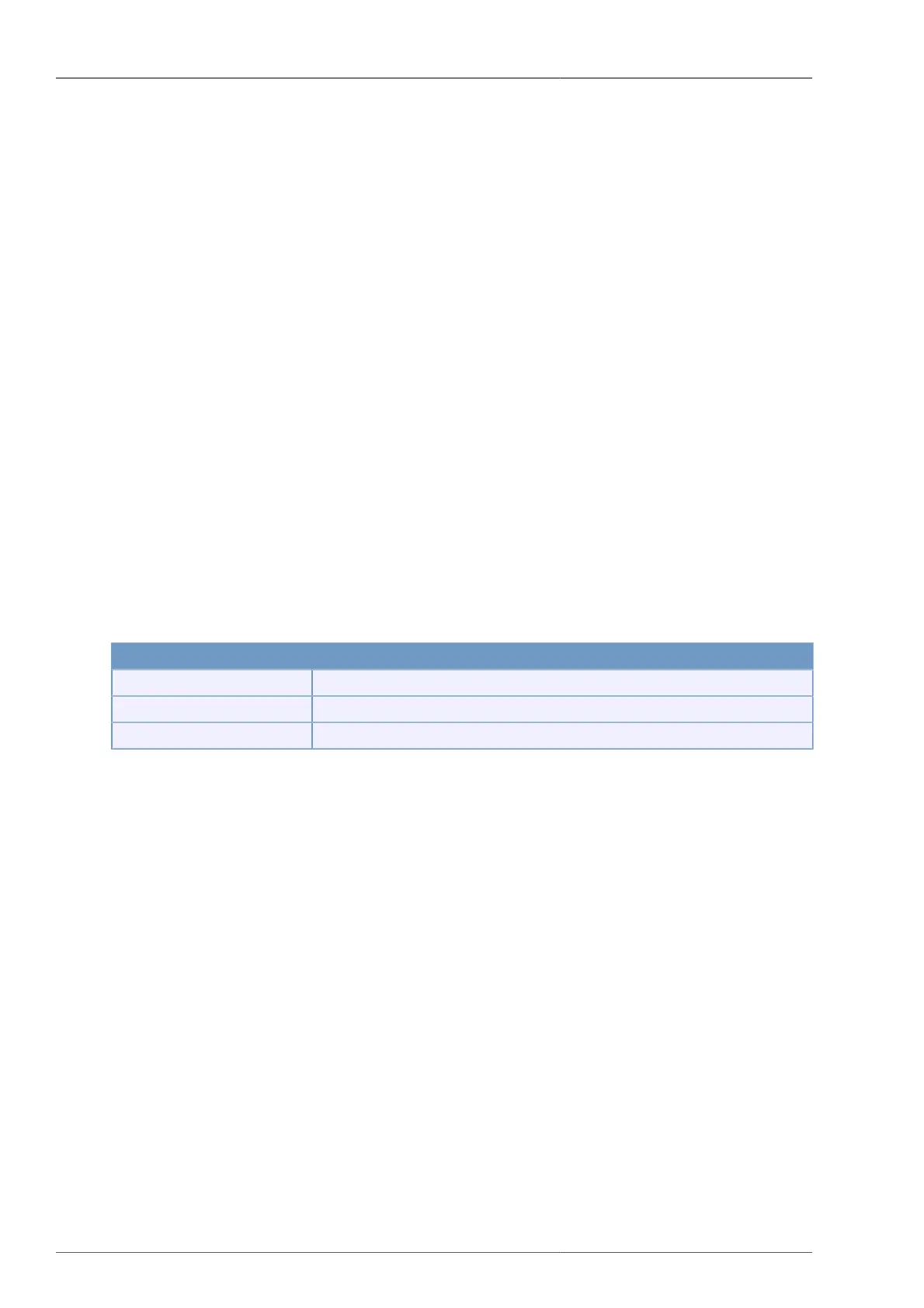
You can manipulate the mouse on live or playback screen as following;
Mouse operation Meaning
Left Button Double Click Conversion to Full Screen Mode or Mux Mode
Middle Button Click Conversion to Mux Mode
Right Button Click Entering Menu and Exiting Menu
Table 1.2. Manipulating Mouse
1.5. Video Output
4/8/16CH DVR supports various video outputs. At the same time, CVBS and Analog RGB (VGA) signals are
available. This is a great advantage for the users to set up the display according to his environment. Also SPOT
output is additionally supported to bring more convenience to central surveillance functions.
1.6. Audio In/Out
4 Channel Audio Inputs are provided via RCA standard ports. In case of 8 or 16 channel, by using EXTENTION
PORT, balance audio inputs are supported. Accordingly audio inputs up to 16 channels are fully supported.
1.7. RS-232
You can control DVR system by using RS-232 protocol. To ease the system setup, you can connect it with PC
serial port. The PC should have Quick Installer program installed. For connection, please use cross cable.
1.8. RS-485
DVR supports 1 - 2 Port each, supporting RS-485 standard, enabling to control external PTZ camera, connecting
to external keyboard and for many other purposes. Also it's equipped with terminal block format for easy and
direct cable connection.



 To Next Page