Home
Vicon
Voice Recorder
VDR-704C
Page 33 (Log in ID of FTP Server)
Vicon VDR-704C - Log in ID of FTP Server; FTP Server Log in Passwor
146 pages
Manual
Save Page as PDF
To Next Page
To Next Page
To Previous Page
To Previous Page
Loading...
Main Menu Configuration
23
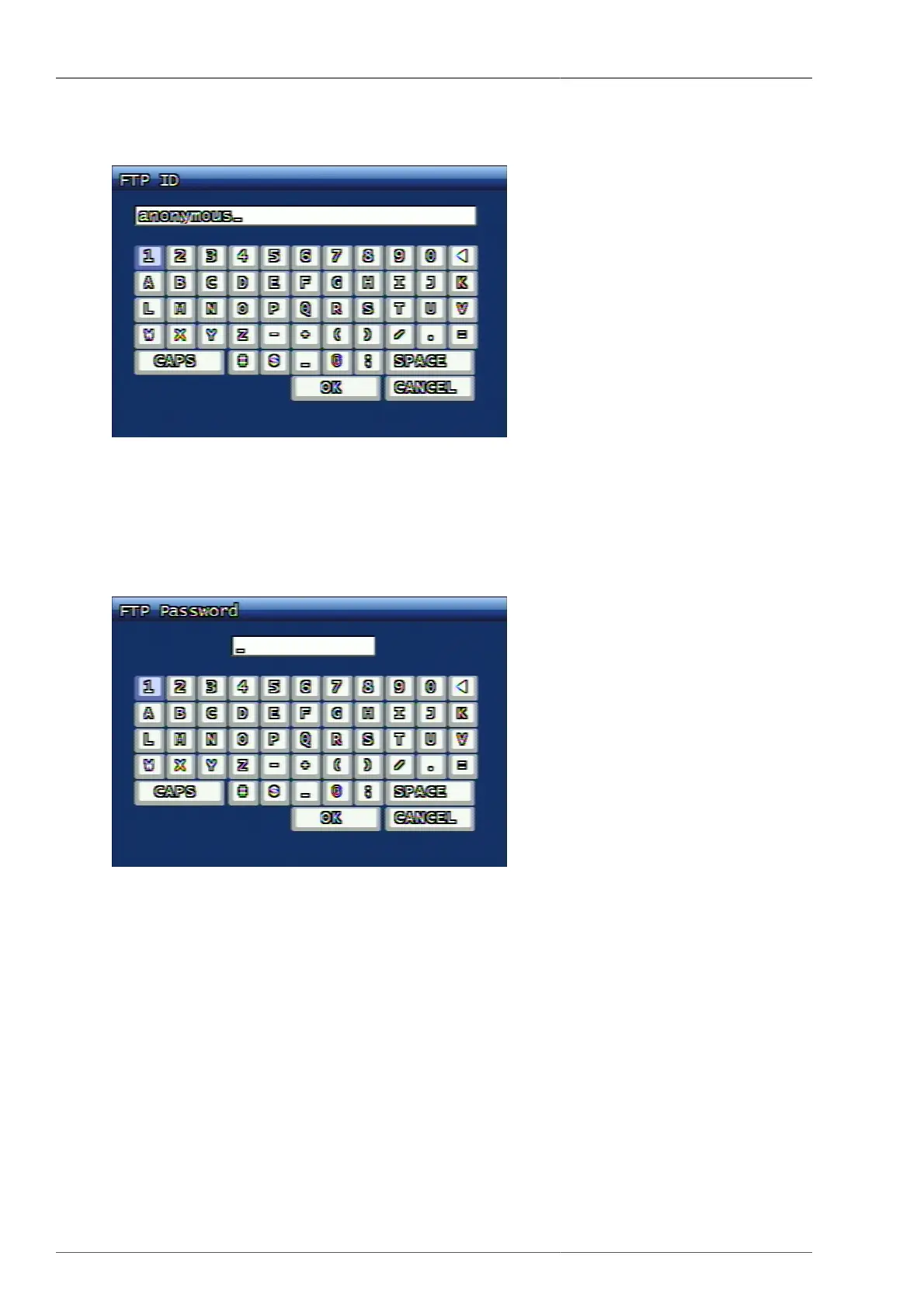
3.3.5.2. Log in ID of FTP Server
Figure 3.19. Log in ID of FTP Server
Entering Log in ID of FTP Server
3.3.5.3. FTP Server Log in Passwor
Figure 3.20. FTP Server Log in Passwor
Entering Log in Password of FTP Server
32
34
Table of Contents
Main Page
Default Chapter
3
Table of Contents
3
1 Product Features
11
Front Key Functions
11
Rear Panel Fucntions
13
Remocon
14
Manipulating Mouse
15
Video Output
15
Audio In/Out
15
Aux / Alarm / Sensor
16
Aux
16
Alarm out (NO, COM, NC)
16
Sensor(16Ch : 1~16, 8CH : 1~8, 4CH : 1~4)
16
Network
16
Usb
16
2 Basic Operations
17
Power ON/OFF
17
Power on
17
Power off
17
Date Time Adjustment
17
Password Setup
17
Network Setup
17
Recording
17
Menu Setup for Recording
17
Recording Condition Setup
17
Playback
18
Direct Playback by Using PLAY Button
18
Audio Playback
18
Search
18
Search Mode
18
Search Method (Selection by OK Key Button)
18
Back up
18
Dvr-Rw
18
USB Memory Stick
18
Network
19
Client Program
19
RAMS (Remote Access Monitoring System)
19
Uniplayer
19
Multiviewer
19
Quick Installer
19
Unimap
19
Mobileviewer
19
3 Main Menu Configuration
20
Camera Setup Menu Configuration
20
Channel
20
Camera Setup Screen
20
Camera Name
21
Hiding the Screen
21
Screen Adjustment
22
PTZ Setup
22
Screen Adjustment Screen
22
PTZ Contingent Menu Screen
23
Spot
24
Screen Switching Time
24
Recording Setup Menu Configuration
24
Addition Setup
24
Resolution
25
Channel
25
Picture Quality
25
Recording Speed
25
Recording Setup Screen
25
Recording Condition
26
Recording Schedule Setup
27
Event Setup Menu Configuration
27
Recording Schedule Setup Screen
27
Motion Detection Setup
28
Motion Detection Setup Screen Configuration
28
Motion Detection Area Setup Screen
28
Mouse Operation from Detection Area Setup
29
Motion Trace Screen
29
Sensor Setup
30
Alarm In/Output Setup
30
Post-Alarm Continuous Recording Time (Second)
31
FTP Setup
32
FTP Server Address
32
Log in ID of FTP Server
33
FTP Server Log in Passwor
33
FTP Trigger Setup
34
Target Directory of FTP Server
34
Email Address Setup
35
Email Setup Configuration
35
Email Address Setup Screen
35
Email Setup Configuration Screen
35
Event Log
37
Playback Setup Menu Configuration
38
Channel
38
Playback Starting Point
38
Audio
38
Screen Display Setup Menu Configuration
38
Screen Display Setup Screen
38
VGA Setup
39
Network Setup Menu Configuration
39
DDNS Setup
39
Network Setup Menu Screen
39
Network Type
40
DHCP Setup Screen
41
ID Input Screen
42
Pppoe Setup Screen
42
Password Input Screen
43
Network Type Change Confirmation Screen
43
JPEG Frame Rate Setup
44
Dual Codec Setup
44
System Setup Menu Configuration
44
DVR Name ID
45
System Password
46
System Password Setup
46
User Account
46
Date and Time
47
Password Input Screen
47
Buzzer
48
NTP Application
48
Language
49
Hard Disk
49
AUX Port & RS485
50
Hard Disk Format Confirmation Screen
50
System Initialization
51
Software Upgrade & Etc
51
System Initialization Confirmation Screen
51
Software Upgrade Screen
51
Back up Menu Configuration
52
Back up Equipment
52
Starting Time
52
Range
52
Back up Screen
52
Channel
53
Back up Start
53
Format
53
System Log
53
System Information Menu Configuration
55
Video Standard
55
Hardware Version
55
Software Version
55
Kernal Version
55
MAC Address
55
Audio
55
Language
55
System Information Screen
55
Search Menu Configuration
56
Search Screen
56
Calendar Search
57
Calendar Search Screen
57
Event Search
58
Still Image Search
59
Event Search Result Screen
59
Still Image Search Result Screen
59
Playback
60
Playback of Recorded Video Data
60
Playback Screen in Progress (Example)
60
Still Image Playback
61
Other Menu
62
Still Image Playback Screen (Example)
62
Net
63
Osd
63
Audio Mute
63
Hdd
64
Log
64
4 PC Client Introduction
65
UDR-704/708/716 Client Program Introduction
65
PC Specification
65
Program Installation and Execution
65
Rams_H264(Remote Access & Monitoring System H.264)
66
Program Screen Configuration and Button Explanation
66
DVR Connection
67
Uniplayer_H264 Link
67
DVR List Dialog
67
Fullscreen Display
68
Full Screen
68
Program Environment Setup
69
Program Environment Setup Screen
70
DVR Recording
71
When DVR Is Not on Recording
72
DVR Playback File Search and Backup File Search
73
This Screen Shows the Searched Recoreded Data on DVR
74
Backup Guide Screen
75
DVR File Playback
76
This Screen Shows the Searched Recoreded Data on DVR
77
The Screen Is Showing the Playback Video Data Saved on DVR
78
DVR File Backup
80
DVR File Backup Guide Screen
81
DVR Setup
82
D-Zoom Function
82
D-Zoom (Example)
83
Still Image Capture
84
Video Data Recording
85
PAN/TILT, ZOOM/FOCUS, Speed, Preset
86
PTZ Preset
86
Aux Control
87
PTZ Button
87
AUX Button
87
DVR Information
88
HDD Information
88
DVR Information Callup Button
88
Program Version Confirmation
89
DVR System Upgrade
89
Program Logo
89
Program Information
89
Software Upgrade
90
Program Minimization
91
Program Termination
91
Multiviewer
91
Contents
91
Software Upgrade Progress Screen
91
Multiviewer Program Execution
92
Connection List
94
Connection List Management Screen
94
Group Modify Screen
95
Connection
96
Selected Channel Information
96
Search and Playback
97
Connected DVR List
97
DVR Recording Data Search Screen
98
DVR Recording Data Playback Screen
99
Search and Backup
100
Connected DVR List
100
DVR Recording Data Search Screen
101
DVR Recording Data Backup Screen
102
DVR Setup
103
Still Image Capture
103
Connected DVR List
103
Save as
104
Capturing 2X2 Screen
104
PTZF Control
105
PTZF Screen
105
Multiviewer Environment Setup
106
Environment Setup Screen
106
Program Information
107
Program Minimization, Movement, Termination
107
Uniplayer
108
Program Screen Configuration and Button Explanation
108
Directory Search
109
File Opening
109
Still Image File Search
110
File Playback
110
Still Image Search
110
Calendar Search
112
Calendar Search Screen
113
Still Image Capture
114
Still Image Print
115
Video File Reversed Playback, Playback, Pause, Stop, Movement between the Frames, Faster Playback
115
Still Image Captured Screen
115
Watermark Excerpt
116
Still Image Screen
117
Panorama
118
Program Information Verification, Minimization, Termination
119
Program Version Information
119
Quick Installer
120
Model Selection
120
System Parameter Selection
120
Model Selection Screen
120
Quickinstaller Screen
120
DVR and Communication
121
Setting up the DVR Time
121
Login Screen (Communication Setup : Network)
121
Login Screen (Communication Setup : Serial)
121
Activex
122
DVR Connection by Internet Explorer
122
DVR Connected Screen
123
Search
124
Playback
125
Unimap
125
Definition of Function
125
Edit Mode
125
Playback Screen on Activex
125
Edit Mode Screen
126
Creating E-Map
127
DVR Addition, Amendement, Deletion Dialog
127
View Mode
128
View Mode Screen
129
Mobileviewer
130
Contents
130
Using Mobileviewer
130
Connect Screen
131
ADD DVR Screen
132
Channel Change Menu
133
PTZF Control Screen
134
Connected Dvr's Information
135
Console Protocol
136
Console Protocol Code
136
How to Use Console Protocol
138
Console Protocol Code Chart
138
Usage Time Per Recording Mode, Per Screen Quality, Per FPS, Per HDD Capacity
139
Recording Time Per HDD Capacity on NTSC System
139
Recording Time Per HDD Capacity on NTSC System
140
Recording Time Per HDD Capacity on PAL System
141
Recording Time Per HDD Capacity on PAL System
142
System Log Information
143
System Log List
143
Watchdog List
144
Rec Warn/Fail List
144
System Log List
144
Rec Warn/Fail List
145



 To Next Page