PC Client Introduction
56
4.4. RAMS_H264(Remote Access & Monitoring System H.264)
4.4.1. Program screen configuration and button explanation
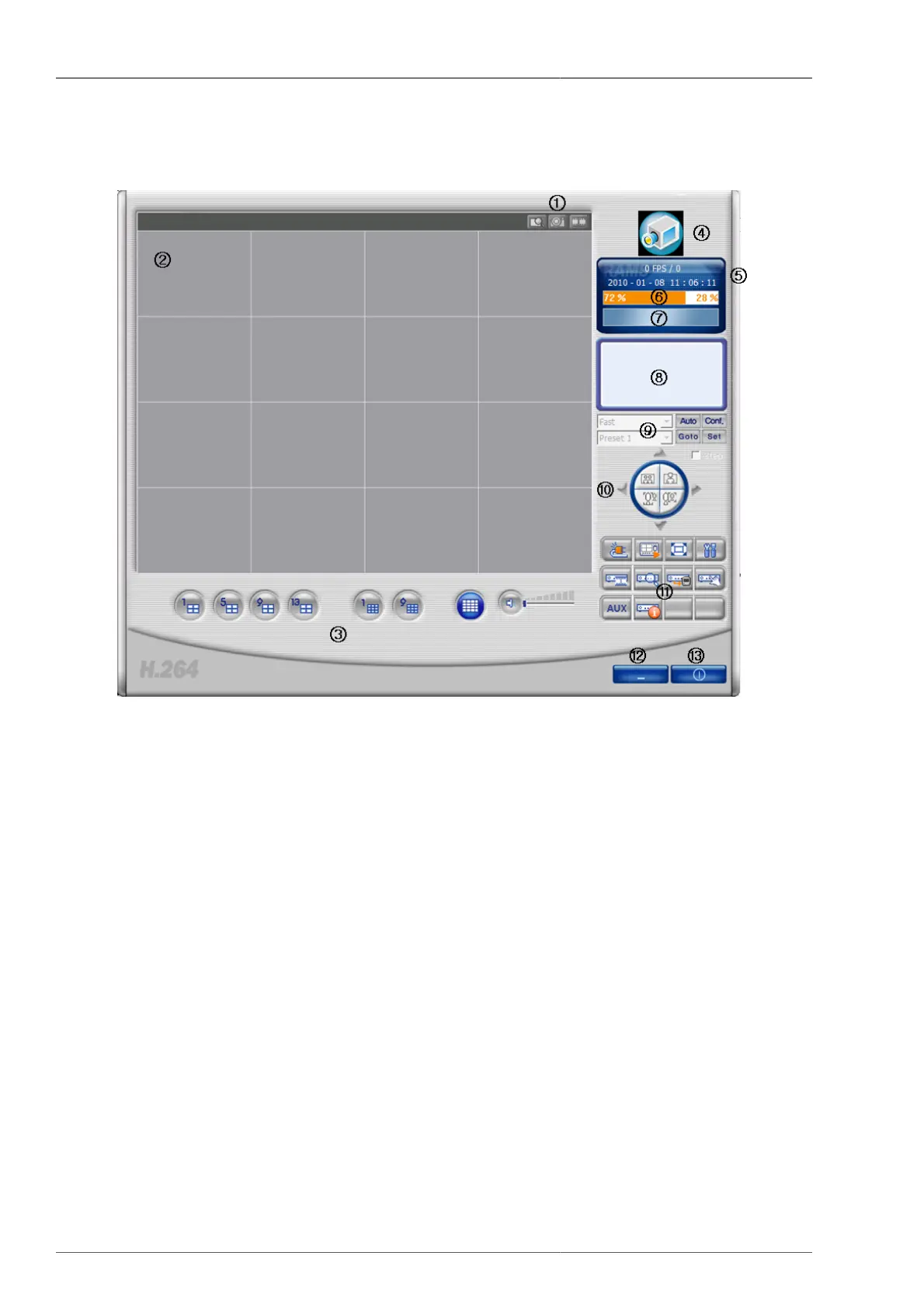
Figure 4.1. RAMS_H264 Program
1. D-Zoom Button, Screen Capture Button, Video Recording Button
2. Screen Display Window - This is the part where the DVR video is displayed.
3. Channel Display Selection Button, Sound Control Button
4. When clicking the logo, program version window will pop up. From this window, DVR software upgrade is
available.
5. Current communication status display window and current time display window (PC time)
6. PC Hard Disk Information Window
7. Display window to show if the current video is on live mode, or on playback mode.
8. Connected DVR Information Display Window
9. Auto Preset, PTZF Speed, Preset
10.Pan/Tilt, Zoom/Focus Button
11.• DVR connection button, UniPlayer_H264 link button, Full Screen View button, Program Environment Setup
button
• DVR Recording button, DVR Search and Playback button, DVR Search and Backup button, DVR Setup
(linked with QuickInstaller) button



 To Next Page