PC Client Introduction
75
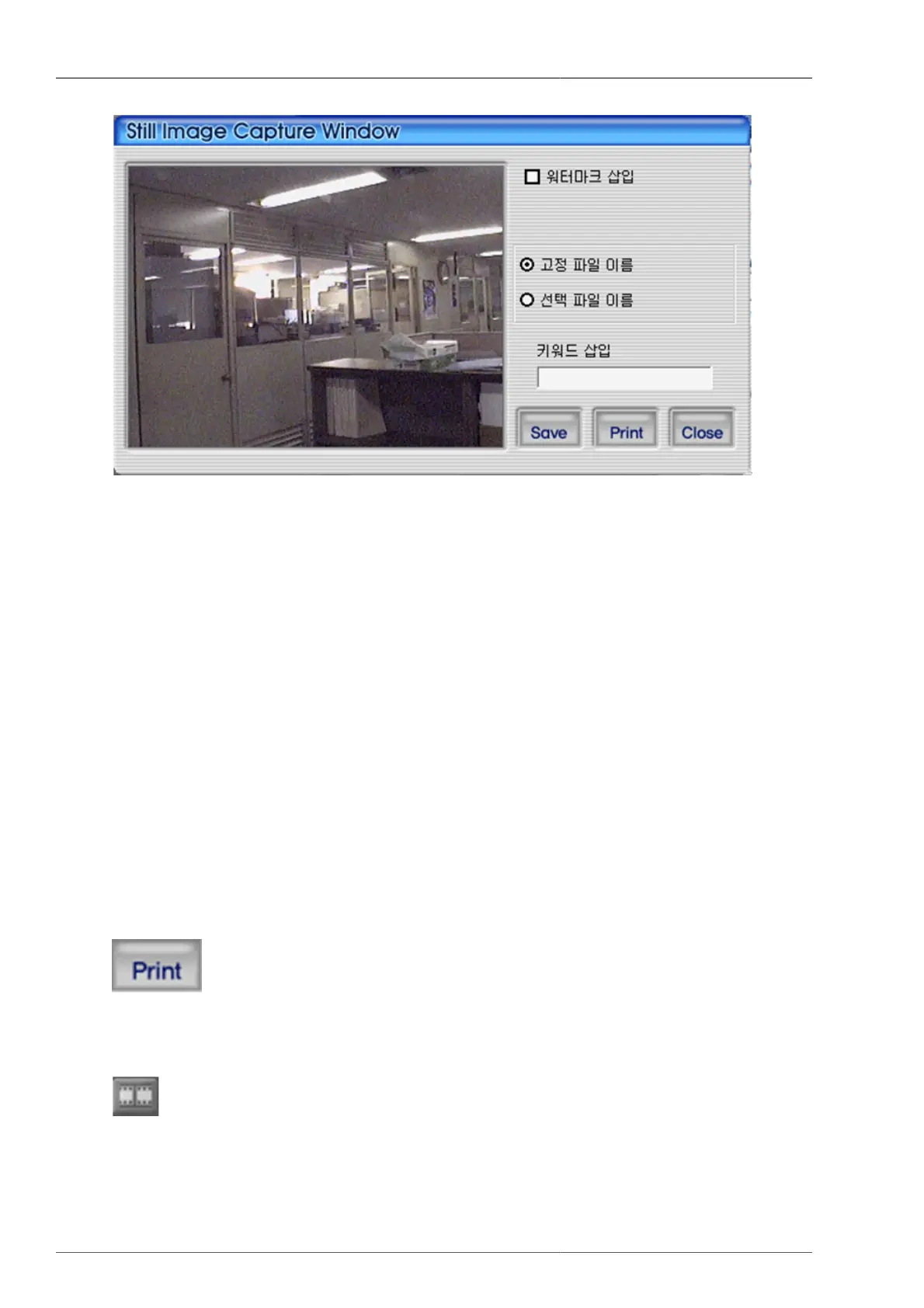
Figure 4.19. Capture
1. Watermark insertion : To insert watermark into the still image, please select the check box.
2. Fixed File Name : This is to save still image set by the fixed name on program.
3. Selected File Name : This is to save the still image with user's preferred file name on to the preferred folder.
4. Keyword Insertion : For easy search on Uniplayer_H264, the user can enter keyword.
5. Close : This is to close still image capture screen.
6. Print : This is to print out the captured still images.
7. Save : This is to save the still images. Saving location is the still image saving folder on setup screen.
4.4.12.1. Watermark Insertion
If the user wants to insert watermark on to still image and save it, the user needs to check the watermark insertion
check box and save it from the above captured screen.
4.4.12.2. Still Image Print
To print the still image, from the above capture screen
button needs to be pressed.
4.4.13. Video data recording
is the function to save the current screen display as video data file and save it on to PC. The user can start
up the recording by pressing the recording button on top of screen. When the recording time setup screen is
displayed, the user can set up the recording continuation time and termination time. The recording will start when
the confirmation button is pressed from this screen.



 To Next Page