ZEISS OPERATION Axio Imager 2
Operating the motorized microscope via the touchscreen of the TFT display
112 430000-7544-001 01/2016
4.8.5.1 Revolver page
Depending on the configuration carried out under
the Settings menu item, different tabs and
information will appear on the Revolver page.
These are described below.
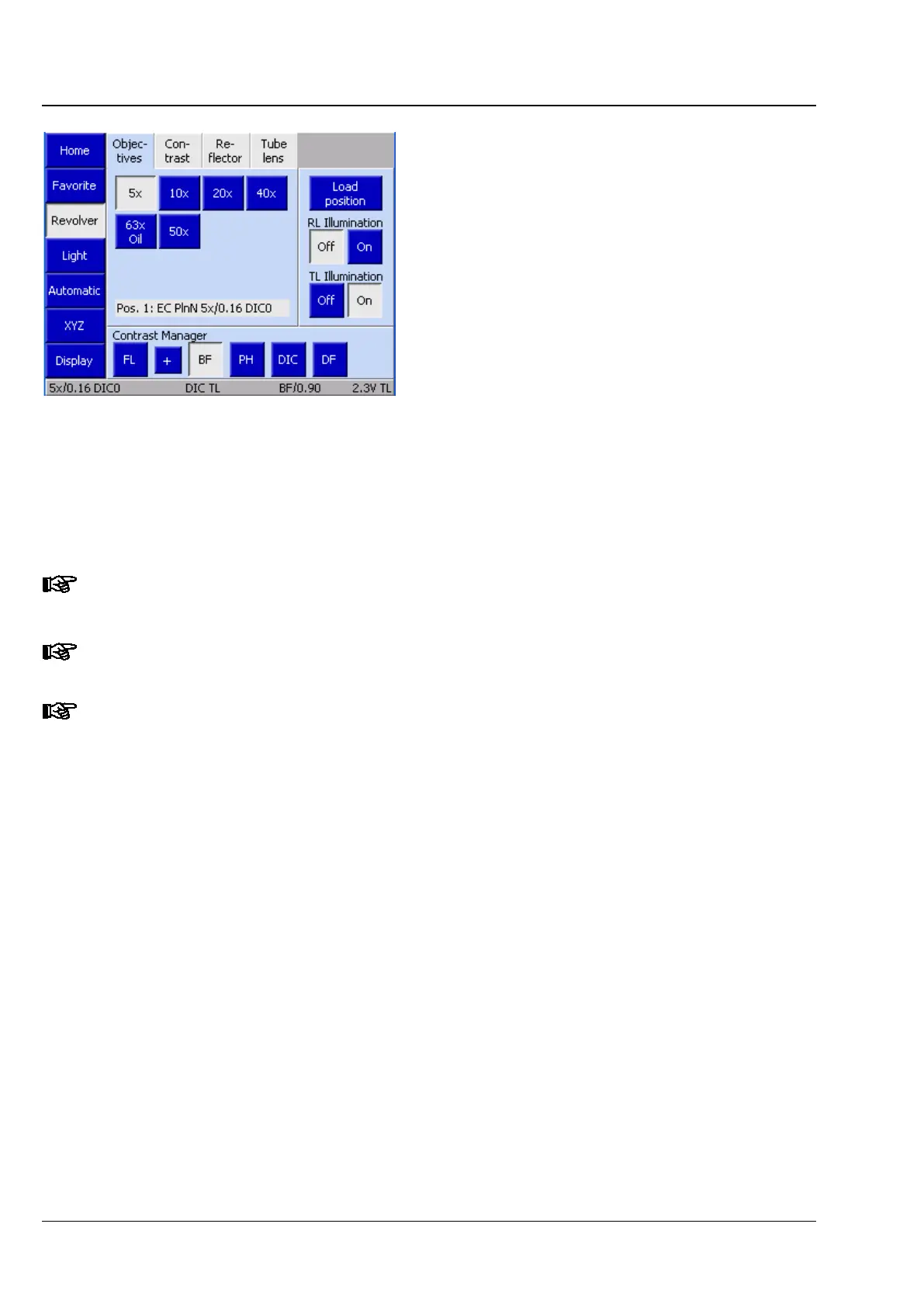
(1) Objectives tab
Depending on the nosepiece installed (all
motorized ones), up to seven control elements will
appear for the various objective positions (Pos. 1 to
Pos. 7). For pre-configured objective positions, the
system will display the magnification and, where
applicable, the following additional information:
− Oil: Oil immersion objective
− W: Water immersion objective
− Imm: Immersions
There is no
operation page for objectives with coded nosepieces. The active objective is only
indicated in the status line.
If the light manager is active, it is automatically used in the event of a change of objective.
If a contrast method was set in the
contrast manager prior to a change of objective, the
contrast manager will automatically try to adapt the method to the objective (i.e. positions on
the condenser turret and reflector turret may change). If the contrast method is not available
for the objective concerned, the system will switch to brightfield.
Fig. 103 Microscope -> Revolver ->
Objectives








 To Next Page