Axio Imager 2 FIRST-TIME SET-UP ZEISS
Setting the dovetail guide of the stage carrier …
01/2016 430000-7544-001 49
3.19 Setting the dovetail guide of the
stage carrier
When stage carrier 430701-9901-000 is used, the
specimen space needs to be moved for specimens
of less than 13 mm, so that the specimen can be
focused.
To do so, proceed as follows:
• Remove the stage carrier (see Section 3.17).
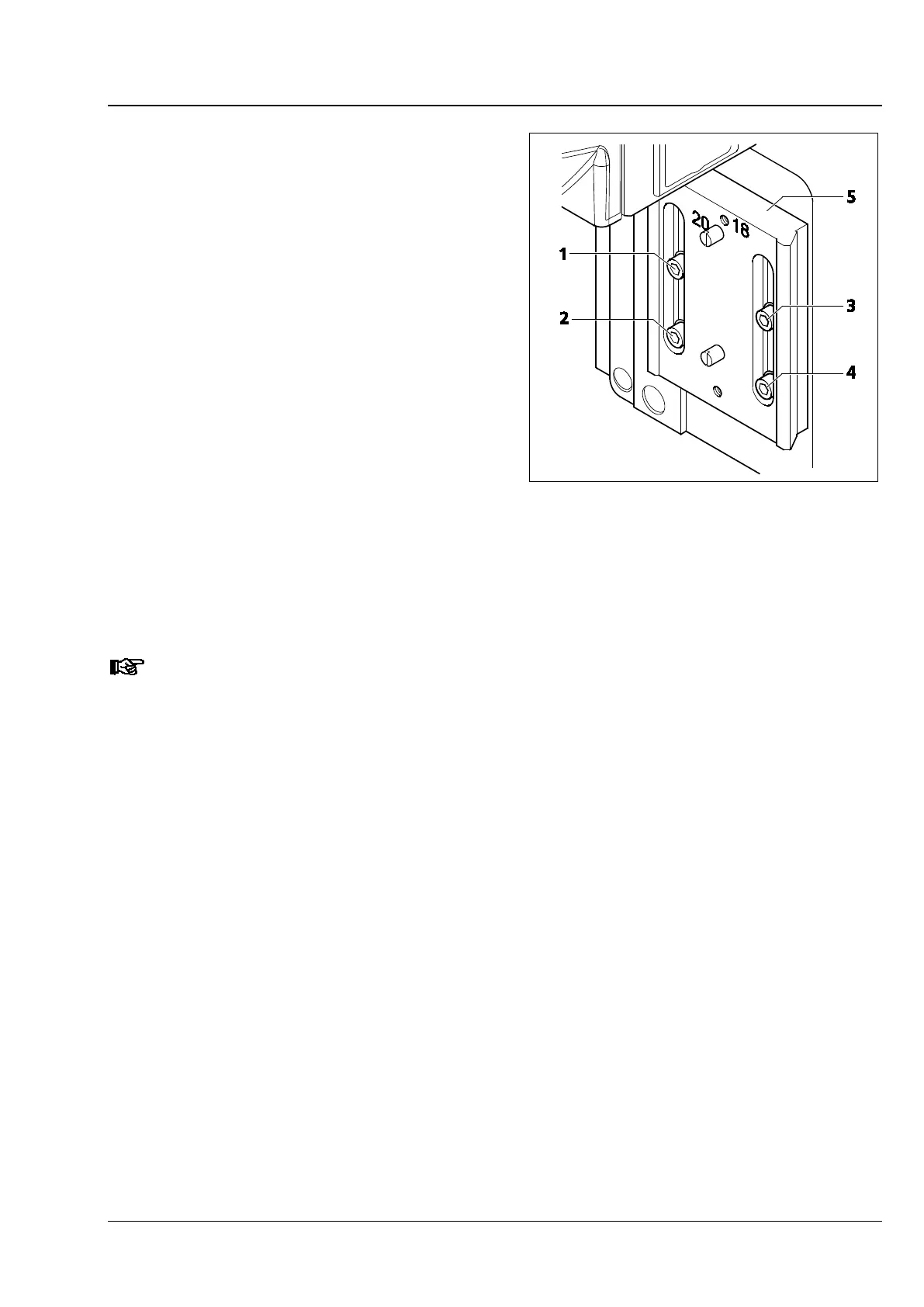
• Loosen the four clamping screws (Fig. 31/1 to
4) of the dovetail guide.
• Move the guide plate (Fig. 31/5) as far up as it
will go in the slots.
• Then, tighten the four screws. Always proceed
in the following order:
− upper left screw (Fig. 31/1),
− lower left screw (Fig. 31/2),
− upper right screw (Fig. 31/3),
− lower right screw (Fig. 31/4),
• Attach the stage carrier (see Section 3.17).
If stage carrier 430701-9901-
000 is no longer used, the guide plate must be set back to the
lower position (normal position).
Fig. 31 Setting the dovetail guide up for
specimen space expansion








 To Next Page