ZEISS FIRST-TIME SET-UP Axio Imager 2
Rotary stage Pol
74 430000-7544-001 01/2016
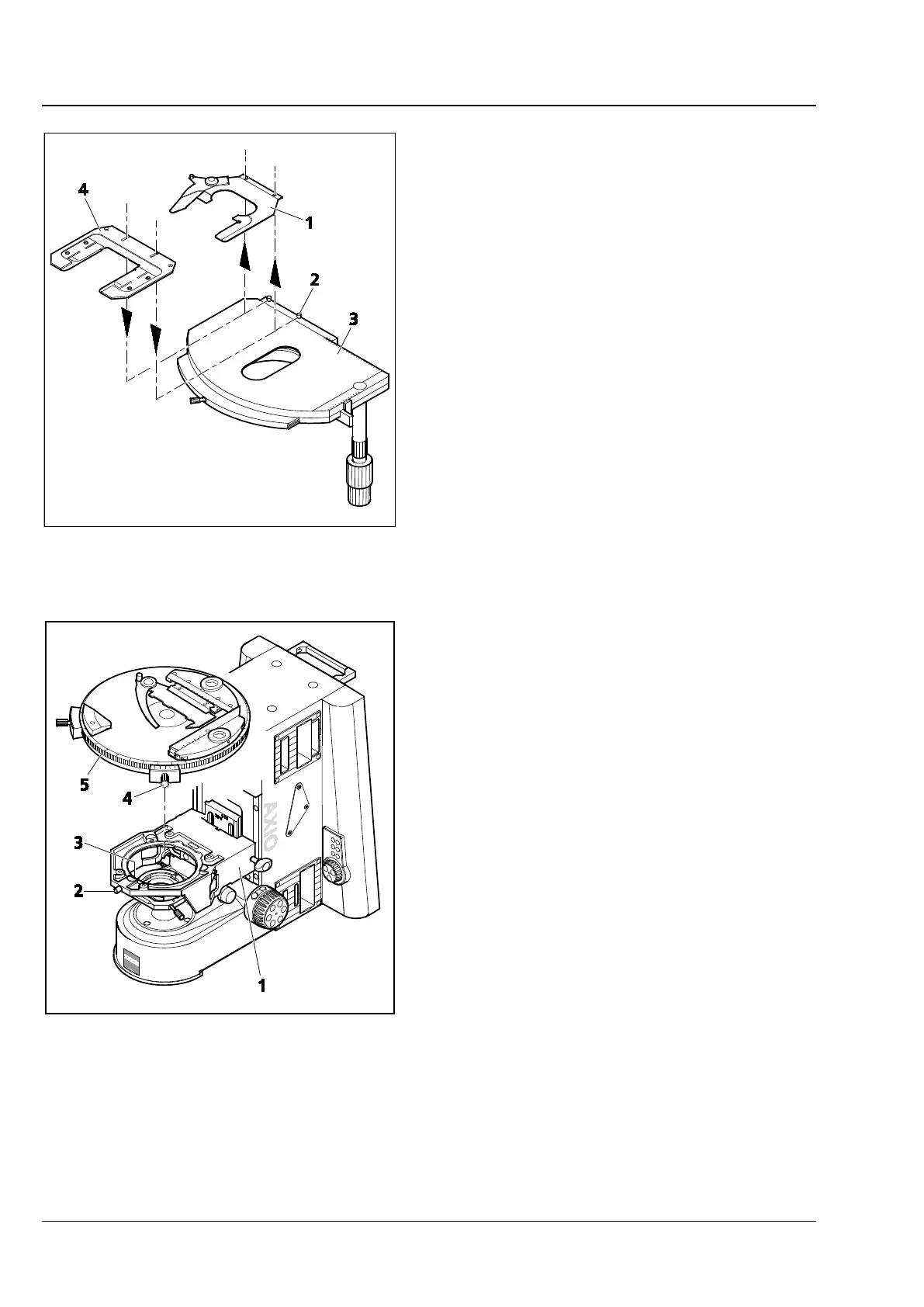
3.35.6 Changing the specimen holder
• Loosen the two knurled screws (Fig. 66/2).
• Remove the specimen holder (Fig. 66/1) from
the mechanical stage (Fig. 66/3) to the front.
• Attach the desired specimen holder (Fig. 66/4)
to the mechanical stage with the slots under the
heads of the knurled screws and tighten it using
the knurled screws.
3.36 Rotary stage Pol
3.36.1 Removing the rotary stage Pol
• Loosen screw cap (Fig. 67/2) from the spring
housing (roughly three rotations).
• Press rotary stage Pol (Fig. 67/5) to the front
against spring-loaded pin (Fig. 67/3), lift it off
the stage carrier (Fig. 67/1) from the back and
remove it upwards.
• Retighten screw cap (Fig. 67/2).
Fig. 66 Changing the specimen holder
Fig. 67 Attaching the rotary stage Pol








 To Next Page