ZEISS FIRST-TIME SET-UP Axio Imager 2
Installing Polarizer D, fixed
82 430000-7544-001 01/2016
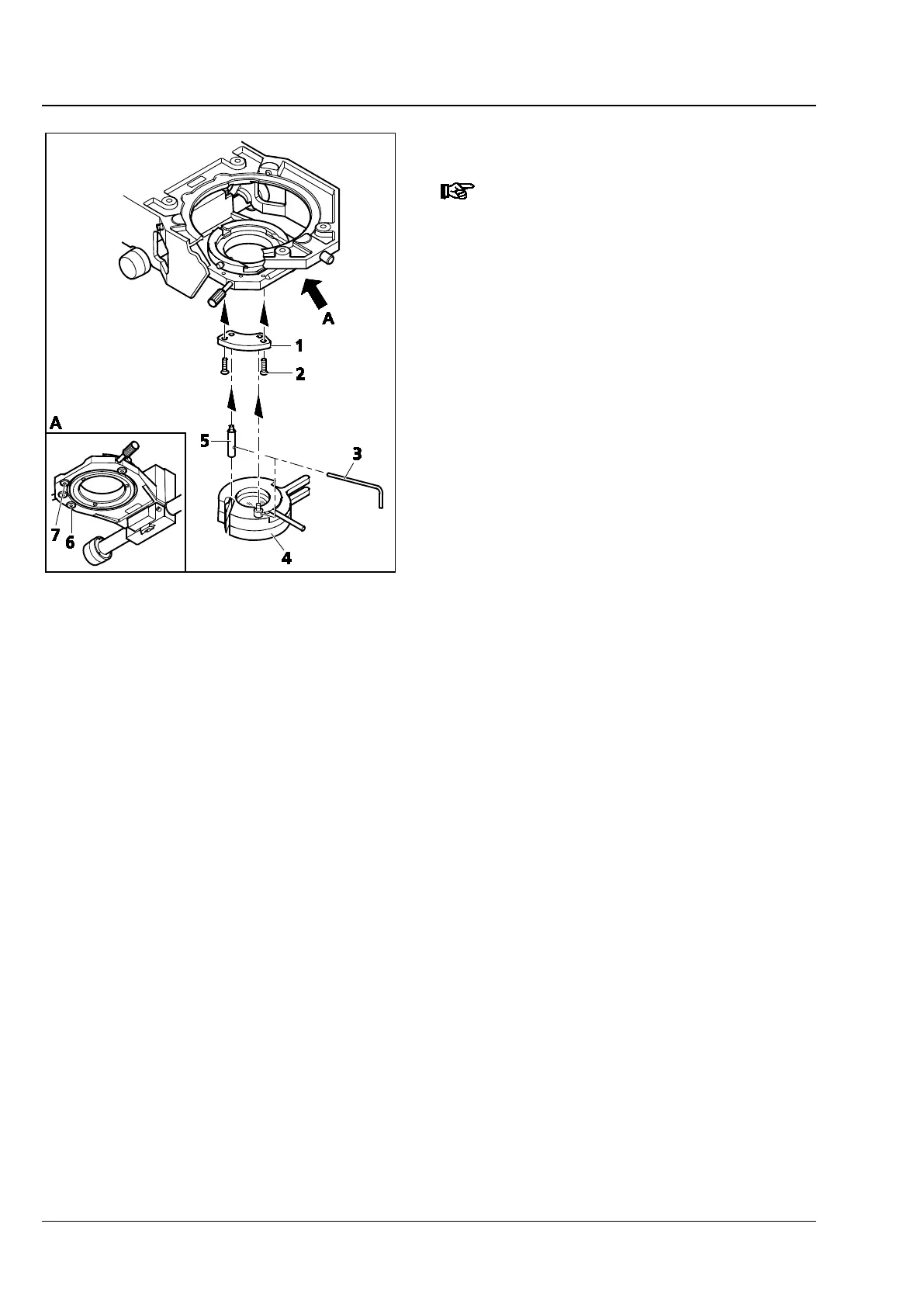
3.38 Installing Polarizer D, fixed
If the stand has a detachable stage
carrier, remove it (see Section 3.17),
set it aside, upside down, and install
the polarizer from above.
• Remove any installed polarizer or color filter
carrier from the condenser carrier.
• Fasten adapter plate (Fig. 75/1) with screws
(Fig. 75/2) to the condenser carrier, using holes
(Fig. 75/6 and 7).
• Hold the polarizer (Fig. 75/4) parallel to the
bottom side of the condenser carrier. Using the
offset adjusting lever (Fig. 75/3), screw the
retaining bolt of the polarizer (Fig. 75/4) into
the rear tapped hole of the adapter plate as far
as it will go.
• Using the adjusting lever (Fig. 75/3), screw the
detent bolt (Fig. 75/5) into the front tapped
hole of the adapter plate as far as it will go.
For the installation of other polarizers or of the
color filter carrier, proceed in the same way.
Fig. 75 Installing Polarizer D, fixed








 To Next Page