ZEISS FIRST-TIME SET-UP Axio Imager 2
Mounting the TFT display on the motorized stand
54 430000-7544-001 01/2016
3.23.2 Deactivating the high-performance
focus
• Use the Z drive to move the microscope stage
into the lowest position.
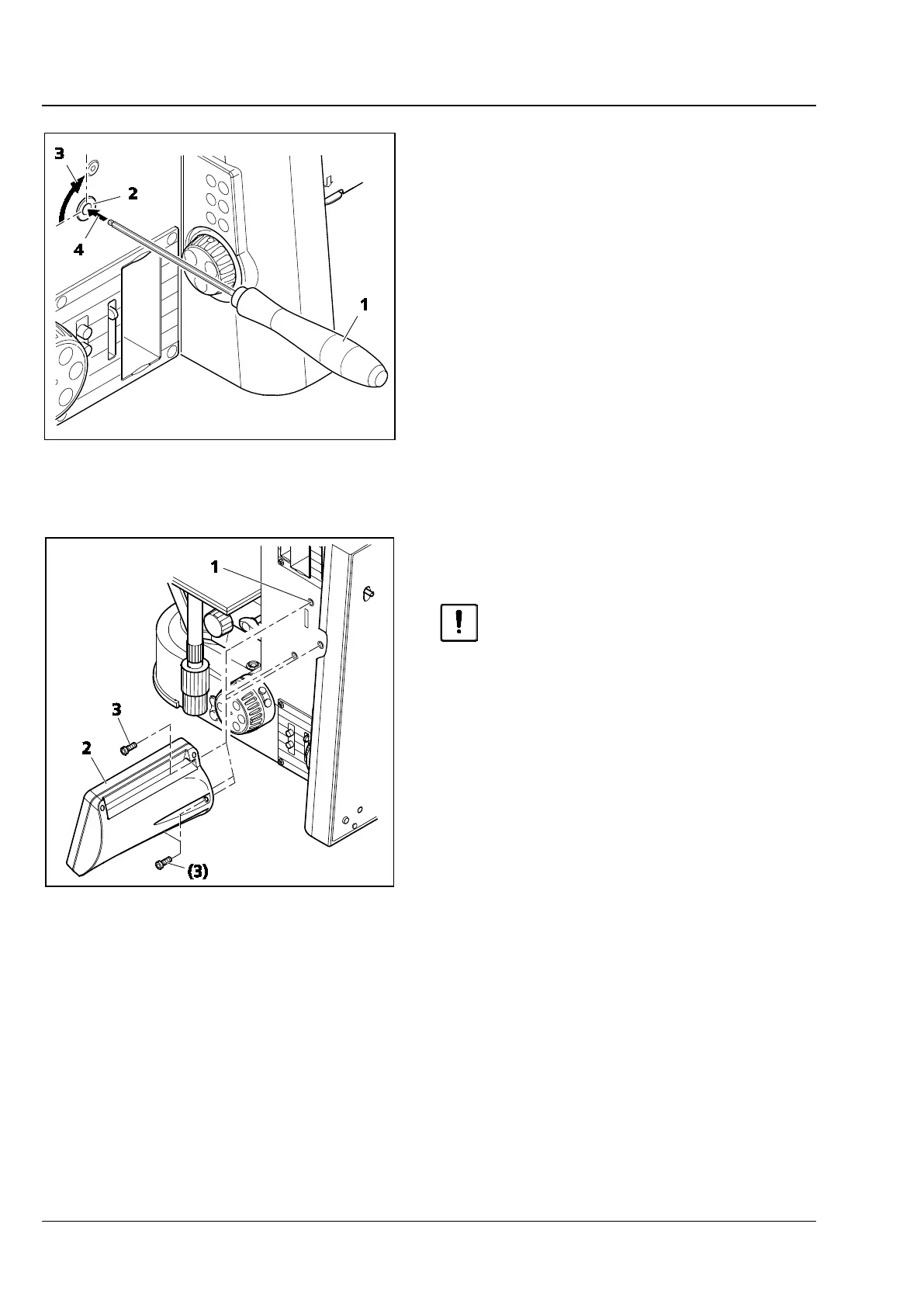
• Using the AF 3 ball-head screwdriver (Fig. 37/1)
release the two locking pins (Fig. 37/2) on the
right and left of the stand (Fig. 37/3) by turning
them 90 degrees anticlockwise (Fig. 37/4).
The head of the locking pin is now no longer
visible, and the high-performance focus is
inactive.
• Use the Z drive to move the microscope stage
into the working position.
3.24 Mounting the TFT display on the
motorized stand
When mounting the TFT display, the
microscope must be switched off.
• Mount the TFT display (Fig. 38/2) on the right
side of the motorized stand (Fig. 38/1) using the
three screws (Fig. 38/3).
During the mounting, the stand and TFT display
are automatically connected electrically via the
plug contact.
Fig. 37 Deactivating the high-performance
focus
Fig. 38 Mounting the TFT display








 To Next Page