1: Introduction
Application scenario
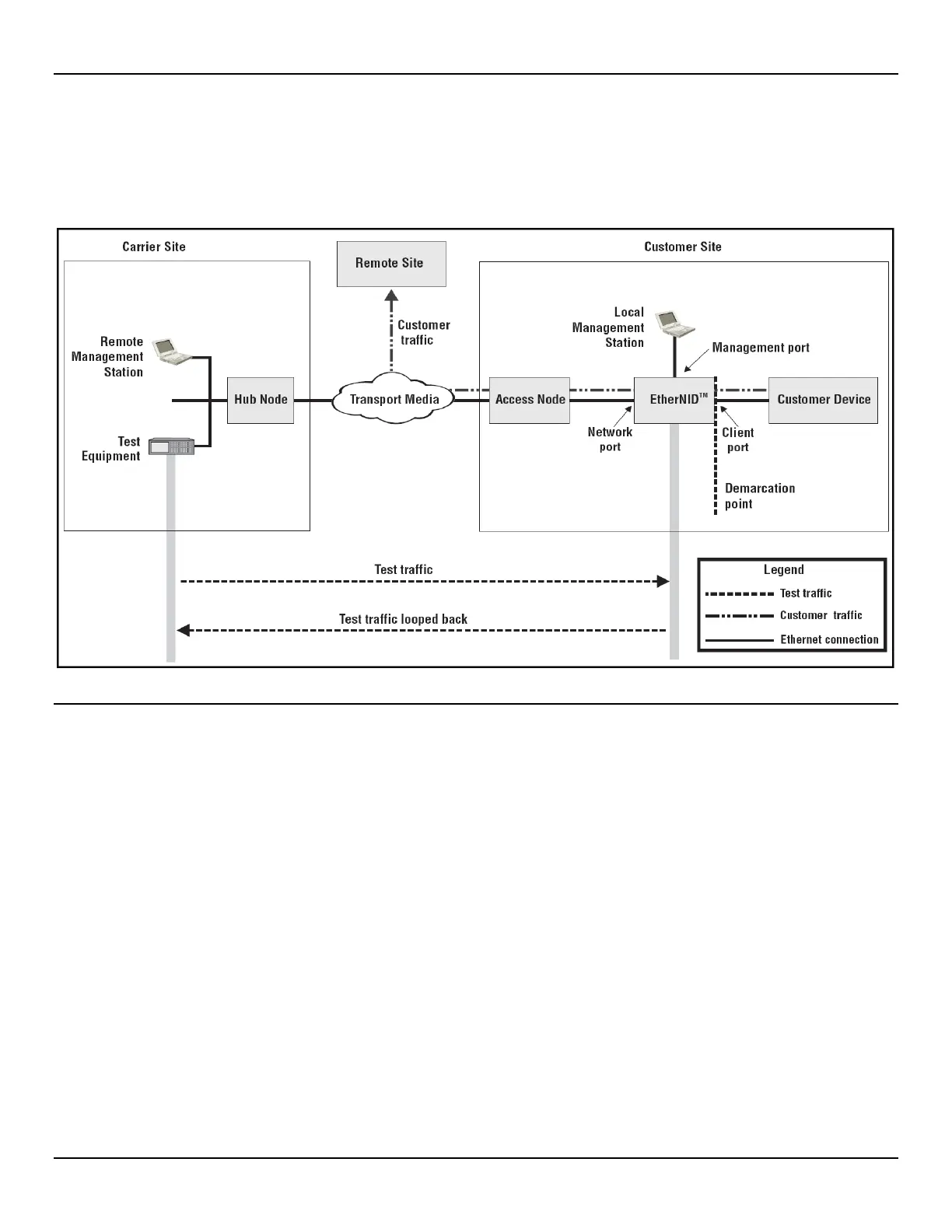
The following scenario illustrates how the EtherNID can be used to provide a remotely manageable customer premises
demarcation point for the delivery of Ethernet services.
About this scenario:
• Remote Management station is a computer that is used to remotely manage the EtherNID and to setup
loopbacks. Access to the EtherNID management web interface occurs through a secure shell (SSL) via a web
browser session and requires a JavaScript-enabled Web browser such as Firefox 1.0 or higher, or Microsoft
Internet Explorer 6.0 or higher.
• Test equipment provides the test suite that is used to validate the link to the customer premises.
• Hub node provides network connectivity for the carrier site.
• Transport media provides connectivity between the carrier site and the customer premises.
• Access node provides network connectivity for one or more customer devices at a remote location.
• Local management station is the computer that is used to define initial configuration settings on the EtherNID
when it is installed. This station can be eliminated if a DHCP server is available on the network. In this case the
DHCP server can be configured to provide a specific IP address to the EtherNID based on its MAC address.
• Customer device is the customer-owned switch or router residing on the customer’s network.



 To Next Page