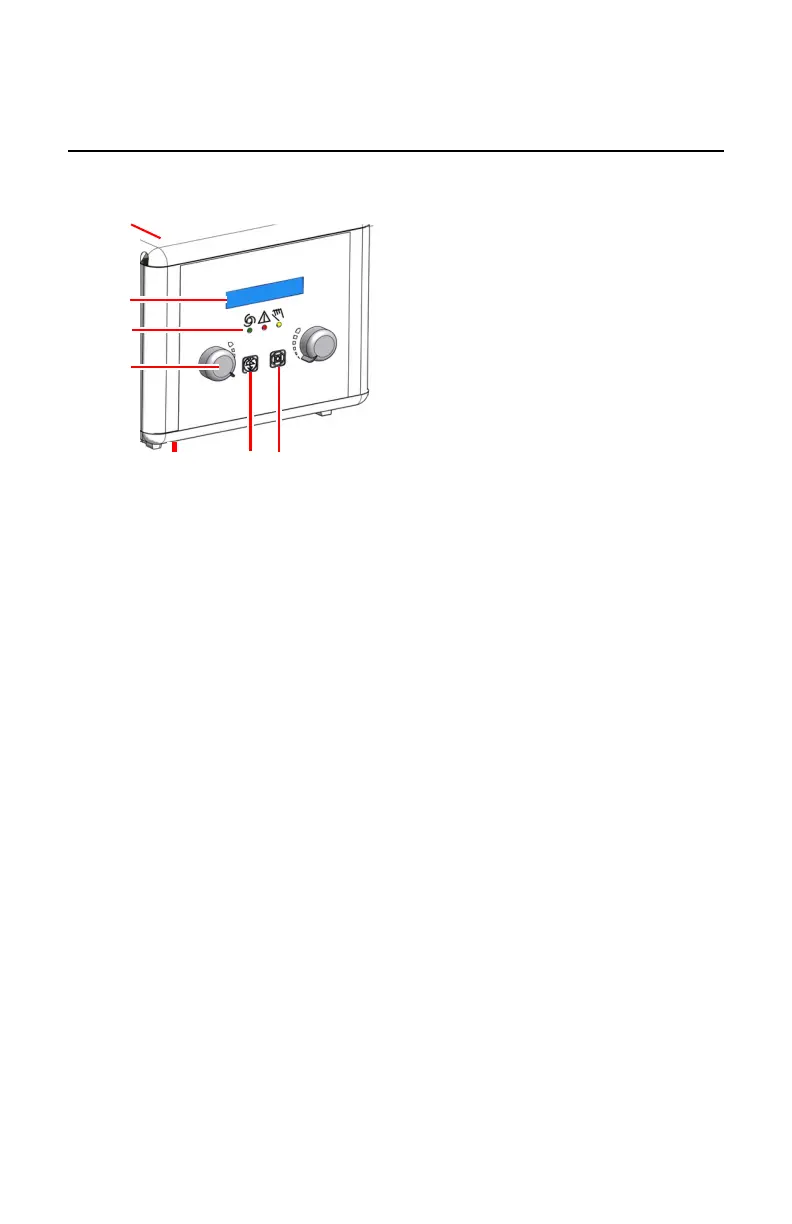
Automatic Collimator
The collimator can limit the collimated area to the size of the cassette or DR
Detector inserted in the bucky.
1.
Display
• Size of the collimated area
• Active filter
2.
Operation mode indicators
• Green: automatic mode
• Red: error mode
• Yellow: manual mode
3.
Knobs to adjust the internal blades
4.
Button to change the filter
5.
Button to switch on or off the light field.
After pressing the button, the lamp remains lit for a few seconds before
automatically switching off. The time for the collimation light is
configurable by service between 10 and 60 seconds.
6.
Measurement tape to measure the distance between the focal spot of X-ray
tube and the tabletop
7.
Key to switch to manual mode
The key is located on the backside of the collimator.
Figure 56: Ralco 225 ACS collimator controls
Another button to switch on the light field is available on both sides of the
radiographic wall stand.
The collimator operates in full automatic mode normally. Other operation
modes are manual collimation mode and semi-automatic collimation mode.
Topics:
DR 400 | Radiographic Table and X-Ray Tube Stand | 149
3231E EN 20210708 1530



 To Next Page