3. Initial Settings
121
ML-2050A/2051A/2150A
Chapter 5 Laser Welding by External Communication Control (RS-485 CONTROL)
Introduction Part
Installation and
Preparation Part
Operating Part Maintenance Part Appendixes
Setting Equipment No.
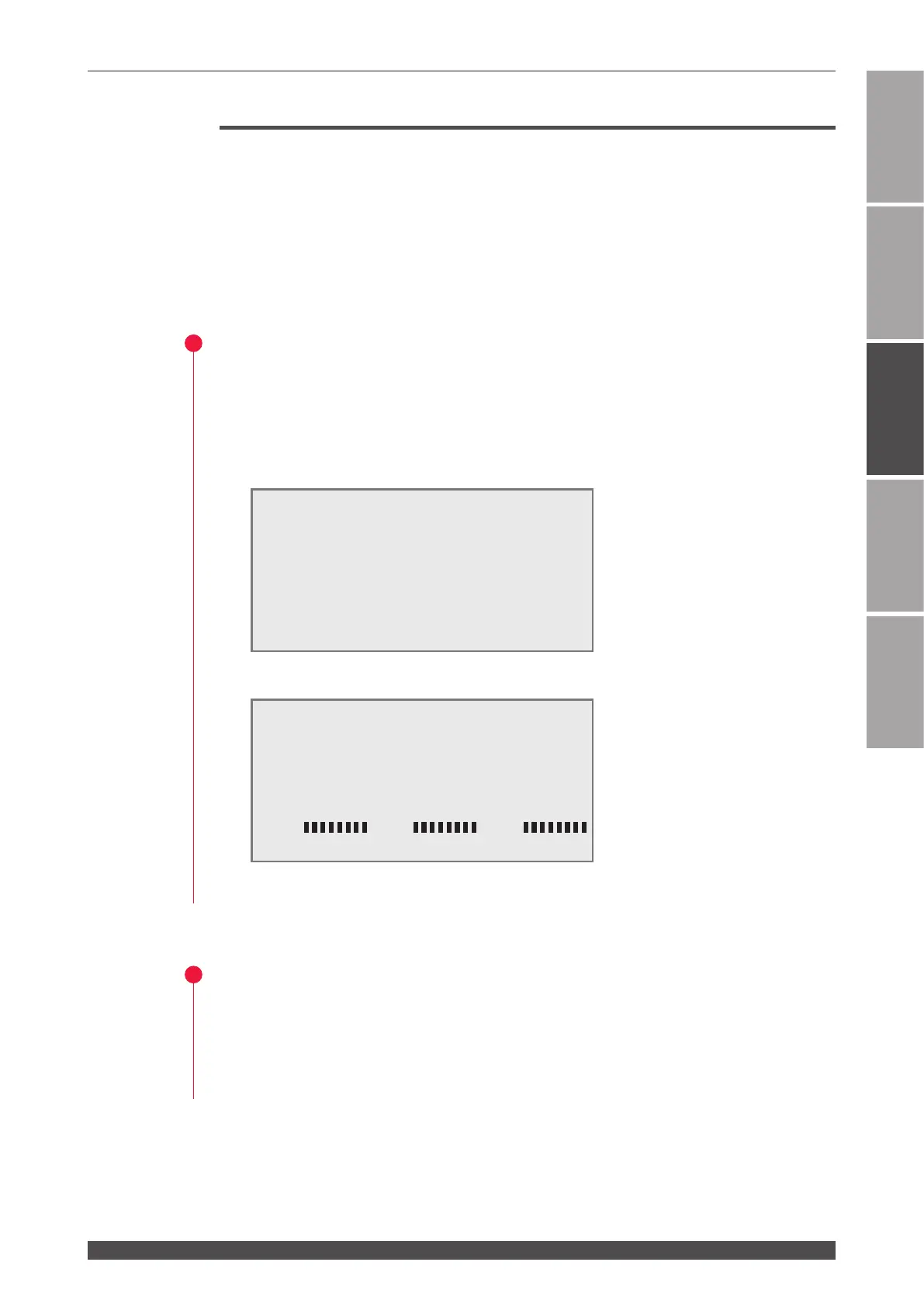
Display the INITIAL screen on the control panel of the laser and set equipment
No. (NETWORK #).
⇒
For controlling multiple lasers by single personal computer, it is necessary to
register equipment No. (NETWORK #) for each equipment. Set equipment No.
without duplication. If duplication of equipment No. exists, a data collision will
occur on the communication line and the laser cannot be correctly operated.
1
Displaying the INITIAL Screen
(1) Turn OFF the CONTROL keyswitch and turn ON the MAIN POWER switch while
holding down the MENU key.
⇒
Hold down the MENU key until the SELF-CHECK > screen appears.
The power supply is turned ON, the POWER lamp comes on, and the SELF-
CHECK > screen appears.
At completion of the self check, the INITIAL screen appears.
⇒
Unless the CONTROL keyswitch is OFF, the INITIAL screen does not appear.
2
Specifying Equipment No.
(1) Move the cursor to "NETWORK #" and press the ON or OFF key to set
equipment No. in the range of 00 to 15.
⇒
For details of each item on the INITIAL screen, refer to Chapter 2 "1. Setting
Welding Schedules" on page 58.
WATER 28˚C
AUTO-START
SELF-CHECK >
INITIALIZE:OFF WATER 28˚C
NETWORK #00
TEMP CONT 30˚C ALARM L20˚C H40˚C
POSITION AUTO OFF 60min
SW1-12345678 SW2-12345678 SW3-12345678
ON ON ON
OFF
OFF
OFF


 To Next Page